Git Restore Untracked Files How To Remove Untracked Files In Git Developer s Coffee Git Remove Untracked Files Simplified Do s Don ts GoLinuxCloud CoderJony How To Delete Untracked Files In Git IDEA Git Untracked Files Prevent Merge Move Or Commit Them CoderJony What Are Untracked Files In Git Web Apr 30 2014 nbsp 0183 32 I m trying to restore untracked files that were deleted when I went back to my last commit I was in a hurry to revert to my previous commit after messing something up so I used git reset HEAD hard and git clean fd
Web Apr 27 2011 nbsp 0183 32 14 Answers Sorted by 1983 You can run these two commands Revert changes to modified files git reset hard Remove all untracked files and directories f is force d is remove directories git clean fd Web Git does not track untracked files and so will not know the untracked file was deleted and thus won t be able to stash the removal of that file Before Git 2 35 Q1 2022 quot git stash apply quot man forgot to attempt restoring untracked files when it failed to restore changes to tracked ones
CoderJony What Are Untracked Files In Git How To Remove Local Untracked Files In Git Working Directory Here s How To Clean Git And Remove Untracked Files Git Git Define Howto Removing Git Untracked Files How To Properly Remove Untracked Files With Git CloudBees Define Howto Removing Git Untracked Files What Are Tracked And Untracked Files In Git Dillion s Blog What Are Tracked And Untracked Files In Git Dillion s Blog
Git Restore Untracked Files
 Git Restore Untracked Files
https://www.developerscoffee.com/wp-content/uploads/2022/08/3W563.png
Web Mar 28 2018 nbsp 0183 32 An upper level folder must have been renamed and during the pull the folder he was working in was deleted and all of the tracked files were moved to the new folder All of the untracked files appear to be deleted Is there a way to restore the untracked files or to revert the repository using git reflog and git reset
Pre-crafted templates provide a time-saving service for developing a diverse series of files and files. These pre-designed formats and layouts can be used for different personal and expert projects, including resumes, invitations, leaflets, newsletters, reports, presentations, and more, improving the content development procedure.
Git Restore Untracked Files

How To Remove Untracked Files In Git
How To Remove Local Untracked Files In Git Working Directory

Here s How To Clean Git And Remove Untracked Files
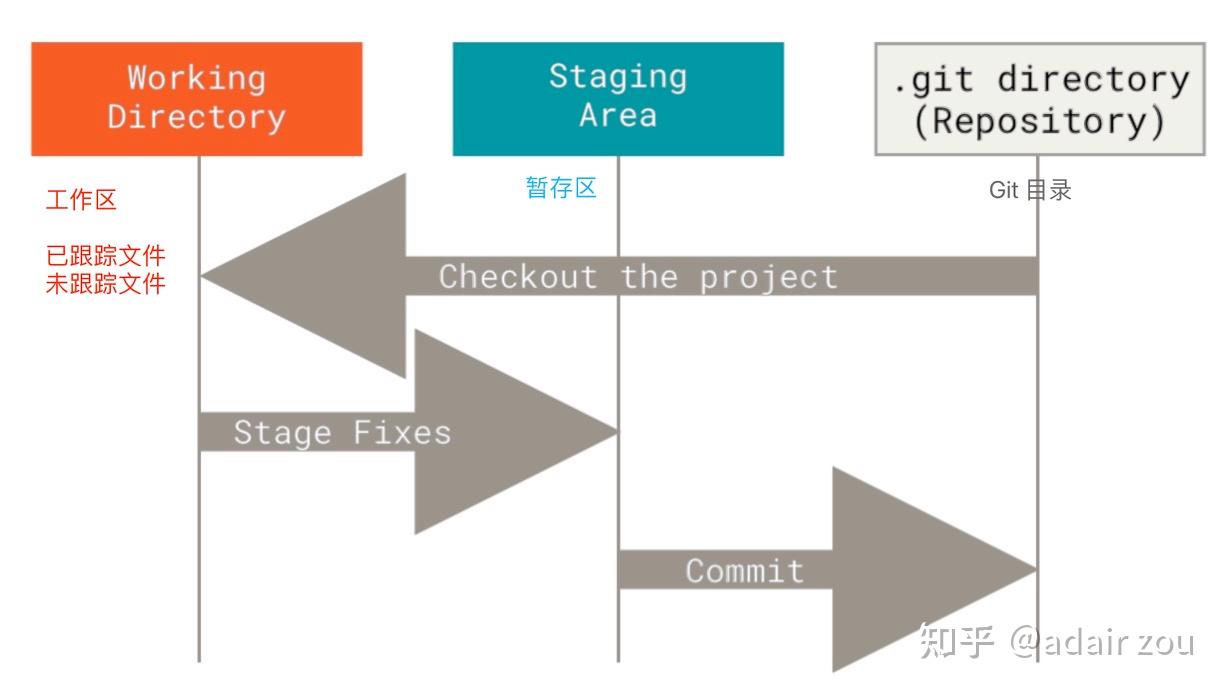
Git Git
How To Properly Remove Untracked Files With Git CloudBees

Define Howto Removing Git Untracked Files

Web git reset hard is a classic command in this situation but it will only discard changes in tracked files i e files that already are under version control To get rid of new untracked files you ll have to use git clean Usage Examples and Options Let s take a look at an example scenario

Web Mar 17 2012 nbsp 0183 32 Step 1 Select the Folder Right click on it Setp 2 Go to Local History and then go to Show history Step 3 Select the untracked files that your revert accidentally then select those file in right side panel and revert the changes you will get the files in reverted format Share
Web Oct 18 2021 nbsp 0183 32 Performing a Reset Git Reset First you ll need to fetch the latest state of the remote repository usually quot origin quot and then checkout the master branch or whichever one you re resetting to git fetch origin git checkout master You can also check out and reset to an individual commit using its ID e g git checkout 342c47a4

Web May 25 2013 nbsp 0183 32 Mar 11 2022 at 0 18 1 I noticed that you need have all the unstaged files in your path not some directories above like file yaml Instead you need to first cd then do git reset hard and or git clean fd to reset everything When you run git status nothing should be any directories above you

Web DESCRIPTION Restore specified paths in the working tree with some contents from a restore source If a path is tracked but does not exist in the restore source it will be removed to match the source
Web Since they re not being tracked by git git reset won t touch them If you want to blow away all untracked files the simplest way is git clean f use git clean n instead if you want to see what it would destroy without actually deleting anything Web Nov 7 2022 nbsp 0183 32 The command performed by gkeenley with the hard option tells git to not only reset HEAD that is their last commit but also the index where git quot caches quot changes to files and trees as well as the working tree Thus git add will simply stage the changes of the commit before the reset
Web Sep 29 2022 nbsp 0183 32 Method 1 Stash Untracked Files with the git stash Command Use git stash to stash untracked files by specifying one of the two available options 1 Using the include untracked Option The include untracked option instructs Git to stash untracked files and other changes in the working directory Run the following command