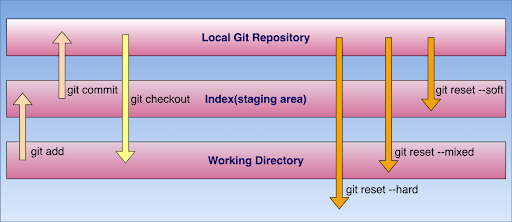
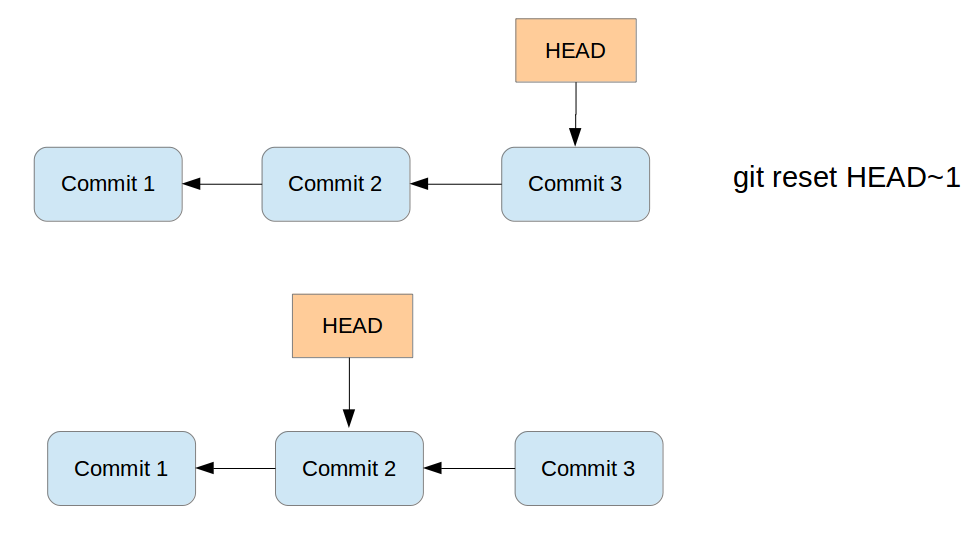
Git Reset Head Example How To Undo The Last Commit Using The Git Reset Command Paper Writer Version Control With Git Undoing Changes 3 How To Discard Your Local Changes In Git Example 036 Git Reset HEAD 3 GitFichas WEB Sep 28 2020 nbsp 0183 32 For git reset hard HEAD 1 it will move what HEAD points to in the example above master to HEAD 1 If the soft flag is used git reset stops there Continuing with our example above HEAD will point to
WEB May 3 2022 nbsp 0183 32 The basic syntax for git reset is as follows git reset lt mode gt lt commit gt Git reset offers three main modes or options that determine how it behaves They are WEB git reset soft HEAD n to move back to the commit with a specific reference n git reset soft HEAD 1 gets back to the last commit git reset soft lt commit ID gt moves back to the
036 Git Reset HEAD 3 GitFichas Git Reset HEAD DevsDay ru Git Reset Head A Practical Guide With Examples TecAdmin Git Git Reset How To Undo The Last Commit Using Git Reset Command Built In Git Reset hard The Git Reset Command Is For Undoing By Praaveen Vr Praaveen Medium Two Ways To Unstage A File In Git Git Rm cached And Git Reset Head JavaProgramTo How To Git Reset To HEAD What Is Git HEAD How To Reset Git Head To Latest Commit Junos Notes Git Reset Tutorial Ihatetomatoes
Git Reset Head Example
 Git Reset Head Example
https://builtin.com/sites/www.builtin.com/files/styles/ckeditor_optimize/public/inline-images/1_git-reset-soft-head_0.png
WEB Git reset allows you to move the HEAD to a previous commit undoing the changes between your starting state and specified commit Learn how to use Git reset hard and
Templates are pre-designed files or files that can be utilized for numerous purposes. They can save time and effort by offering a ready-made format and design for developing various kinds of material. Templates can be utilized for personal or expert projects, such as resumes, invites, leaflets, newsletters, reports, discussions, and more.
Git Reset Head Example

How To Git Hard Reset Head WiseTut
Git Reset HEAD DevsDay ru
Git Reset Head A Practical Guide With Examples TecAdmin

Git Git Reset

Git Reset hard The Git Reset Command Is For Undoing By Praaveen Vr Praaveen Medium

Two Ways To Unstage A File In Git Git Rm cached And Git Reset Head JavaProgramTo
WEB git reset patch p lt tree ish gt lt pathspec gt Interactively select hunks in the difference between the index and lt tree ish gt defaults to HEAD The chosen hunks are

WEB The git reset HEAD 2 command moves the current branch backward by two commits effectively removing the two snapshots we just created from the project history Remember that this kind of reset should only be used
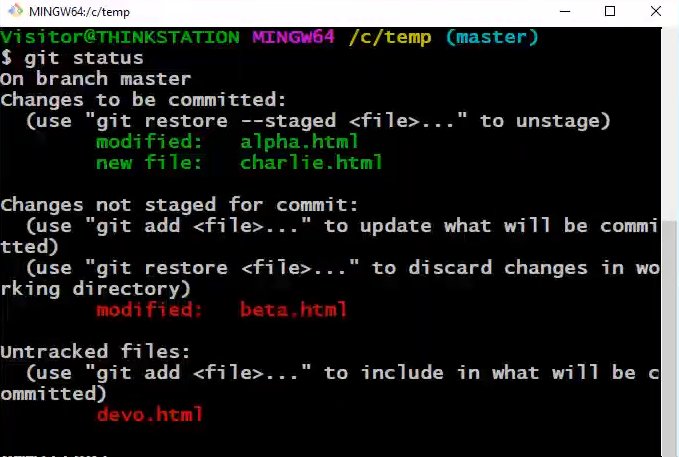
WEB May 30 2023 nbsp 0183 32 If you ve staged changes with git add that you no longer want to commit you can use git reset HEAD to unstage those changes Here is an example Imagine you have added a file to staging using git add
WEB Apr 10 2023 nbsp 0183 32 This article showed you how to reset your codebase to HEAD and to a particular commit using the git reset hard HEAD and git reset hard HEAD n commands Be aware that the git reset hard
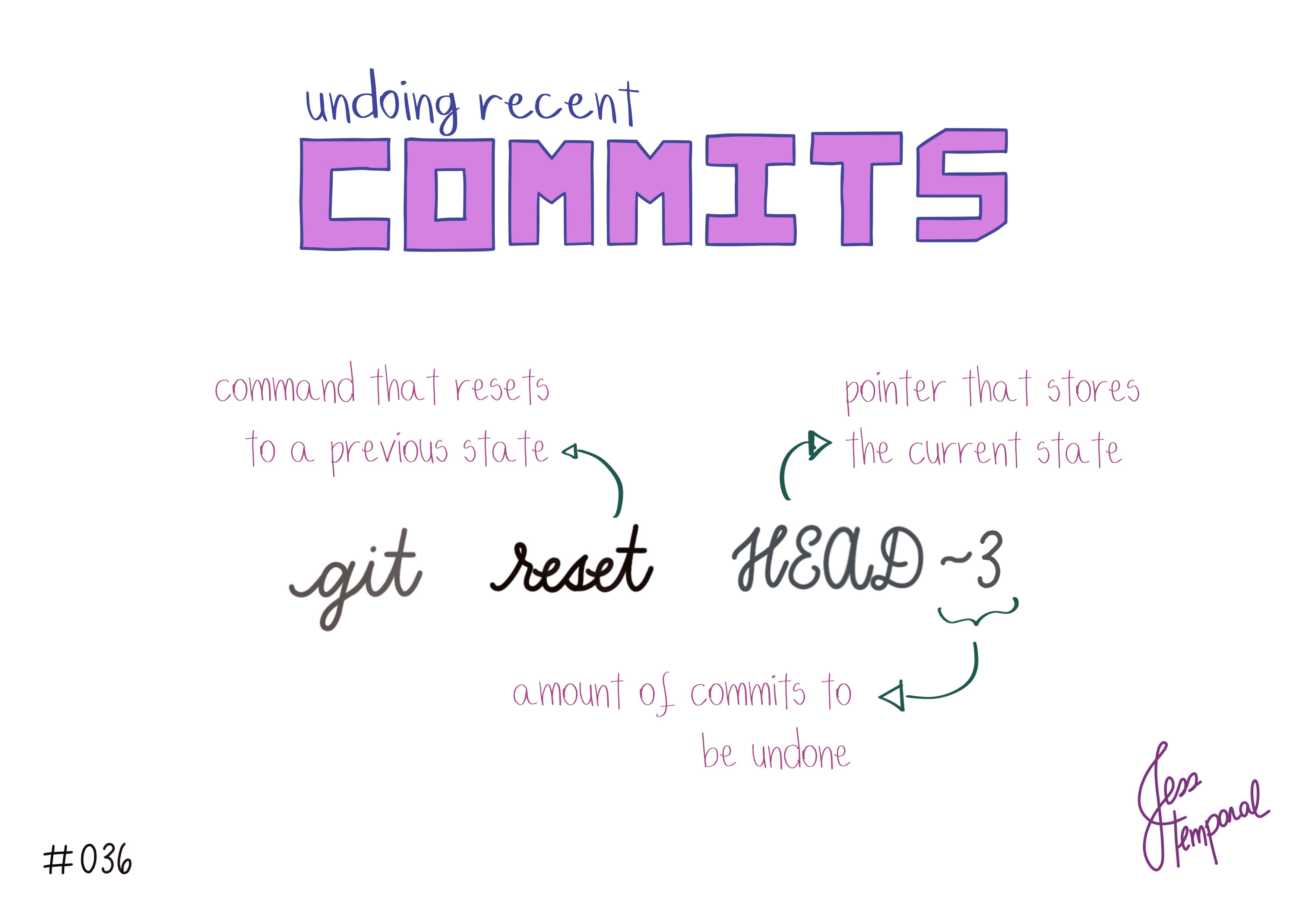
WEB Oct 11 2019 nbsp 0183 32 The git reset command allows you to RESET your current head to a specified state You can reset the state of specific files as well as an entire branch This
WEB Sep 2 2023 nbsp 0183 32 To revert to a previous commit using git reset hard HEAD follow these steps 1 Open a terminal or command prompt and navigate to the local repository WEB Sep 7 2022 nbsp 0183 32 The git reset command changes your repository and working directory to a known state Specifically git reset adjusts the HEAD ref to a given commit and by
WEB This Git tutorial focuses on the capacity to roll back changes undo a local commit and restore the development environment to an earlier and possibly more stable state For