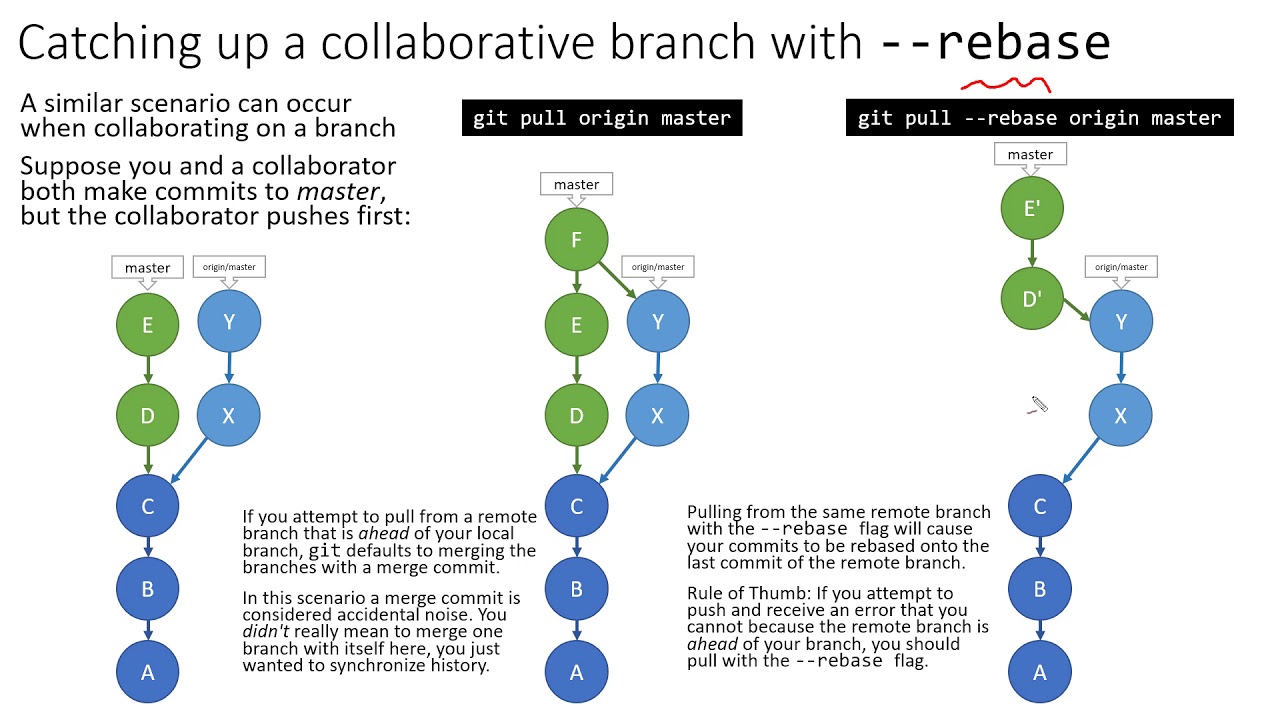
Git Rebase Rewrite History Modifying Git History 3 3 Pulling A Shared Branch With Rebase To Merge Commits Preserve History And Rebase Rewrites History Rewrite 16 Git Tips And Tricks Git Rewrite History M365 Bass Rewrite Git History Using Bash Script Web Rebasing or any other form of rewriting a branch that others have based work on is a bad idea anyone downstream of it is forced to manually fix their history This section explains how to do the fix from the downstream s point of view
Web Nov 8 2016 nbsp 0183 32 Yes it s possible to rewrite the entire history but for your case you don t have to You just need to rewrite the bits you worked on This is probably just the changes to your master branch For that you can do an interactive rebase for all the changes between master and origin master which is what they have upstream Web This operation works by going to the common ancestor of the two branches the one you re on and the one you re rebasing onto getting the diff introduced by each commit of the branch you re on saving those diffs to temporary files resetting the current branch to the same commit as the branch you are rebasing onto and finally applying each ch
Rewrite Git History Using Bash Script Motivated Git 4 How To Rewrite History And Why You Want To HEBREW Anonymize Author Names For Historical Commits In Git Rewriting History With Git Rebase An Introduction To Git Merge And Rebase What They Are And How To Use Rebase Git Clean Git History And Keep Only Merged Commits In Master Rebase Git Clean Git History And Keep Only Merged Commits In Master Git Rewriting History With Git Quick How To Reset Your Git Branch To A Previous Commit both Local And
Git Rebase Rewrite History
 Git Rebase Rewrite History
https://i.ytimg.com/vi/-H2U3kJ_urw/maxresdefault.jpg
Web Oct 23 2022 nbsp 0183 32 Git rebase resequences the commit history of the target branch so that it contains all source branch commits followed by all target branch commits since the last common commit Another way to view it is that a rebase replays the changes in your target branch on top of the source branch history Notably Git rebase changes the sequence
Templates are pre-designed files or files that can be used for numerous functions. They can conserve time and effort by supplying a ready-made format and layout for producing various sort of material. Templates can be used for personal or expert jobs, such as resumes, invites, leaflets, newsletters, reports, discussions, and more.
Git Rebase Rewrite History

How To Keep Your Git History Clean With Interactive Rebase GitLab

Motivated Git 4 How To Rewrite History And Why You Want To HEBREW
Anonymize Author Names For Historical Commits In Git

Rewriting History With Git Rebase

Rebase Git Clean Git History And Keep Only Merged Commits In Master

Rebase Git Clean Git History And Keep Only Merged Commits In Master

Web As detailed in the rewriting history page rebasing can be used to change older and multiple commits committed files and multiple messages While these are the most common applications git rebase also has additional command options that can be useful in more complex applications

Web git rewrite history reorder and merge commits Ask Question Asked 13 years 1 month ago Modified 5 years 9 months ago Viewed 6k times 25 Current situation origin mybranch A1 B1 A2 B2 A3 B3 mybranch

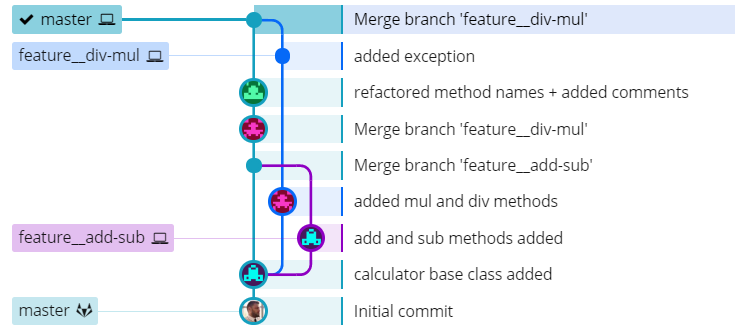
Web Jun 9 2023 nbsp 0183 32 By using git rebase you can rewrite the commit history making it appear as if the changes were developed sequentially even if they were initially developed in parallel Rebase vs Merge

Web In this article we discussed several methods of changing git history and undoing git changes We took a high level look at the git rebase process Some Key takeaways are There are many ways to rewrite history with git Use git commit amend to change your latest log message Use git commit amend to make modifications to the most recent
Web Jun 11 2022 nbsp 0183 32 Completely untested but in theory I believe it will work step 1 make a commit that causes a conflict for example make a commit that deletes file py off of the parent of the first commit you modified file py in Step 2 rebase onto that delete commit with X ours This should auto resolve conflicts on the file and leave it deleted
Web Git doesn t have a modify history tool but you can use the rebase tool to rebase a series of commits onto the HEAD they were originally based on instead of moving them to another one With the interactive rebase tool you can then stop after each commit you want to modify and change the message add files or do whatever you wish Web Apr 17 2023 nbsp 0183 32 This tutorial introduced the two most common use cases of git rebase We talked a lot about moving branches around but keep in mind that rebasing is really about controlling your project history The power to rewrite commits after the fact frees you to focus on your development tasks instead of breaking down your work into isolated
Web Sep 24 2014 nbsp 0183 32 1 Answer Sorted by 19 You could rebase your branch to remove the false commit Then you have to use a forced push to push that rebased branch to the repository at Assembla All developers then either would have to do a fresh clone or to fetch the remote branch and then do a hard reset of their local branch to the new remote branch