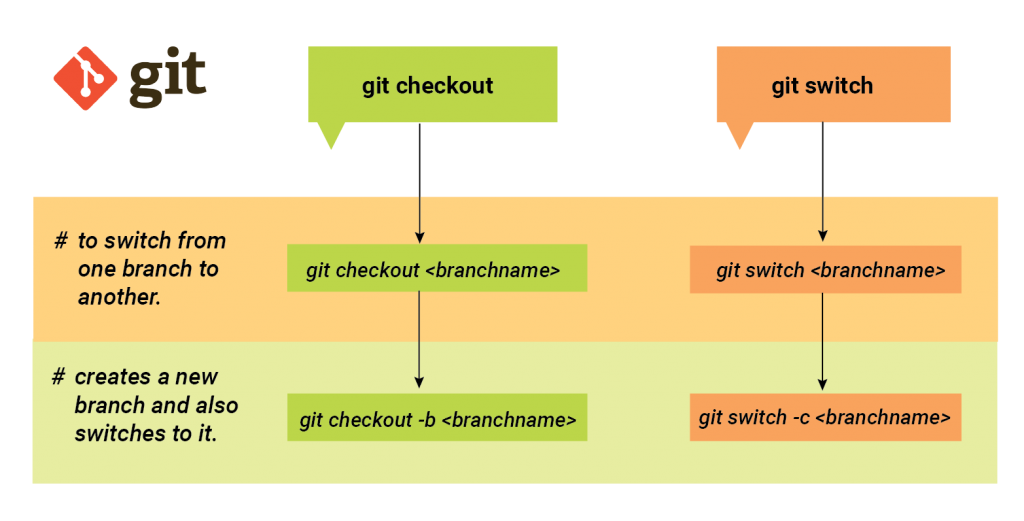
Git Checkout Commit From Remote Branch How To Checkout A Remote Git Branch YouTube Git Create Branch From Remote Branch Shedvvti Git Revert Studytonight Git Merging Git Checkout A Remote Branch Video 3 4 YouTube Git Github The git checkout command lets you navigate between the branches created by git branch Checking out a branch updates the files in the working directory to match the version stored in that branch and it tells Git to record all new commits on that branch Think of it as a way to select which line of development you re working on
Currently this is used by git switch 1 and git checkout 1 when git checkout something or git switch something will checkout the something branch on another remote and by git worktree 1 when git worktree add refers to a remote branch This setting might be used for other checkout like commands or functionality in the future If your current branch is set up to track a remote branch see the next section and Git Branching for more information you can use the git pull command to automatically fetch and then merge that remote branch into your current branch This may be an easier or more comfortable workflow for you and by default the git clone command automatically sets up your local master branch to track the
Git Github Git Checkout Remote Branch Admin s Choice GIT Branch And Its Operations An Easy Understanding Digital Varys How To Checkout A Remote Branch In Git Easily Perform Git Checkout Remote Branch Step by Step How To Cherry Pick Git Commits When Use A Picking With Vs Code Part 2 Confusing Terms In The Git Terminology By Pragati Verma Level Up Coding Git Commands Cloud Studio Introduction To Undoing Things In Git Earth Data Science Earth Lab
Git Checkout Commit From Remote Branch
 Git Checkout Commit From Remote Branch
https://i.ytimg.com/vi/CdcoSnSaOWs/maxresdefault.jpg
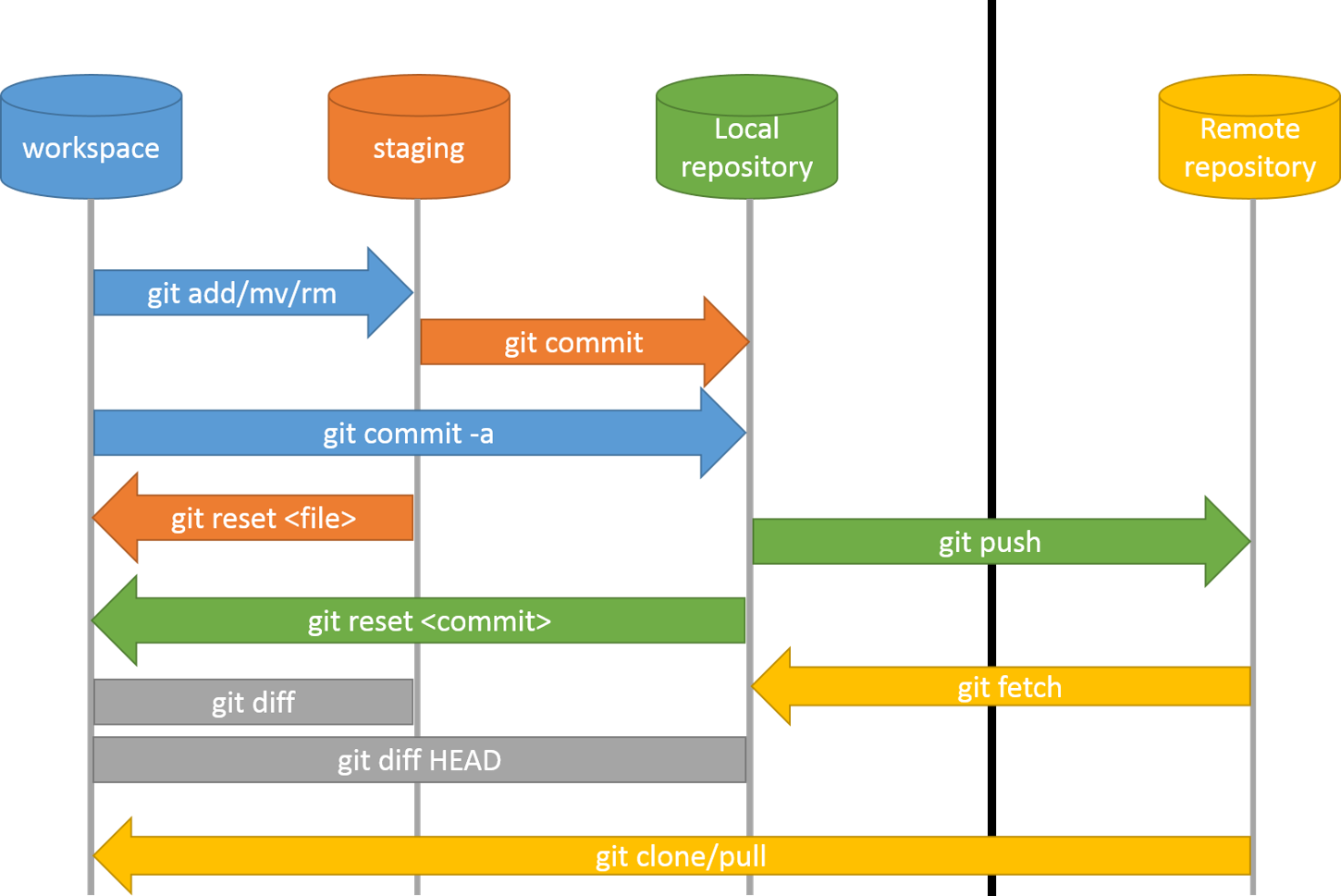
This command looks up which server origin is in this case it s git ourcompany fetches any data from it that you don t yet have and updates your local database moving your origin master pointer to its new more up to date position Figure 32 git fetch updates your remote tracking branches
Templates are pre-designed files or files that can be utilized for different purposes. They can save effort and time by supplying a ready-made format and design for creating different sort of material. Templates can be used for personal or expert projects, such as resumes, invitations, flyers, newsletters, reports, presentations, and more.
Git Checkout Commit From Remote Branch
GIT

Git Checkout Remote Branch Admin s Choice

GIT Branch And Its Operations An Easy Understanding Digital Varys
How To Checkout A Remote Branch In Git

How To Cherry Pick Git Commits When Use A Picking With Vs Code Part 2
Confusing Terms In The Git Terminology By Pragati Verma Level Up Coding
To checkout a branch from a remote repository use the git fetch command and then git branch r to list the remote branches Pick the branch you need and use a command of the form git checkout b new branch name origin remote branch name
This is the transactional equivalent of git branch f branch start point git checkout branch that is to say the branch is not reset created unless git checkout is successful git checkout detach branch git checkout detach commit

How to Git Checkout Remote Branch Let s say there s a remote branch created by another developer and you want to pull that branch Here s how you go about it 1 Fetch all remote branches git fetch origin This fetches all the remote branches from the repository origin is the remote name you re targetting

There is no actual command called git checkout remote branch It s just a way of referring to the action of checking out a remote branch Why Use Git Checkout Remote Branch In Git a is a separate line of development The Git branch command creates new branches
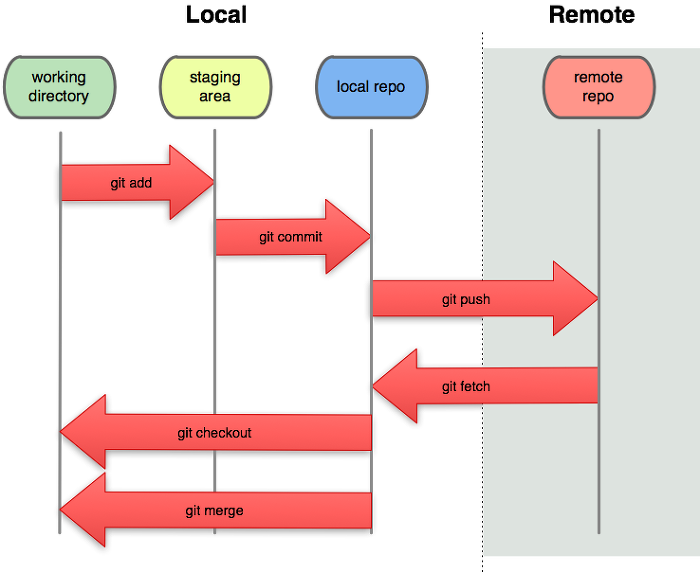
The syntax for making git checkout remote ready is rather easy simply add the track flag and the remote branch s ref like in the following example git checkout track origin newsletter Branch newsletter set up to track remote branch newsletter from origin Switched to a new branch newsletter
Here s how to do this git switch my branch With the git switch command or alternatively the git checkout command you can simply provide the name of the branch you want to checkout This branch will then be your current working branch also referred to as HEAD in Git 1 OK so what does git config get all remote origin fetch show It should normally be refs heads refs remotes origin but if you originally cloned with single branch it won t be and you will have to re set it to that torek Nov 29 2017 at 18 10 Show 2 more comments 1 Answer
Use git push to push commits made on your local branch to a remote repository About git push The git push command takes two arguments A remote name for example origin A branch name for example main For example git push REMOTE NAME BRANCH NAME