Git Checkout 2 Branches At The Same Time The Dangers Of Trying To Implement Several Changes At The Same Time Git CSDN Projects Tasks And Subtasks Knowledge Base Pipedrive When Was The Last Time A Beatles Song And An Elvis Movie Came Out At How To Checkout Git Branches Interactively Amit Merchant A Blog On To create a new branch and switch to it at the same time you can run the git checkout command with the b switch git checkout b iss53 Switched to a new branch iss53 If you changed the same part of the same file differently in the two branches you re merging Git won t be able to merge them cleanly
Commits and their parents A branch in Git is simply a lightweight movable pointer to one of these commits The default branch name in Git is master As you start making commits you re given a master branch that points to the last commit you made Every time you commit the master branch pointer moves forward automatically A git repository can support multiple working trees allowing you to check out more than one branch at a time With git worktree add a new working tree is associated with the repository This new working tree is called a linked working tree as opposed to the main working tree prepared by git init or git clone
How To Checkout Git Branches Interactively Amit Merchant A Blog On The AI Act Will Generative AI Be Considered High Risk Git How Can I Generate A Diff For A Single File Between Two Branches GIT Branch And Its Operations An Easy Understanding Digital Varys Git Checkout Explained With Example Git Checkout Command Git Private Investment A Shrinking Slice Of India s GDP Pie Since 2012 It Going The Same Way Explore The Bible Creating A New Branch And Switching To It With Just One Command October 21 2017 Australian Newsagency Blog
Git Checkout 2 Branches At The Same Time
 Git Checkout 2 Branches At The Same Time
https://www.symbal.com/wp-content/uploads/2022/03/trying-to-implement-several-changes-at-the-same-time-e1647855237634.png
Roughly speaking it translates to these git commands git branch 2 0 develop git checkout 1 3 fix code commit push git checkout develop git merge 1 3 git checkout 2 0 git merge develop The assumption is that 2 0 is always ahead of the 1 x branches Conceptually the 2 0 branch should have everything that exists in develop and the 1 x
Pre-crafted templates provide a time-saving option for developing a varied range of files and files. These pre-designed formats and layouts can be made use of for various personal and professional tasks, consisting of resumes, invitations, flyers, newsletters, reports, discussions, and more, enhancing the material creation process.
Git Checkout 2 Branches At The Same Time

Edgar Allan Poets Noir Rock Band DCxPC Live Vol 7 Presents

The AI Act Will Generative AI Be Considered High Risk

Git How Can I Generate A Diff For A Single File Between Two Branches

GIT Branch And Its Operations An Easy Understanding Digital Varys
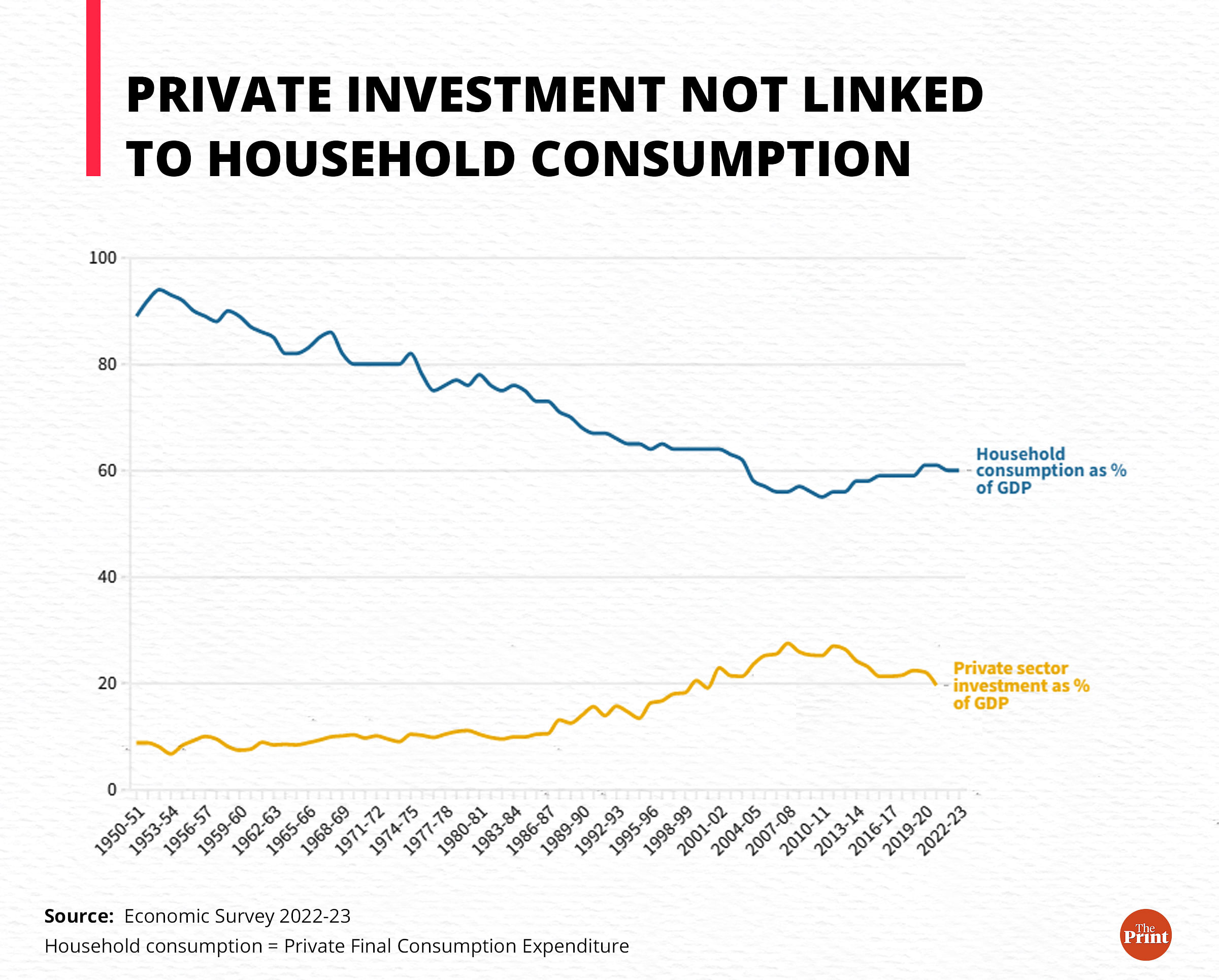
Private Investment A Shrinking Slice Of India s GDP Pie Since 2012 It

Going The Same Way Explore The Bible

Not really as Git only supports to have one working copy of the repository data within the repository directory If you want to commit pull to the same repository with two different working copies you could create a bare repository and clone it to two working copies Whenever you have finished something you simply push to the main bare repository

The above command will create a copy of the repo in the mentioned directory with the specified branch name Now you got two copies of the repo in your local So you can work on two branches simultaneously One small catch is that you can t have the same branches checked out in different worktrees So if you have checked out one branch in one

The command git worktree allows you to have separate working directories for multiple branches that all use the same repository Assuming that you are in the cloned directory of the server repository the following command will checkout the stable13 branch at a new directory called stable13 git worktree add stable13 stable13 After

Solution 2 Clone the repository again The brute force way to work on two git branches at once is to clone the entire repository to a different folder and check out a different branch in each clone In the example below the same repository is cloned in app example and app example 2 This certainly gets the job done
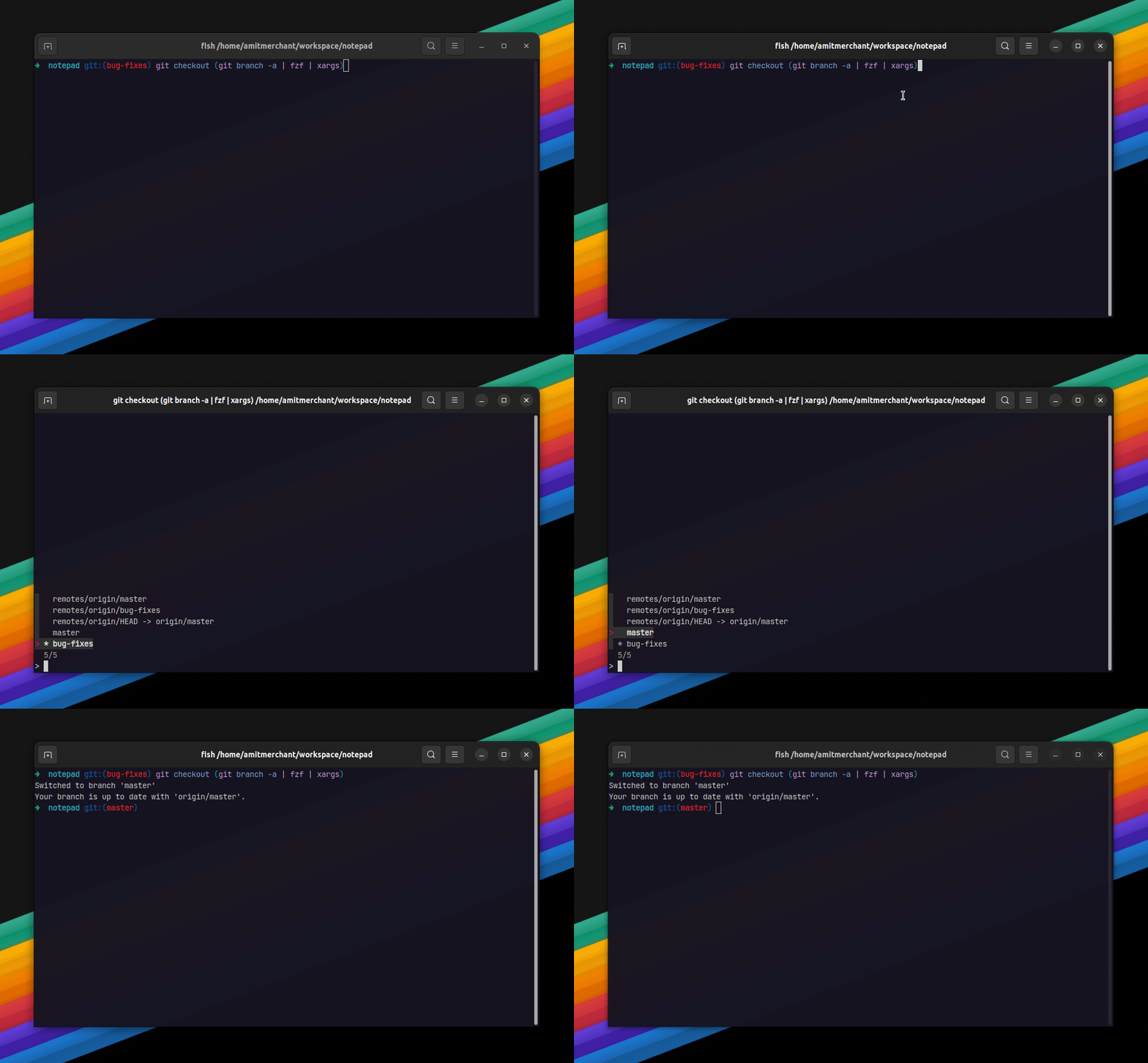
Git checkout detach branch git checkout detach commit Prepare to work on top of commit by detaching HEAD at it see DETACHED HEAD section and updating the index and the files in the working tree Local modifications to the files in the working tree are kept so that the resulting working tree will be the state recorded in the commit plus the local modifications
Watch this step by step tutorial to learn how to leverage Git worktree and speed up your workflow This video includes a Git worktree example so you can lea While doing my development work in my local development environment I created another merge request for the documentation using the Web IDE essentially working on two different Git branches at the same time using two different editors In my quick example below you can see a merge request to add Jenkins content to our DevOps tools page I
Git checkout works hand in hand with git branch The git branch command can be used to create a new branch When you want to start a new feature you create a new branch off main using git branch new branch Once created you can then use git checkout new branch to switch to that branch Additionally The git checkout command accepts a b argument that acts as a convenience method which will