Git Branch Does Not Show All Remote Branches Git Create Branch Tracking Remote Nasadinsights Git Branch Atlassian Git Tutorial Git Pull Remote Branch Differbetween Git Fetch All Branches Scratch Code Git Merge Branches In With Git Using VS Code not Working ITecNote Do you want to request a feature or report a bug bug What is the current behavior checking the Show remote branches does not toggle all remote branches If the current behavior is a bug please provide the steps to reproduce and if po
A remote branch is a branch that exists on a remote repository such as GitHub GitLab or Bitbucket When you clone a repository Git automatically creates a remote that points to the original repository You can then use this remote to fetch changes made by other collaborators on the project How to Fetch Remote Branches in Git Doesn t show all remote branchs with git branch r Asked 7 years 11 months ago Modified 5 years 11 months ago Viewed 4k times 4 when I execute the command git branch r it s show just origin HEAD origin master origin development elton origin master And when execute the command git remote show origin it s show
Git Merge Branches In With Git Using VS Code not Working ITecNote Git Create Branch From Terminal Lasopachristian Git Fetch All Remote Branches Updated 2023 Vendor Interoperability Impact On Peer Availability IPSec Virtual How To List Remote Branches In Git How To Clone All Remote Branches In Git YouTube Git Create Branch Tracking Remote Nasadinsights What Is Git Checkout Remote Branch Benefits Best Practices More GIT Branch And Its Operations An Easy Understanding Digital Varys
Git Branch Does Not Show All Remote Branches
 Git Branch Does Not Show All Remote Branches
https://s3.ap-south-1.amazonaws.com/s3.studytonight.com/tutorials/uploads/pictures/1623294975-103268.png
Method 1 List Remote Branches The most straightforward way to list all branches in a remote repository is to use the following command git branch r Important To ensure you get all the branches from the remote repository run the following command first git fetch all
Pre-crafted templates offer a time-saving option for developing a varied range of files and files. These pre-designed formats and layouts can be utilized for different individual and expert projects, consisting of resumes, invites, leaflets, newsletters, reports, discussions, and more, enhancing the content development procedure.
Git Branch Does Not Show All Remote Branches

Listar Todas Las Ramas Remotas En Git Delft Stack

Git Create Branch From Terminal Lasopachristian

Git Fetch All Remote Branches Updated 2023
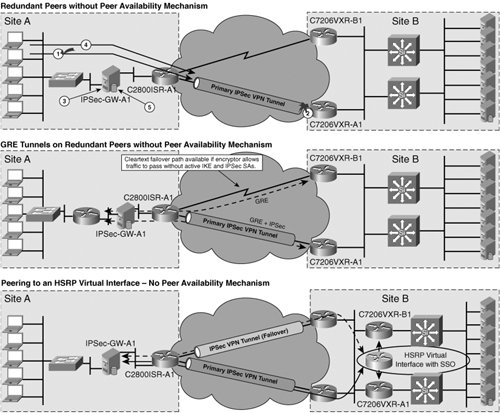
Vendor Interoperability Impact On Peer Availability IPSec Virtual

How To Clone All Remote Branches In Git YouTube
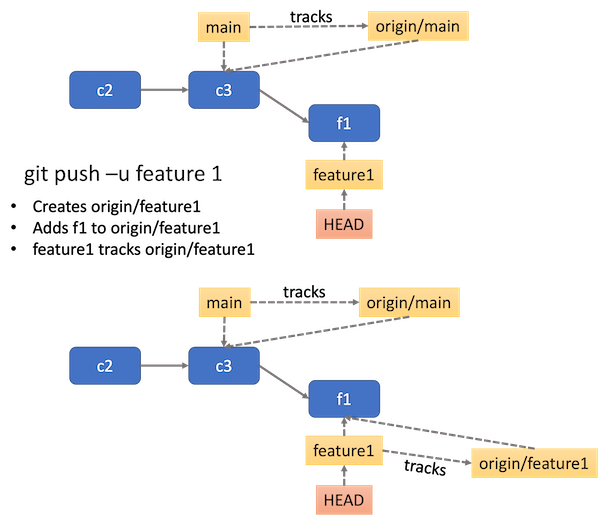
Git Create Branch Tracking Remote Nasadinsights

To see all local and remote branches run git branch a You can see detailed information such as the local or remote branches in use commit ids and commit messages by running git branch vv or git branch vva Conclusion This article showed you how to list branches while working with Git

Local and remote work can diverge To synchronize your work with a given remote you run a git fetch remote command in our case git fetch origin

23 GitHub version 3 0 5 2 for Windows no longer shows me all the remote branches This is working with a GitHub for Enterprise server For example when I click on the branches drop down it used to show me all the remote branches in origin but now only shows me branches I ve checked out locally

A glob pattern that matches branch or tag names under refs For example if you have many topic branches under refs heads topic giving topic would show all of them r remotes Show the remote tracking branches a all Show both remote tracking branches and local branches current

When a local branch is started off a remote tracking branch Git sets up the branch specifically the branch name remote and branch name merge configuration entries so that git pull will appropriately merge from the remote tracking branch This behavior may be changed via the global branch autoSetupMerge configuration flag That setting can be overridden by using the track and no
Git branch not showing branches in terminal I m using Ubuntu 16 04 and Git 2 7 4 I just did git init and then git branch but nothing appears at all node uui git init Initialized empty Git repository in home alex node uui git node uui git branch node uui I m really puzzled Solution If you faced such situation just run below command git fetch all and if you run the same command git branch r you can now see all the branches available in remote git git branch r origin HEAD origin master origin master origin remote branch name1 origin remote branch name2 In Git
203 I have been pushing to a remote Bitbucket repository and recently a colleague has pushed a new branch he created to the same repository I m trying to fetch the changes he uploaded git branch a master localbranch1 localbranch2 remotes origin master git branch r origin master