Git Bash Set Email And Password How To Set Git Config Username And Email Git bash Git HOME Web Git Bash Set An Environment Variable Set Email And User Name In Git Git Programming Users Tutorials Using Git Bash Tutorial Pdf Duolasopa Git Configuration As you read briefly in Getting Started you can specify Git configuration settings with the git config command One of the first things you did was set up your name and email address git config global user name John Doe git config global user email johndoe example
Save Username and Password in Git Credentials Storage Run the following command to enable credentials storage in your Git repository git config credential helper store To enable credentials storage globally run git config global credential helper store When credentials storage is enabled the first time you pull or push from the To set your global commit name and email address run the git config command with the global option git config global user name Your Name git config global user email youremail yourdomain Once done you can confirm that the information is set by running git config list user name Your Name user email youremail yourdomain
Using Git Bash Tutorial Pdf Duolasopa Github Git Prompts For Username And Password For Git Push Origin Set Github Username And Password Terminal Git Bash Tutorial In Hindi How To Set Up User Name And Email In Git YouTube Hexo Algolia Nicksxs s Blog Hexo Algolia Nicksxs s Blog BASH Password Strength Checking Script YouTube Hexo Algolia Nicksxs s Blog How To Set Up Git Username And Email In Ubuntu Make Tech Easier
Git Bash Set Email And Password
 Git Bash Set Email And Password
https://www.brainstormcreative.co.uk/wp-content/uploads/git-config-set-username.png
After downloading Git most developers immediately run Git config commands to set their username and email After that there are thousands of ways you can configure Git to fit specific use cases and workflows In order to keep things simple and informative we ll explain the most common Git config levels including Git config system global and local as well as how to configure your
Templates are pre-designed files or files that can be used for different functions. They can conserve effort and time by offering a ready-made format and design for producing various sort of material. Templates can be utilized for individual or expert jobs, such as resumes, invitations, leaflets, newsletters, reports, discussions, and more.
Git Bash Set Email And Password

Bash Set Command Tutorial LinuxTect

Github Git Prompts For Username And Password For Git Push Origin

Set Github Username And Password Terminal Git Bash Tutorial In Hindi
How To Set Up User Name And Email In Git YouTube
Hexo Algolia Nicksxs s Blog

BASH Password Strength Checking Script YouTube

Git Bash is a Microsoft Windows software that functions as an abstraction shell for the Git command line experience A shell is a console application that allows you to interact with your operating system by command prompt Now let us discuss how to set Git Username and Password in Git Bash

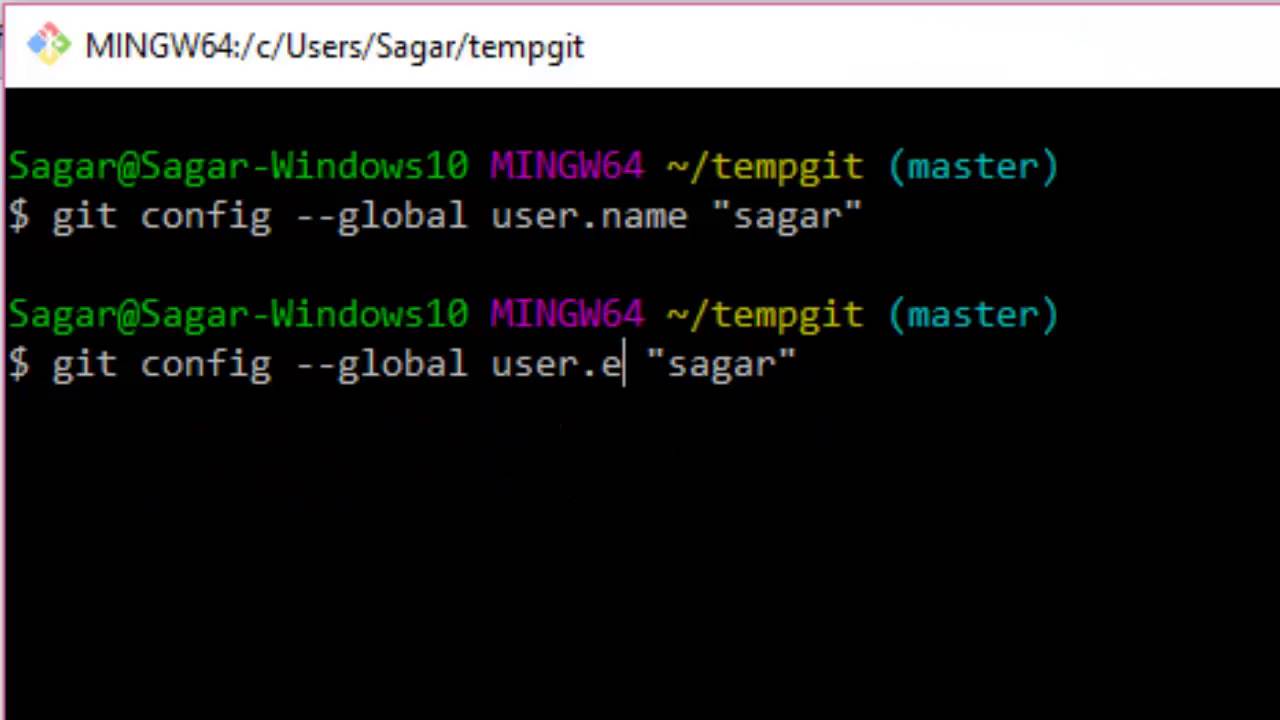
To set your global commit name and email address run the git config command with the global option git config global user name Your Name git config global user email youremail yourdomain Once done you can confirm that the information is set by running git config list user name Your Name user email youremail yourdomain
The first thing you should do when you install Git is to set your user name and email address This is important because every Git commit uses this information and it s immutably baked into the commits you start creating git config global user name John Doe git config global user email johndoe example

Terminal Git Bash Change the current working directory to the local repository where you want to configure the name that is associated with your Git commits Set a Git username git config user name Mona Lisa Confirm that you have set the Git username correctly git config user name Mona Lisa

Without any credential helpers defined Git will try the following strategies to ask the user for usernames and passwords If the GIT ASKPASS environment variable is set the program specified by the variable is invoked A suitable prompt is provided to the program on the command line and the user s input is read from its standard output
So that for example running git push origin all will then output asking for a password I want this in one command I am aware of the ability to set up keys and other solutions but I want to know if there is a way to just keep using username and password with one command I am running Git Bash on Windows 8 1 You can use your GitHub provided noreply email address or any email address git config user email YOUR EMAIL Confirm that you have set the email address correctly in Git git config user email email example Add the email address to your account on GitHub so that your commits are attributed to you and appear in your contributions graph
Try git credential oauth included in many Linux distributions No more passwords No more personal access tokens No more SSH keys git credential oauth is a Git credential helper that securely authenticates to GitHub GitLab BitBucket and Gerrit using OAuth The first time you push the helper will open a browser window to authenticate