Get Service Powershell Log On As Get Service In PowerShell Peter Whyte DBA Blog How To Get Powershell Log On Webgui Splunk Community Oracle DB s Not Showing But Instance Shows In UI Unitrends Create A Group Managed Service Account With Powershell On Windows Log On As A Service Powershell Viva Wyatt WEB Dec 9 2022 nbsp 0183 32 You can get the services on a local or remote computer by using the Get Service cmdlet As with Get Process using the Get Service command without parameters returns all services You can filter by name even using an asterisk as a wildcard PowerShell Copy PS gt Get Service Name se Status Name DisplayName
WEB Feb 14 2022 nbsp 0183 32 I can use Get Service to query the service information of a local or remote computer but that cmdlet does not return any Logon As or Run As information at all Here s an example PS C Users mkana gt get service LanmanServer Select Object Name LanmanServer RequiredServices SamSS Srv2 CanPauseAndContinue WEB Jul 6 2022 nbsp 0183 32 The Get Service cmdlet retrieves the properties of a service If you re using an earlier version of PowerShell and do not have the Credential parameter available you can use the gwmi Get WmiObject cmdlet account quot lt the account name gt quot password quot lt the account password gt quot servicename quot name lt the service name gt quot
Log On As A Service Powershell Viva Wyatt How To Get Powershell Log On Webgui Splunk How To Get Powershell Log On Webgui Splunk Community Powershell Log Your Scripts PoshDB Use PowerShell To Log Into Office 365 Exchange Log On As A Service Powershell Viva Wyatt Log All PowerShell Commands And Outputs And Write Them In Text Files Comment Arr ter Un Service Windows Partir De La Ligne De Commande Et Use PowerShell To Log Into Office 365 Exchange
Get Service Powershell Log On As
 Get Service Powershell Log On As
https://peter-whyte.com/wp-content/uploads/2021/10/get-service_feature.png
WEB Jun 29 2019 nbsp 0183 32 Set and manage Service Logon Accounts remotely across multiple computers using PowerShell A must read for sysadmins
Pre-crafted templates offer a time-saving service for creating a diverse series of documents and files. These pre-designed formats and designs can be used for numerous individual and expert projects, including resumes, invites, leaflets, newsletters, reports, discussions, and more, improving the material production procedure.
Get Service Powershell Log On As

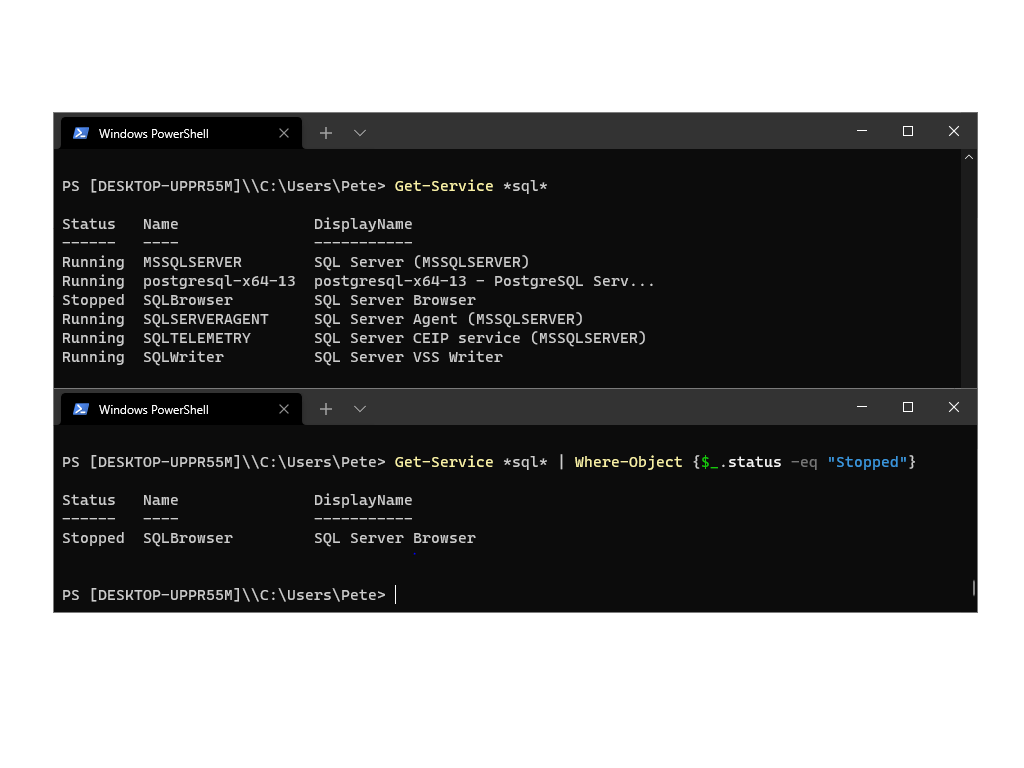
Get Service In PowerShell MSSQL DBA Blog

How To Get Powershell Log On Webgui Splunk

How To Get Powershell Log On Webgui Splunk Community

Powershell Log Your Scripts PoshDB
Log On As A Service Powershell Viva Wyatt
Log All PowerShell Commands And Outputs And Write Them In Text Files
WEB Nov 24 2008 nbsp 0183 32 You can take advantage of PowerShell s ability to add NET types to the current session and NET s P Invoke to call Windows APIs in order to grant a user the Log on as a service permission from PowerShell

WEB Jun 1 2016 nbsp 0183 32 Get WmiObject Win32 Service cn server1 server2 Filter Name quot NetBackup Client Service quot Or this Get WmiObject Win32 Service cn quot server1 quot quot server2 quot Filter Name quot NetBackup Client Service quot

WEB The Get Service cmdlet gets objects that represent the services on a computer including running and stopped services By default when Get Service is run without parameters all the local computer s services are returned

WEB You can change the settings for the Log on as a service policy from the PowerShell command line The easiest way to grant Log on as a service permissions is to use the NTRights exe command line tool which is part of the
WEB The Set Service cmdlet changes the properties of a service such as the Status Description DisplayName and StartupType Set Service can start stop suspend or pause a service To identify a service enter its service name or submit a service object
WEB The built in Get Service PowerShell cmdlet can be used to get a list of Windows services check their statuses filter them by name or service status Let s learn how to use Get Service to check Windows services WEB The easiest way to do this from a command line is definitely using NTRights exe from the Windows Server 2003 Resource Toolkit An answer to this question superuser questions 309360 has a Powershell example
WEB May 25 2022 nbsp 0183 32 Get WMIObject Class Win32 Service Select Object Name Caption StartMode StartName State Sort Object Name Export CSV result csv StartName is the property that has the Log On As information It is better to use Get CIMInstance as Get WMIObject is deprecated