Foxit Paper Size Why A New Font Type And Size That I Selected For Pop up Note Cannot Be Foxit Pdf Change Paper Size Printable Templates Free Foxit Software PDF Editor Software PDF Solutions Change Font Size In Fillable Pdf Form Foxit Printable Forms Free Online Stacked Paper Sheets Free Stock Photo Public Domain Pictures More Tips for Managing Your PDF Document s File Size There are many reasons why you would opt for using PDF software over a standard word processing application to create documents After all an enterprise grade PDF software application comes with a rich set of features that help you secure and design great looking files There are times however when so many different features and
1 Choose Organize Crop Pages the cursor will change to Drag the cursor to select an area you want to crop Then double click the area you cropped 2 In the pop up Crop Pages dialog box the margin measurement indicates the size of the area you selected You can directly click OK or provide new settings in the dialog box You can insert pages from a paper document using Foxit PDF Editor and your scanner Click Organize Choose one of the following methods Click Insert in the Organize tab and choose From Scanner Right click a page thumbnail in the Pages panel or Thumbnail window and choose Insert Pages From Scanner
Stacked Paper Sheets Free Stock Photo Public Domain Pictures How To Change The Page Size Of A Blank Page Help Center Foxit Software Foxit Reader Naysthai How To Print Multiple Copies Of A Page To One Sheet With Foxit PDF How To Set Default Viewing Layout Help Center Foxit Software Prints Paper Format Custom Paper s Standard Paper Size Chart How To Silent Install Foxit Reader With PDQ Deploy PDQ
Foxit Paper Size
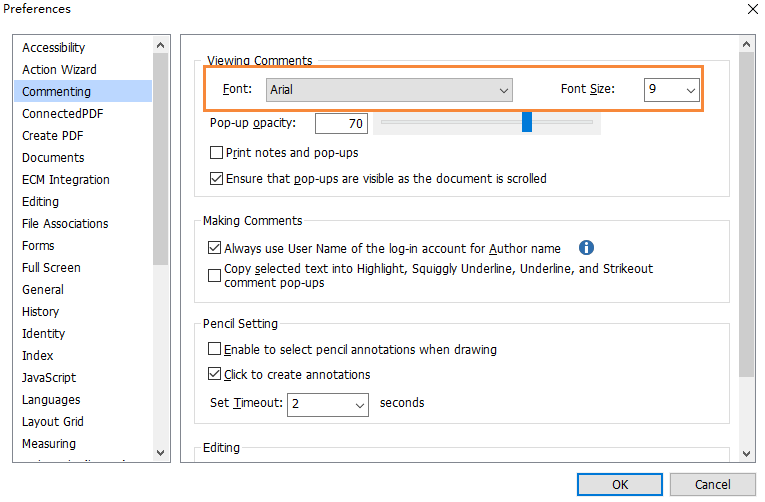 Foxit Paper Size
https://kb.foxit.com/hc/article_attachments/360070177551/mceclip0.png
When you designated a paper size like Tabloid 11x17 inch in the Xerox printer properties dialog box and went back to Foxit print preview window you might find the Paper shows a different size like 8 5x11 0 inch To update the paper size you need to set the original document size in the Xerox printer properties
Pre-crafted templates provide a time-saving service for creating a varied series of files and files. These pre-designed formats and designs can be utilized for different individual and professional tasks, including resumes, invitations, flyers, newsletters, reports, discussions, and more, enhancing the content creation procedure.
Foxit Paper Size

Foxit Reader Lupon gov ph
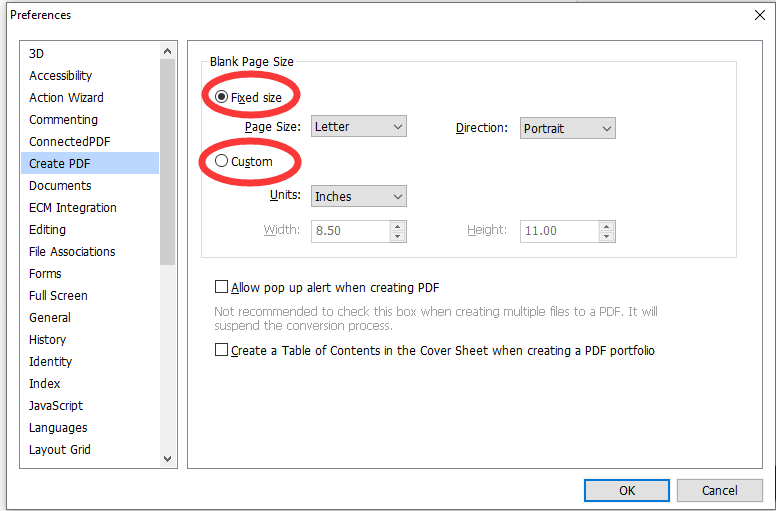
How To Change The Page Size Of A Blank Page Help Center Foxit Software

Foxit Reader Naysthai
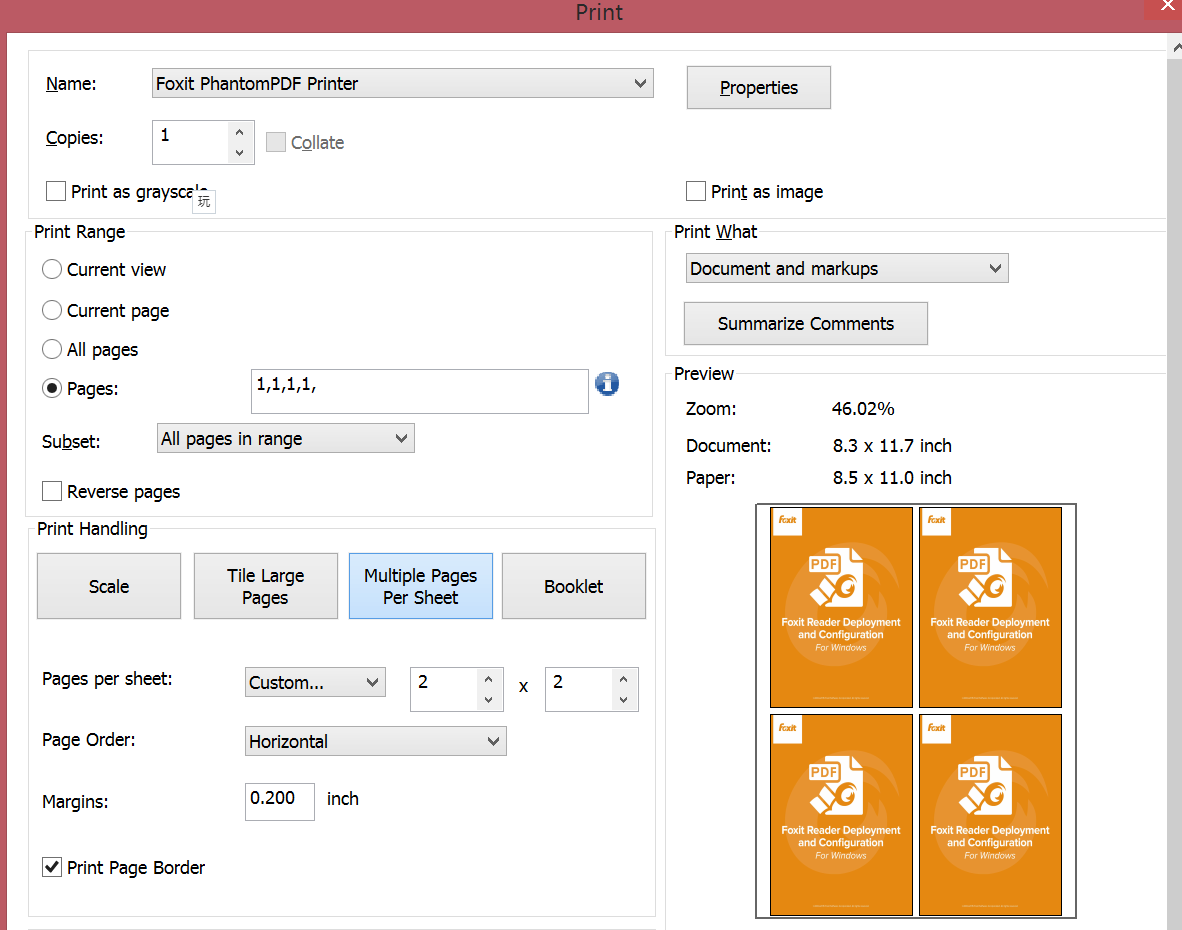
How To Print Multiple Copies Of A Page To One Sheet With Foxit PDF

Prints Paper Format
Custom Paper s

1 Open the PDF document you want to resize pages 2 Right click the target page s on the Pages thumbnails choose Resize Pages Or choose Organize Resize Pages In the pop up Resize Pages dialog box specify the page range For the

Right click on Foxit PDF Editor Printer select Printing Preferences 3 Choose Layout click Custom Page Size 4 Click Add button to add a new form highlight an existing form click Edit to modify it or click Remove to delete it 1 Go to Control Panel All Control Panel Items Devices and Printers In Windows 10 please go to Control Panel

Solution Foxit PDF Editor can help print oversized PDF into multiple pages From the Print Screen in Foxit PDF Editor Ctr F Select Tile Large Pages under Print Handling This will allow you to divide the PDF into multiple pages using the Page Zoom below In the screenshot below I have my Page Zoom set to 800 so this will split the

However it always printed to A4 instead of staying on letter In this case check the following In Foxit Reader Print dialog box see if the option Choose Paper Source by PDF Page Size was checked if so uncheck it With this option enabled Foxit Reader will pick up a paper size that is most matched with the current PDF page layout
Paper Size Select a paper size Resolution Select a resolution supported by your scanner Output New PDF Document Output the scanning results as a new PDF document Append Append the converted scan to an existing PDF file After selecting this option click Browse to find and select an existing PDF file from your local disk
With Foxit PDF Editor you can print a whole PDF file a selected portion of a page or specifed sections in a document Foxit PDF Editor also allows you to print multiple PDF files at a time the printer will automatically adjust the page orientation based on the page size and the paper size For example with the page height larger than The size is measured in inch by default If you need to change the unit please go to File in the Ribbon or Foxit PDF Editor in the menu bar Preferences Measuring Measuring Units Right click the selected objects and choose Properties Then input a value in the Width Height or Scale X Scale Y box in the properties dialog box
The default is the magnification set in the File tab or Foxit PDF Editor in the menu bar Preferences Page Display Zoom level Open to page Specify the page that appears when you open the document Paper Source by Page Size Automatically select the paper type according to the page size of the PDFs when printing