Find Duplicates In Google Sheets How To Remove Duplicates In Google Sheets How To Find Duplicates In Google Sheets 2022 Lucid Gen How To Highlight Duplicates In Google Sheets Gambaran How To Find Duplicates In Google Sheets YouTube How To Find Duplicates In Google Sheets Tech Advisor Web Nov 6 2019 nbsp 0183 32 One way to do this is to click or tap in the upper left cell then drag to the lower right cell in the range Choose Data Sort Range Google Sheets will display several sort options
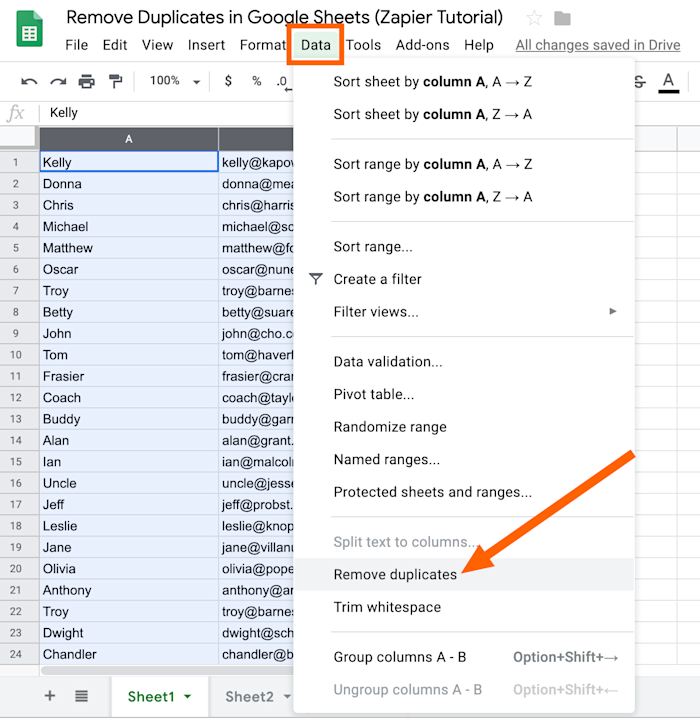
Web Aug 10 2016 nbsp 0183 32 by Natalia Sharashova updated on August 10 2023 Looking for a simple way to find duplicates in Google Sheets How about 7 ways That s all you need for numerous use cases I will show you how to use formula free tools no coding promise conditional formatting and a few easy functions for avid formula fans Web May 7 2019 nbsp 0183 32 Select the data you want to check for duplicates Go to the Data tab move to Data Cleanup and pick quot Remove Duplicates quot in the pop out menu In the window that appears you ll see the columns you ve selected with an option to mark whether or not your data has headers
How To Find Duplicates In Google Sheets Tech Advisor How To Find And Remove Duplicates In Google Sheets TechUntold How To Remove Duplicates In Google Sheets In Five Different Ways How To Cross Reference In Excel To Find Duplicates How To Find Duplicates In Google Sheets Tech Advisor How To Find Duplicates In Google Sheets Tech Advisor How To Find Duplicates In Google Sheets Tech Advisor How To Find Duplicates In Google Sheets Tech Advisor How To Find Duplicates In Google Sheets Easy Method Howchoo
Find Duplicates In Google Sheets
https://images.ctfassets.net/lzny33ho1g45/6nZAv53ozhJzsJrFrwvKhO/d0361f43caff5c12038d9ab863fce211/Click_Data__Remove_duplicates?w=700
Web Feb 10 2023 nbsp 0183 32 Highlight the columns you want to check for duplicate data In the menu at the top select Data gt Data cleanup and then choose Remove duplicates A dialogue popup will appear Mark the boxes
Pre-crafted templates offer a time-saving solution for creating a diverse series of files and files. These pre-designed formats and designs can be made use of for different individual and professional tasks, consisting of resumes, invites, leaflets, newsletters, reports, presentations, and more, streamlining the content production process.
Find Duplicates In Google Sheets
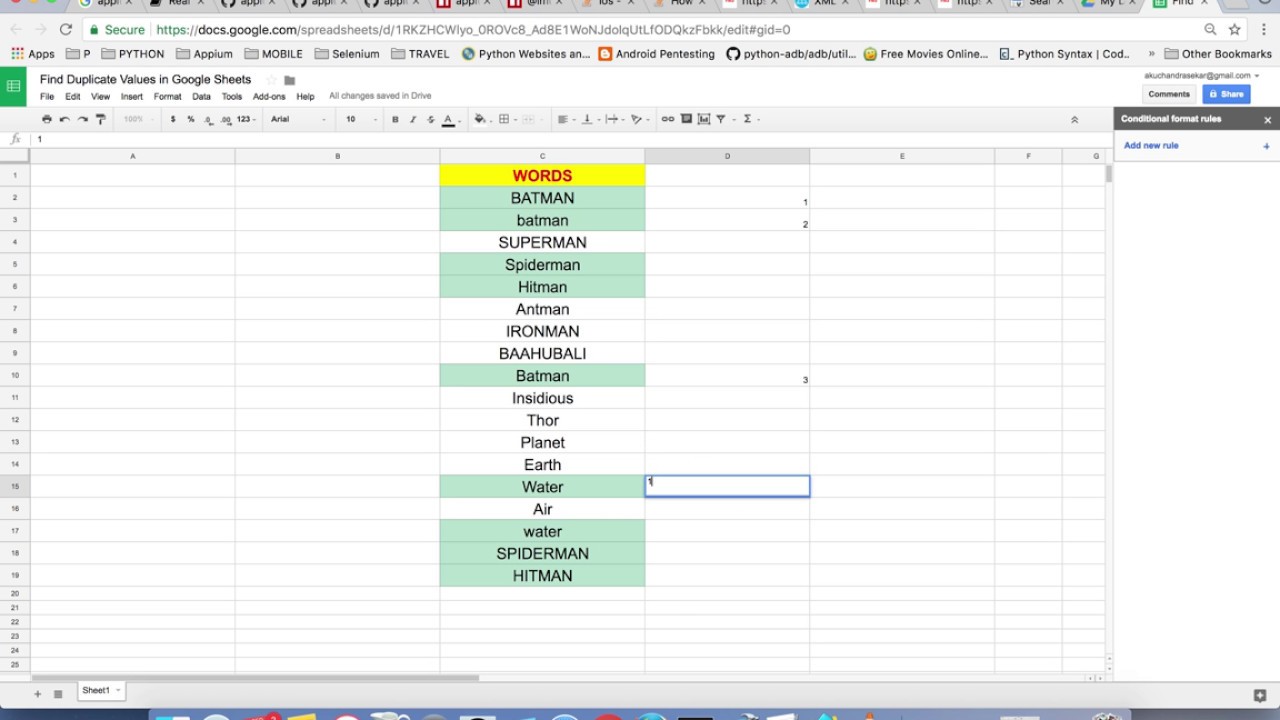
Google Sheets Duplicate Values The Ultimate Guide To Using Conditional Formatting In Google

How To Find And Remove Duplicates In Google Sheets TechUntold
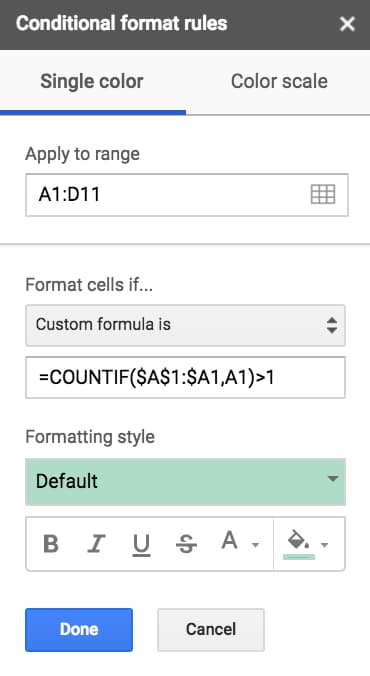
How To Remove Duplicates In Google Sheets In Five Different Ways
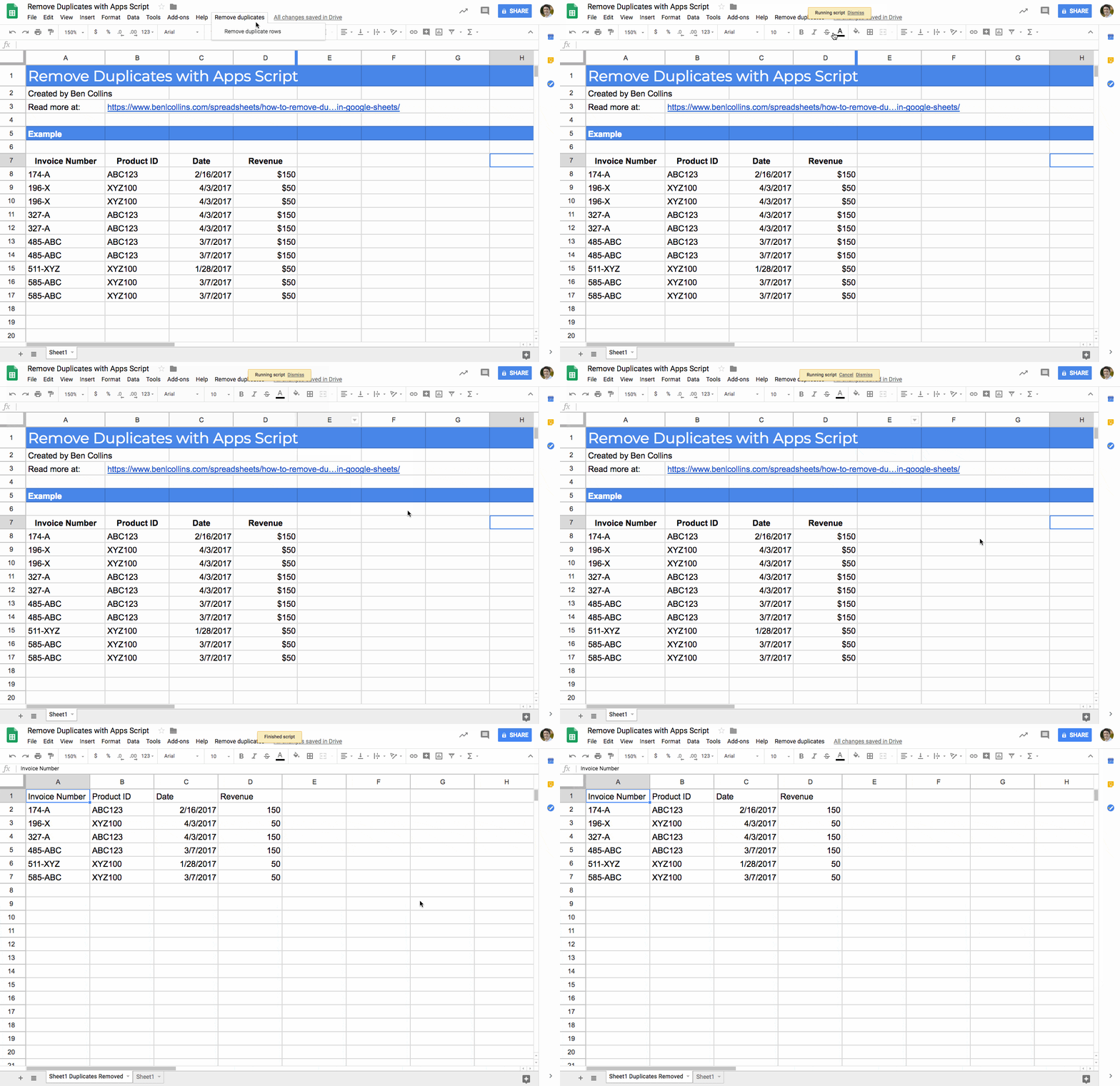
How To Cross Reference In Excel To Find Duplicates

How To Find Duplicates In Google Sheets Tech Advisor

How To Find Duplicates In Google Sheets Tech Advisor

Web Sep 16 2022 nbsp 0183 32 How to Find Duplicates in Google Sheets Columns Open the spreadsheet you want to analyze in Google Sheets Make sure the spreadsheet has data organized by columns and each column has a heading Highlight the column you want to search through Click Format gt Conditional Formatting The Conditional

Web Oct 25 2022 nbsp 0183 32 Edit Add or Delete a Conditional Formatting Rule To edit a rule select it make your changes and click quot Done quot To set up an additional rule select quot Add Another Rule quot To remove a rule hover your cursor over it and click the trash can icon

Web Using Conditional Formatting to Highlight Duplicates Step 1 Select the range in which you want to find duplicates Usually this will be a single column of data such as a list of users products Step 2 Step 3 Step 4 Step 5

Web Jul 12 2022 nbsp 0183 32 Step by Step How to Highlight Duplicates in Google Sheets With Pictures Step 1 Open your spreadsheet First head to Google Sheets and open the spreadsheet you want to check for duplicate Step 2 Highlight the data you want to check Next left click and drag your cursor over the data you

Web Feb 8 2023 nbsp 0183 32 How to highlight duplicates in a single column in Google Sheets Highlight the data range you want to check for duplicate information Then select Format gt Conditional Formatting From the Conditional format rules window that appears click the dropdown menu under Format rules and select Custom
Web Aug 28 2023 nbsp 0183 32 Highlighting duplicates in Google Sheets requires conditional formatting using the custom formula COUNTIF A A A1 gt 1 Let s review how to use it TIP If you d rather not dive into formulas just yet you can download an add on from Google Sheets that will find and highlight duplicates for you 1 Web Jul 11 2023 nbsp 0183 32 Step 2 Highlight the Data Click and drag to highlight the range of data where you want to find and remove duplicates If you want to consider the entire sheet simply click on the square in the top left corner between quot A quot and quot 1 quot to select all cells Step 3
Web Step 1 Select the range Choose the range of cells you want to check for duplicates or uniques You ll see the entire used range highlighted by default Adjust it to your needs by clicking the Select range icon and entering other range manually or selecting it the spreadsheet of interest Tip