Find And Replace For Multiple Word Documents Stock Car Racing October 1965 Harringay Online How Do I Find And Replace Multiple Word Documents How To Create A Shared Table Of Contents For Multiple Word 2010 Documents Healthy Food Near Me Excel Find And Replace Multiple Values At Once Microsoft Word Find And Replace Across Multiple Documents Boatleqwer Answer Bob Jones AKA CyberTaz MVP Replied on February 17 2012 The choice for All Open Documents in the Search list is gone but once you enter the criteria you can switch from one document window to another just keep using the same criteria Use Command to toggle between windows A bit more time consuming perhaps but still effective
How to use Find and Replace in Word on a Mac Open Microsoft Word on your Mac Click or hover over the Edit tab found in the top toolbar Click or hover over Find from the dropdown menu Click In Word with the built in Find and Replace function it s quite easy to find and replace one string at a time in the current editing document However some
Microsoft Word Find And Replace Across Multiple Documents Boatleqwer Download Find And Replace Text In Multiple Ms Word Documents Files Riset Purchase Print Multiple Word Documents And Ms Word Files How To Buy Print Documents From Word Visual Studio Code Search On Multiple Terms Stack Overflow Gambaran Microsoft Word Add In Tabs Porgenesis How To Remove Collapse In Word Enjoytechlife Why Do Multiple Word Documents Open Weeklopte Microsoft Word Find And Replace Multiple Documents Lasopastickers How To Get The Page Counts For Multiple Word Documents At Once
Find And Replace For Multiple Word Documents
Find And Replace For Multiple Word Documents
https://storage.ning.com/topology/rest/1.0/file/get/2065013016?profile=RESIZE_710x&height=568
How to Find and Replace Multiple Words in WORD in Office365 Dear Sir How to Find and Replace Multiple Words in WORD in Office365 I have a MS Word File of about 100 pages The text is in Unicode English and Gujarati I need to Find and Replace many words for 8587774d 194a 4b6c 8477 0198c5789dd9 b49813fb 73c6 4730 a915 4a289d6beb2a NimishShah2020
Templates are pre-designed documents or files that can be used for various functions. They can save time and effort by offering a ready-made format and layout for creating different kinds of material. Templates can be utilized for personal or professional jobs, such as resumes, invitations, flyers, newsletters, reports, discussions, and more.
Find And Replace For Multiple Word Documents
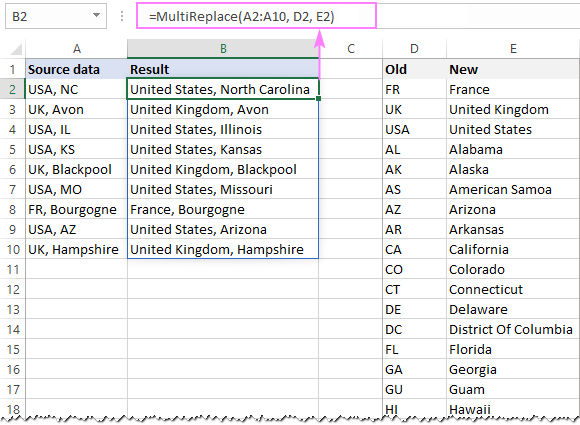
Excel Find And Replace Multiple Values At Once

Download Find And Replace Text In Multiple Ms Word Documents Files Riset
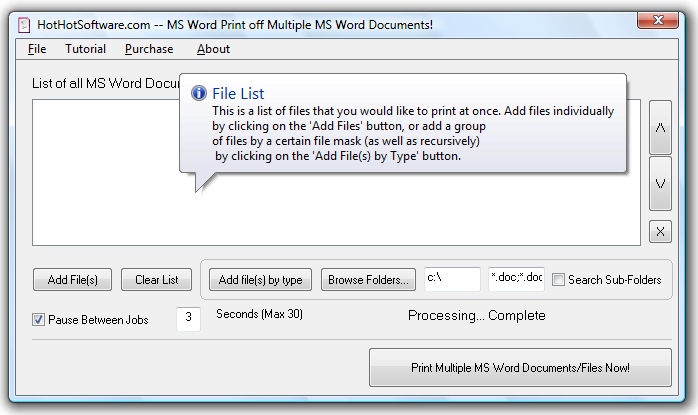
Purchase Print Multiple Word Documents And Ms Word Files How To Buy Print Documents From Word

Visual Studio Code Search On Multiple Terms Stack Overflow Gambaran

How To Remove Collapse In Word Enjoytechlife

Why Do Multiple Word Documents Open Weeklopte
6 Answers Sorted by 7 You could try VBA Find Replace cached link VBA Find and Replace provides a method for finding and replacing text anywhere in a document or collection of documents using single user defined find and replace variable pairs or a user defined list of find and replace pairs

Find and replace texts across multiple word documents at the same time with VBA code Microsoft Visual Basic for Applications Microsoft Visual Basic for Applications then copy the following VBA code into the Module window VBA Code Searching and replacing same content across multiple documents at one time

Steps to Install and Run Macro First and foremost put all file in one folder and open Word Then click Developer tab Next click Visual Basic Or simply press Alt F11 to trigger the VBA editor Then click Normal project Next click Insert tab and then choose Module Now you ve successfully inserted a new module
There are a variety of ways to automate Word documents However depending on your setup some methods may be more effective than others Word while a capable document generator isn t the best platform for everything Sometimes it s best to rely on other tools instead 1 Use find replace shortcut tools Available on Windows macOS Web
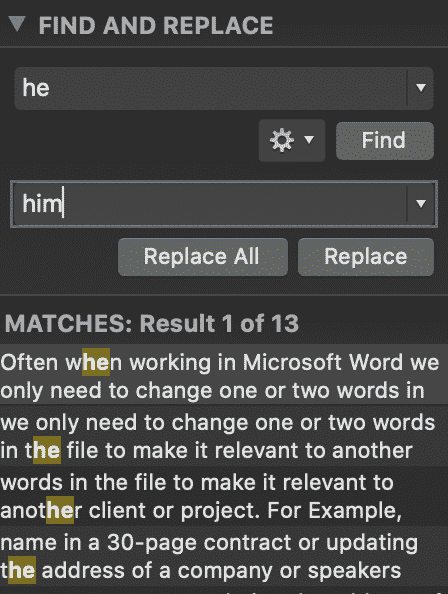
Find and replace words in multiple word files make as many replacements as you want to all your word files Support me and buy the Paid version has 3 additi
1 Open the Word document you want to find and replace multiple words at the same time then press the Microsoft Visual Basic for Applications Microsoft Visual Basic for Applications Then copy below VBA code into the Module window VBA code Find and replace multiple words at the same time in Word Microsoft office tool for Windows and Mac Best in class office productivity software Find replace in any MS Word Excel PowerPoint Visio documents Microsoft Office 2007 2023 Office 365 and any bitness 32 or 64 Find replace in docx xlsx pptx vsdx or text files csv txt html custom
How to Change Text in Multiple Word Files This topic presents the detailed step by step instructions how to update text which is usually referred to as search and replace in many Microsoft Word files 1 Set the Files to Process Select the Microsoft Word Files tab Now you have two options process only the files you select or process all files in a directory of your choice