Extract First 3 Characters In Excel Excel LEFT Function 7 Examples Wikitekkee How To Remove The First 3 Characters In Excel YouTube How To Remove First 3 Characters In Excel 4 Methods Exceldemy Riset How To Extract First 3 Characters In Power BI Desktop YouTube How To Remove The Last 3 Characters In Excel 4 Formulas ExcelDemy LEFT B2 FIND B2 1 Your selected cell will display the result of the function which is the full text before your specified character in your cell You re all set Extract the String to the Right of Your Text To get all the text that s to the right of the specified character in your cell use Excel s RIGHT LEN and FIND functions
How to Extract First 3 Words from Cell in Excel You can use the following formula in Excel to extract the first 3 words from a cell TEXTBEFORE A2 3 This particular formula extracts the first 3 words from cell A2 The following example shows how to use this formula in practice The last name starts five characters from the right B and ends at the first character from the right o This formula involves nesting SEARCH to find the first second and third instances of space The formula extracts five characters
How To Remove The Last 3 Characters In Excel 4 Formulas ExcelDemy Excel Formula To Remove First Two Characters In A Cell Printable Templates Free How To Remove The Last 3 Characters In Excel 4 Esay Ways Incredible Formula To Remove First 5 Characters In Excel 2022 Fresh News How To Remove The Last 3 Characters In Excel 4 Formulas ExcelDemy Excel Formula To Get First 3 Characters From A Cell 3 Easy Ways Excel Formula To Get First 3 Characters From A Cell 3 Easy Ways How To Remove The Last 3 Characters In Excel 4 Formulas ExcelDemy Excel Formula To Get First 3 Characters From A Cell 3 Easy Ways
Extract First 3 Characters In Excel
 Extract First 3 Characters In Excel
https://wikitekkee.com/wp-content/uploads/2022/04/LEFT-Main.png
The first two arguments are required with text being either the actual text or a cell reference and delimiter being the point at which you want the text before Here are descriptions of the three optional arguments Instance Use this argument if there is more than one occurrence of the delimiter in the string and you want a particular one
Pre-crafted templates offer a time-saving option for producing a diverse variety of documents and files. These pre-designed formats and designs can be utilized for numerous personal and expert projects, consisting of resumes, invitations, leaflets, newsletters, reports, presentations, and more, simplifying the content creation procedure.
Extract First 3 Characters In Excel

Excel Formula To Get First 3 Characters From A Cell 6 Ways ExcelDemy
Excel Formula To Remove First Two Characters In A Cell Printable Templates Free
How To Remove The Last 3 Characters In Excel 4 Esay Ways

Incredible Formula To Remove First 5 Characters In Excel 2022 Fresh News

Excel Formula To Get First 3 Characters From A Cell 3 Easy Ways

Excel Formula To Get First 3 Characters From A Cell 3 Easy Ways
1 Using LEFT Function to Get First 3 Characters from a Cell You can use the LEFT function to get the first 3 characters from a cell STEPS First let s see the procedure to use this function First select the cell where you want to place your resultant value Here I selected cell E4
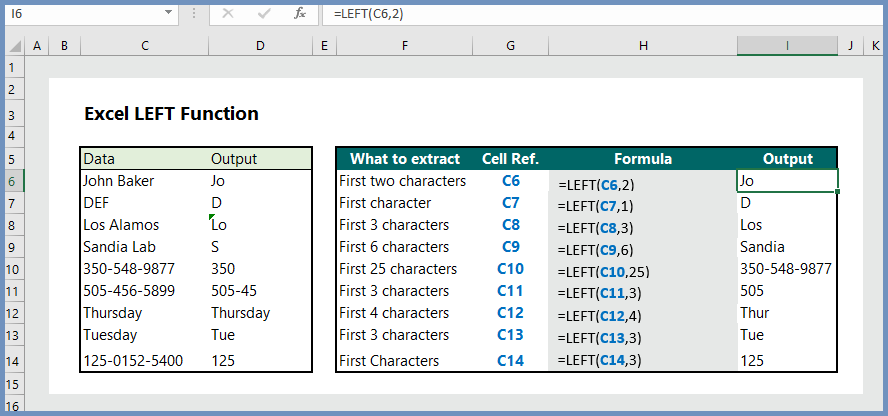
Syntax LEFT text num chars LEFTB text num bytes The function syntax has the following arguments Text Required The text string that contains the characters you want to extract Num chars Optional Specifies the number of characters you want LEFT to extract Num chars must be greater than or equal to zero

Extract the first 3 characters from the text in column A with LEFT A1 3 Then use the formula COUNTIFS with two conditions See this article for detailed instructions Excel COUNTIFS and COUNTIF with multiple AND OR criteria If I understand the problem correctly try this formula

Supposing you want to extract first 3 characters from a given list data please select a blank cell that you want to place the extracted result then use this formula LEFT B3 3 B3 is the cell you extract characters from 3 is the number of characters you want to extract

Select a blank cell here I select the Cell G1 and type this formula LEFT E1 3 E1 is the cell you want to extract the first 3 characters from press Enter button and drag fill handle to the range you want Then you see the first 3 characters are extracted
This function demonstrates how to use the LEFT function in Excel to extract the first 3 characters from a text string The LEFT function is commonly used for manipulating text data in Excel By following the step by step explanation and examples provided you will be able to easily extract the desired characters from any text in Excel Step 1 Consider an Excel sheet where you have a list of items as shown in the following image First to extract the first N characters from a string click on an empty cell and enter the formula as LEFT A2 4 and click enter to get the first value In the formula A2 is the address of the cell and 4 is the value of N
To extract the characters words first middle and last name from a cell we use the formulas LEFT RIGHT MID LEN and SEARCH in Microsoft Excel LEFT Returns the first character s in a text string based on the number of characters specified