Excel Stop Auto Formatting Color How To Turn Off Paragraph Marks In Word WPS Office Academy How To Stop Excel From Auto Formatting Numbers 3 Easy Ways How To Stop Excel From Auto Formatting Dates In CSV 3 Methods Stop Auto Formatting Number By Adding A Space Or Apostrophe YouTube How To Stop Excel From Auto Formatting Dates In CSV 3 Methods Web Oct 26 2021 nbsp 0183 32 Apply an AutoFormat Style Highlight the data in the worksheet that you want to format Go to the Quick Access Toolbar and select AutoFormat In the AutoFormat
Web Feb 21 2022 nbsp 0183 32 1 Reply Hans Vogelaar replied to Burguel Feb 21 2022 08 11 AM Burguel Select the cells you want to color this way On the Home tab of the ribbon select Web Here are the steps to add the AutoFormat option to the QAT Right click on any of the existing icons on the QAT Click on Customize the Quick Access Toolbar option In the
How To Stop Excel From Auto Formatting Dates In CSV 3 Methods Highcharts Display Only Year In X Axis And Stop Auto Formatting ITecNote How To Stop Excel From Auto Formatting Numbers 3 Easy Ways How To Stop Auto formatting Of Text Bold And Underline R MicrosoftWord How To Stop Excel From Auto Formatting Hyperlinks 3 Easy Ways How To Stop Excel From Auto Formatting Hyperlinks 3 Easy Ways How To Stop Auto Formatting Number To Date In Excel How To Stop Excel From Auto Formatting Dates In CSV 3 Methods Conditional Formatting Charts In Excel Riset
Excel Stop Auto Formatting Color
 Excel Stop Auto Formatting Color
https://d3mkpw26g447am.cloudfront.net/images/7f6e603ec141c288efb80e877e1a9a2b.gif
Web The conditional formatting rules for the current selection are displayed including the rule type the format the range of cells the rule applies to and the Stop If True setting If you
Pre-crafted templates offer a time-saving option for developing a varied range of files and files. These pre-designed formats and designs can be made use of for different individual and expert tasks, consisting of resumes, invitations, flyers, newsletters, reports, presentations, and more, improving the material creation procedure.
Excel Stop Auto Formatting Color

How To Stop Word From Changing Formatting Automatically

Highcharts Display Only Year In X Axis And Stop Auto Formatting ITecNote

How To Stop Excel From Auto Formatting Numbers 3 Easy Ways

How To Stop Auto formatting Of Text Bold And Underline R MicrosoftWord

How To Stop Excel From Auto Formatting Hyperlinks 3 Easy Ways
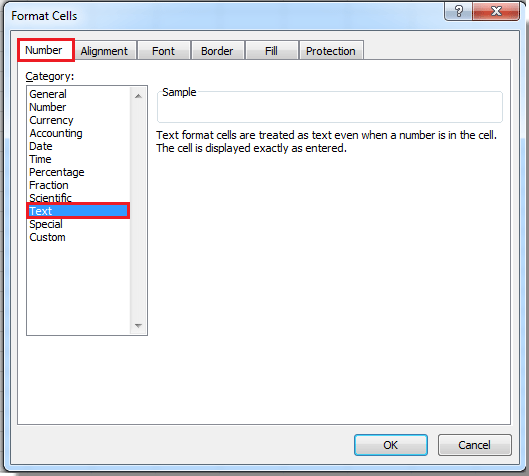
How To Stop Auto Formatting Number To Date In Excel

Web 1 Launch Excel and click Office button File tab gt Options See screenshot 2 Click Advanced in left pane and uncheck Extend data range formats and formulas option 3 Click OK to close dialog then when you

Web Apr 3 2017 nbsp 0183 32 1 I have a spreadsheet I use to check files off from I change the text color to red if the file is incomplete and highlight with yellow once finished If I haven t seen the

Web May 17 2013 nbsp 0183 32 To prevent auto formatting just do the following Select the range where you ll have your special data It can be a column or a
Web Nov 30 2020 nbsp 0183 32 Open Microsoft Excel In the menu bar click Format and select AutoFormat Click the Options button In this section users can enable or disable each of the

Web Verify print options to print cell shading in color If print options are set to Black and white or Draft quality either on purpose or because the workbook contains large or complex
Web Jul 9 2018 nbsp 0183 32 How can this automatic behavior be stopped I m formatting cells programmatically and style color if often defined conditionally it is not simply to please Web You can change the color of cells by going into the formatting of the cell and then go into the Fill section and then select the intended color to fill the cell
Web Nov 20 2023 nbsp 0183 32 In the new window that appears click the New Rule button Then click Use a formula to determine which cells to format then type A2 lt TODAY 5 in the box then