Excel Split Cell By Space Excel Split With VBA Afree Media How To Split Text By Space comma delimiter In Excel Microsoft Excel Split Cells Based On Enter Logicgasm Split Comma Separated Values Or Delimited Data Into Separate Rows Otosection How To Split One Cell Into Two In Excel 5 Useful Methods ExcelDemy This example separates two components first name and last name A single space separates the two names Copy the cells in the table and paste into an Excel worksheet at cell A1 The formula you see on the left will be displayed for reference while Excel will automatically convert the formula on the right into the appropriate result
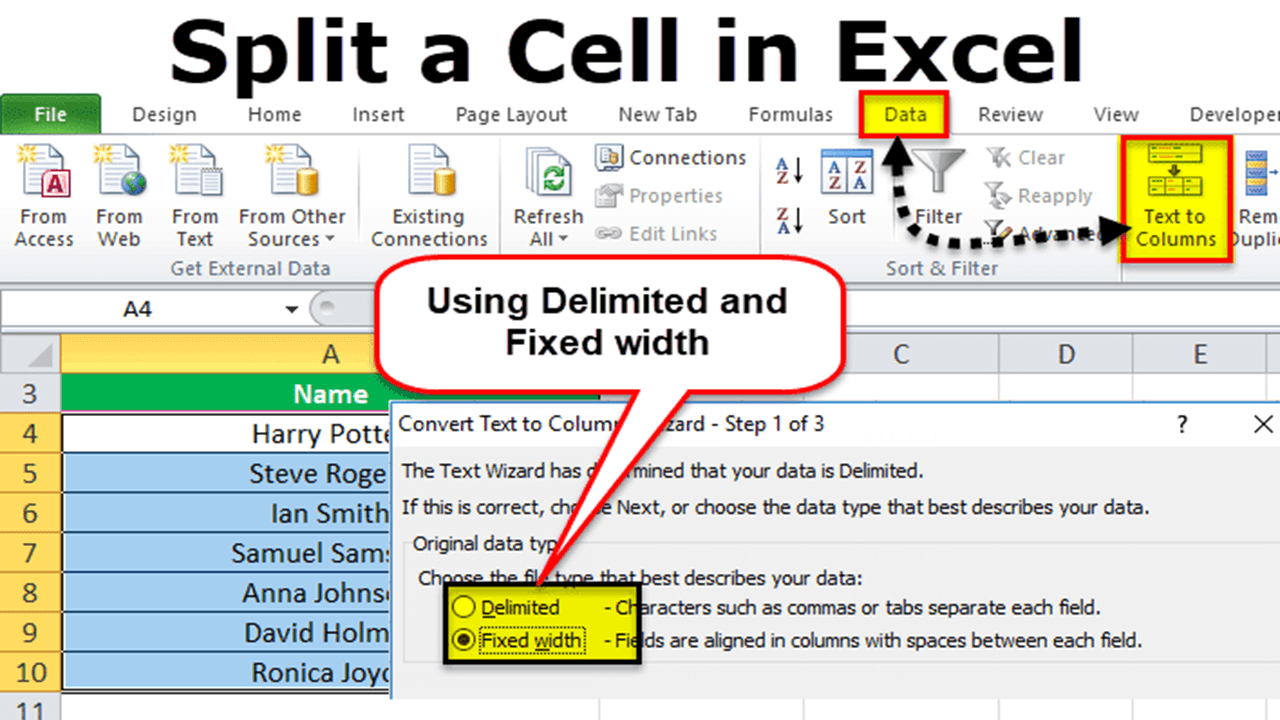
This function uses the following basic syntax TEXTSPLIT A2 This particular formula splits the text in cell A2 into multiple columns based on where the spaces occur in the cell The following example shows how to use this formula in practice Example How to Split Text by Space in Excel Select the cells in which you have the text that you want to split in this case A2 A7 Click on the Data tab In the Data Tools group click on Text to Columns In the Convert Text to Columns Wizard Step 1 of 3 of Text to Columns Wizard Make sure Delimited is selected it is the default selection
How To Split One Cell Into Two In Excel 5 Useful Methods ExcelDemy View Excel Split Cell By Delimiter Formula Latest Formulas Excel Split Cells By Line Break Gadgetlasopa Excel Split Cell By Delimiter Formula ExcelDemy Excel Split Cell By Delimiter Formula ExcelDemy How To Split Cell By Delimiter Using Excel Formula 8 Ways Excel Split Cell By Delimiter Formula ExcelDemy Excel Splitting Names In One Cell And Adding Commas Between To Mobile Hot Sex Picture How To Split Text In Excel In 5 Ways Riset
Excel Split Cell By Space
 Excel Split Cell By Space
https://4.bp.blogspot.com/-d9mvKGqagEQ/VfqJX406yMI/AAAAAAAADas/IqKlx-8MBfc/s1600/split.jpg
Select the cell or cells whose contents you want to split Important When you split the contents they will overwrite the contents in the next cell to the right so make sure to have empty space there On the Data tab in the Data Tools group click Text to Columns The Convert Text to Columns Wizard opens
Pre-crafted templates use a time-saving option for producing a varied variety of files and files. These pre-designed formats and layouts can be used for numerous individual and professional projects, including resumes, invitations, leaflets, newsletters, reports, discussions, and more, streamlining the content production procedure.
Excel Split Cell By Space
How To Split A Cell In Excel Robin Stdenny
View Excel Split Cell By Delimiter Formula Latest Formulas
Excel Split Cells By Line Break Gadgetlasopa

Excel Split Cell By Delimiter Formula ExcelDemy

How To Split Cell By Delimiter Using Excel Formula 8 Ways

Excel Split Cell By Delimiter Formula ExcelDemy
Select the cell or cells whose contents you want to split Important When you split the contents they will overwrite the contents in the next cell to the right so make sure to have empty space there On the Data tab in the Data Tools group click Text to Columns The Convert Text to Columns Wizard opens

1 Select the column list you want to split by delimiter and click Text to Columns Convert Text to columns Wizard dialog pops out and check If you need to split your text string by a special delimiter please check the Split text strings into multiple rows columns by space comma delimiter with Kutools for Excel

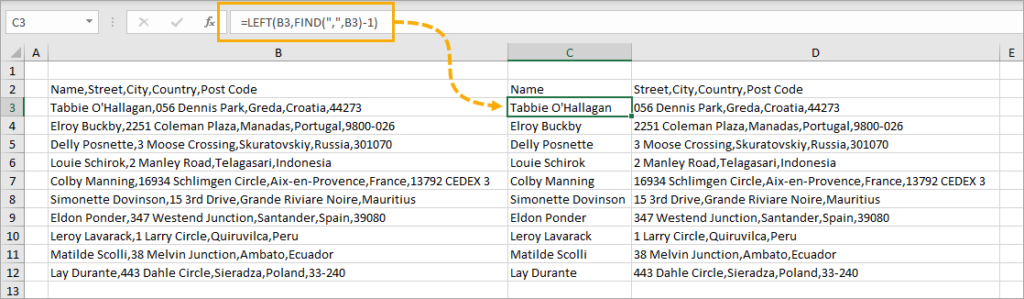
How to separate cells with the Split Text tool Split cell by character Split cell by string Split cell by mask pattern How to split text in Excel using formulas To split string in Excel you generally use the LEFT RIGHT or MID function in combination with either FIND or SEARCH

First click the C2 cell and manually type the name that appears in the B2 cell In this case it will be Mahesh Click the C2 cell so it s selected Then in Excel s ribbon at the top click the Data tab In the Data tab from the Data Tools section select Flash Fill

Splits text strings by using column and row delimiters The TEXTSPLIT function works the same as the Text to Columns wizard but in formula form It allows you to split across columns or down by rows It is the inverse of the TEXTJOIN function Syntax TEXTSPLIT text col delimiter row delimiter ignore empty match mode pad with
Select the cells you want to separate and click the Split Text icon on the Ablebits Data tab in the Text group On the add in s pane configure the following options Select Comma and Space as the delimiters Select the Treat consecutive delimiters as one check box Choose Split to columns A1 Represents the cell containing the text string you will split by the first space How to use the formulas Supposing column B has a text string list which you want to split each cell by the first space Please do as follows Firstly get all texts before the first space 1 Select a blank cell such as D3 to output the result 2
Using 4 Functions to Build our Formulas To split our Full Name column into First and Last using formulas we need to use four different functions We ll be using SEARCH and LEFT to pull out the first name Then we ll use LEN and RIGHT to pull out the last name