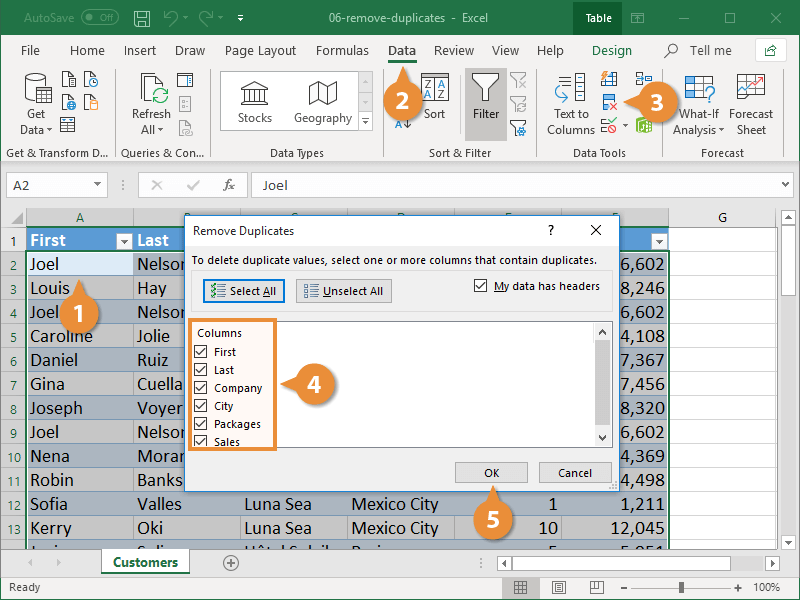
Excel Multiple Columns Remove Duplicates Question 1 Concatenate Function Convert Text To Columns Remove How To Remove Duplicate Rows In Excel Table ExcelDemy Excel Remove Duplicates CustomGuide Question 8 Concatenate Function Convert Text To Columns Remove How To Highlight And Compare Duplicates In Two Columns In Excel WPS Web May 20 2022 nbsp 0183 32 To remove these rows that have duplicates across two columns we need to highlight the cell range A1 B16 and then click the Data tab along the top ribbon and then click Remove Duplicates In the new window that appears make sure the box is checked next to My data has headers and make sure the boxes next to Team and Position are
Web Select Data gt Remove Duplicates and then under Columns check or uncheck the columns where you want to remove the duplicates For example in this worksheet the January column has price information I want to keep Web 2 days ago nbsp 0183 32 Select a cell inside the data which you want to remove duplicates from and go to the Data tab and click on the Remove Duplicates command Excel will then select the entire set of data and open up the Remove Duplicates window You then need to tell Excel if the data contains column headers in the first row
How To Highlight And Compare Duplicates In Two Columns In Excel WPS Find Duplicate Values In Two Columns In Excel Youmayneedit An Remove Duplicates In Excel Methods Examples How To Remove How To Find Duplicates In Two Columns ExcelNotes 2 Easy Ways To Remove Duplicates In Excel with Pictures How To Remove Duplicates In Excel Excel Me Z Druhej Ruky portova Kopec Google Spreadsheets Highlight Duplicates How To Remove Duplicates In Excel Excel Hightlight Duplicates Across Multiple Columns Using Conditional
Excel Multiple Columns Remove Duplicates
 Excel Multiple Columns Remove Duplicates
https://www.teststeststests.com/wp-content/uploads/2021/09/Q1-Excel-Test-Concatenate-function-Convert-Text-to-Columns-Remove-Duplicates.gif
Web Jul 26 2015 nbsp 0183 32 Finding and Highlight Duplicates in Multiple Columns in Excel If you have data that spans multiple columns and you need to look for duplicates in it the process is exactly the same as above Here is how to do it Select the data Go to Home gt Conditional Formatting gt Highlight Cell Rules gt Duplicate Values
Templates are pre-designed documents or files that can be used for different purposes. They can save effort and time by supplying a ready-made format and layout for producing various type of content. Templates can be used for personal or expert projects, such as resumes, invitations, flyers, newsletters, reports, discussions, and more.
Excel Multiple Columns Remove Duplicates
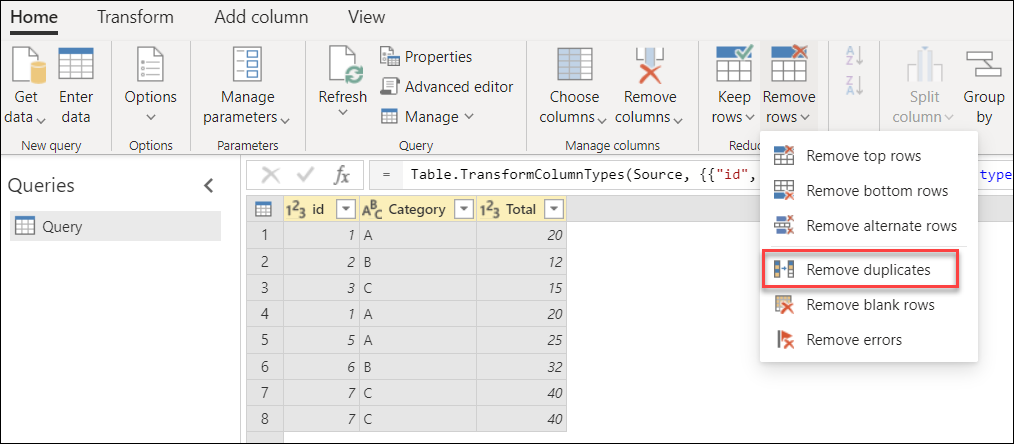
Working With Duplicate Values Power Query Microsoft Learn

Find Duplicate Values In Two Columns In Excel Youmayneedit An
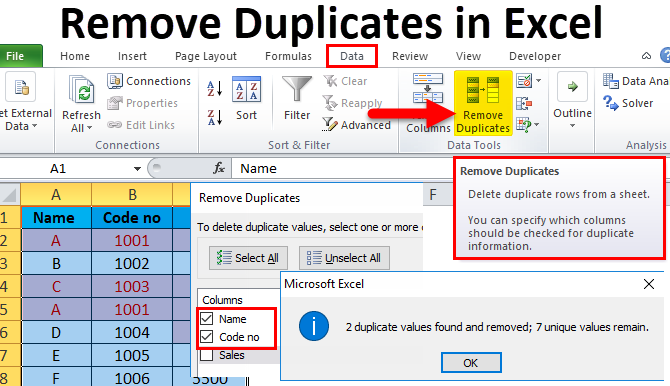
Remove Duplicates In Excel Methods Examples How To Remove
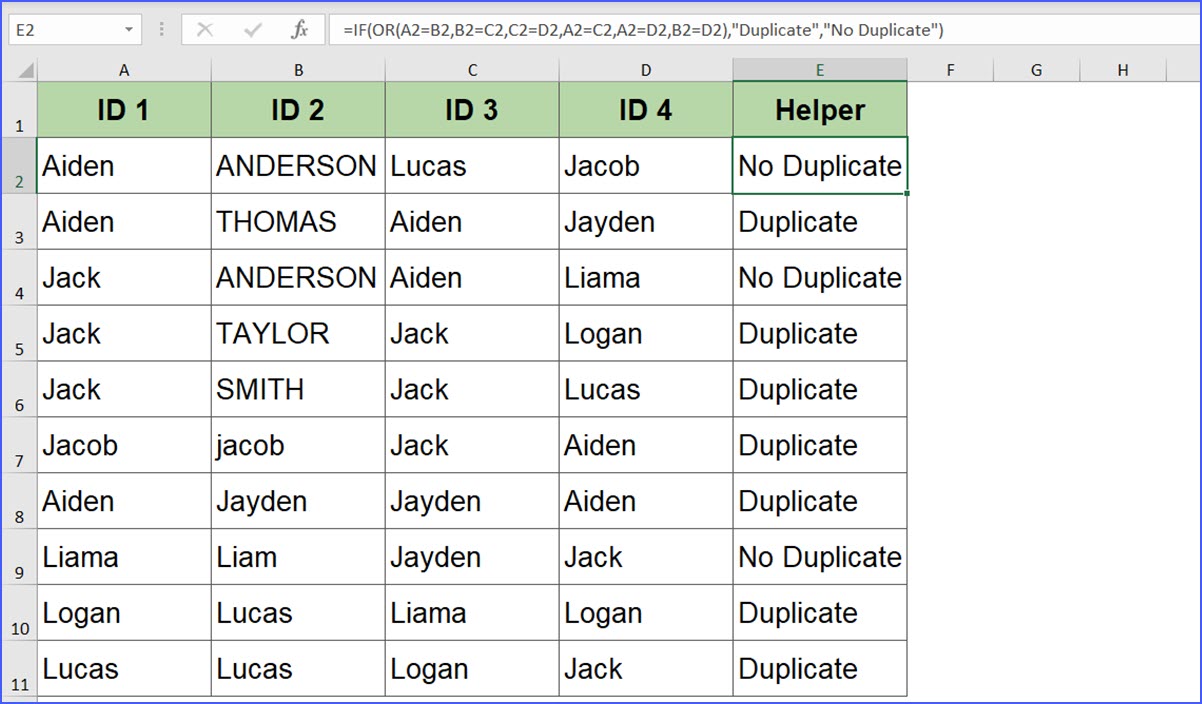
How To Find Duplicates In Two Columns ExcelNotes

How To Remove Duplicates In Excel Excel Me
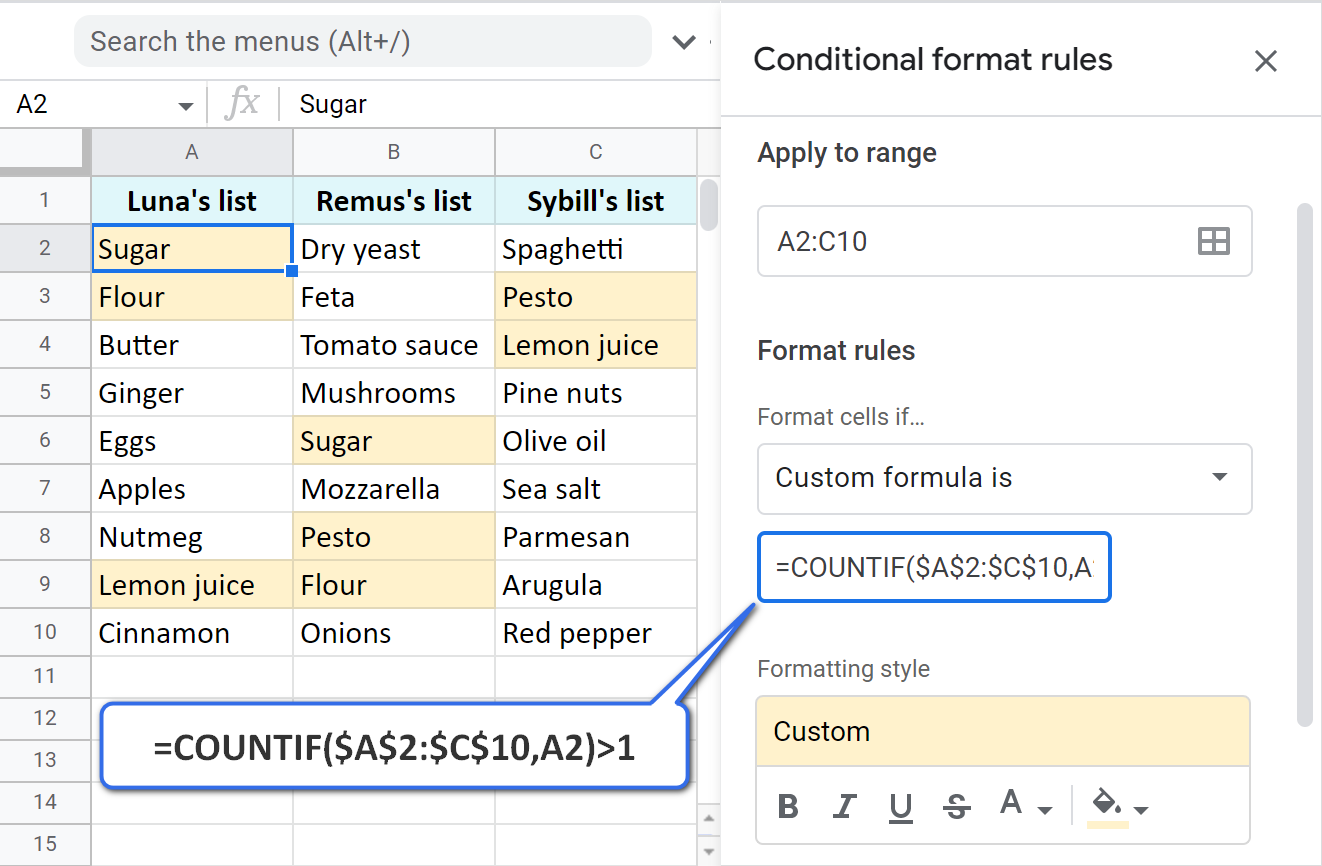
Z Druhej Ruky portova Kopec Google Spreadsheets Highlight Duplicates

Web Mar 23 2023 nbsp 0183 32 If 2 columns are located on one worksheet next to each other adjacent or not touching each other nonadjacent the removing duplicates is a bit more complex We cannot delete entire rows that contain duplicate values because this would delete corresponding cells in the 2nd column too

Web Accessibility center You can filter for unique values to temporarily hide duplicate values and you can remove duplicate values to permanently delete duplicate values A duplicate value is one where all values in the row are an exact match of all values in another row
Web Sep 22 2020 nbsp 0183 32 Remove duplicates within multiple columns without removing adjacent data I currently have 178 columns total filled with dates ranging from June to September I need to remove the duplicate dates within each column and still select all of the columns How can I remove duplicates within each individual column by selecting multiple

Web Windows Web In Excel there are several ways to filter for unique values or remove duplicate values To filter for unique values click Data gt Sort amp Filter gt Advanced To remove duplicate values click Data gt Data Tools gt Remove Duplicates

Web Oct 2 2014 nbsp 0183 32 Select both columns and choose Remove duplicates On the Remove duplicates window uncheck the first column Click OK and it should remove the duplicates from the shorter list from the longer one Note leaving both columns checked will result on no duplicates being found
Web May 3 2010 nbsp 0183 32 Duplicates that span multiple columns require a bit of setup but the solution s not difficult to implement Finding duplicate values in the same column is easy you can sort or apply a filter Web Nov 3 2022 nbsp 0183 32 Select the Range go to Data From Table Range check the option My table has headers and click OK import the range to Power Query editor Select all columns go to Transform tab select Unpivot Columns Change the Value column name to Apple Right click the Apple column and select Remove Duplicates Remove Attribute column
Web When you have a list containing duplicates in Excel you can remove duplicates and leave the cells blank using the combination of the IF and COUNTIF Functions Say you have the following list of names with duplicates in Column B Tip If you have a dataset with multiple columns see how to remove duplicate rows