Excel How To Remove Certain Characters From Cell How To Use The RIGHT Function In Excel To Remove Characters From The End Of A String Technology FIXED R Ggplot2 X axis Labels In Facet wrap FixeMe How To Remove Certain Excel Symbols Skifunty Wie Entferne Ich Ein Bestimmtes Zeichen Aus Einer Zelle In Excel Remove Certain Characters In Starting KNIME Analytics Platform KNIME Community Forum Web Apr 12 2023 nbsp 0183 32 To delete a specific character from a cell replace it with an empty string by using the SUBSTITUTE function in its simplest form SUBSTITUTE cell char quot quot For example to eradicate a question mark from A2 the
Web Mar 13 2023 nbsp 0183 32 Select all the cells where you want to delete text Press Ctrl H to open the Find and Replace dialog In the Find what box enter one of the following combinations To eliminate text before a given character type the character preceded by an asterisk char To remove text after a certain character type the character followed by an Web The SUBSTITUTE function can be used to remove a specific character from a string or replace it with something else The general syntax for this function is SUBSTITUTE original string old character new character instance number Here original string is the text or reference to the cell that you want to work on
Remove Certain Characters In Starting KNIME Analytics Platform KNIME Community Forum How To Remove Certain Screen Options And Table Columns From Post Type In Wp list table How To Remove Last Character In Excel A Shout C How To Remove Certain Characters From A String In C YouTube How To Remove Certain specific Character From Cell In Excel How To Remove Certain Flush One piece Flush Valve Terry Love Plumbing Advice Remodel DIY Review Of How To Remove Certain Characters From Excel Cell Ideas Fresh News How To Remove First Last Or Certain Characters From Text In Excel JavaScript Remove Certain Characters From String
Excel How To Remove Certain Characters From Cell
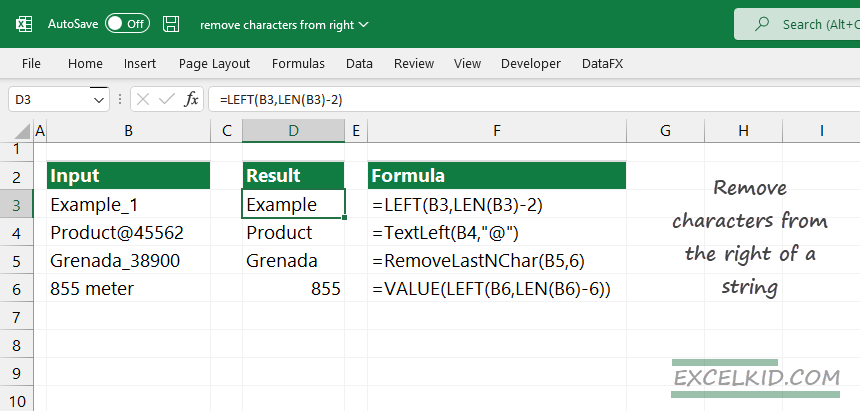 Excel How To Remove Certain Characters From Cell
https://excelkid.com/wp-content/uploads/2022/10/remove-characters-from-right-in-Excel.png
Web Mar 13 2023 nbsp 0183 32 For example to remove the first character from cell A2 the formulas go as follows REPLACE A2 1 1 quot quot RIGHT A2 LEN A2 1 Remove characters from left To remove leading characters from the left side of a string you also use the REPLACE or RIGHT and LEN functions but specify how many characters you want to delete every
Pre-crafted templates provide a time-saving service for producing a diverse series of documents and files. These pre-designed formats and layouts can be used for numerous personal and professional jobs, consisting of resumes, invitations, flyers, newsletters, reports, discussions, and more, streamlining the material creation process.
Excel How To Remove Certain Characters From Cell
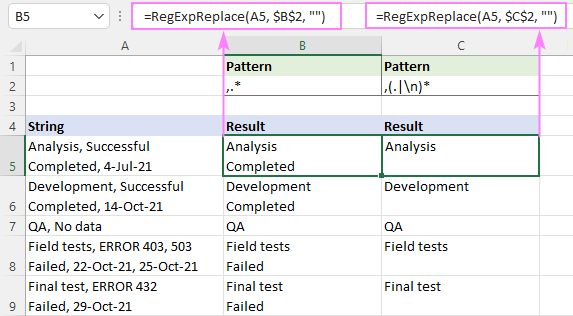
Regex To Remove Certain Characters Or Text In Excel Riset
How To Remove Certain Screen Options And Table Columns From Post Type In Wp list table
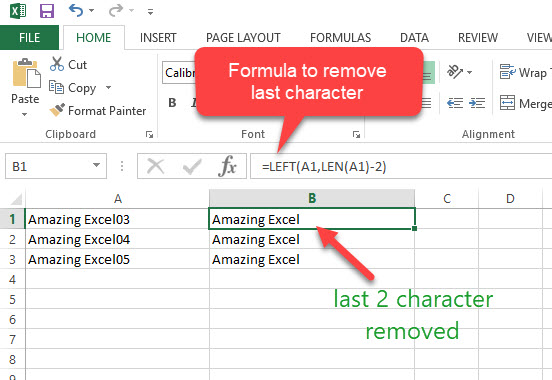
How To Remove Last Character In Excel A Shout
C How To Remove Certain Characters From A String In C YouTube
How To Remove Certain Flush One piece Flush Valve Terry Love Plumbing Advice Remodel DIY

Review Of How To Remove Certain Characters From Excel Cell Ideas Fresh News
Web Summary To remove specific unwanted characters in Excel you can use a formula based on the SUBSTITUTE function In the example shown the formula in C4 is SUBSTITUTE B4 CHAR 202 quot quot Which removes a series of 4 invisible characters at the start of each cell in column B

Web Sep 26 2023 nbsp 0183 32 1 Remove Specific Characters with Find and Replace Feature 2 Delete Specific Characters with SUBSTITUTE Function 3 Extract Only a Particular Instance of a Specific Character in a String 4 Remove Multiple Specific Characters with Nested SUBSTITUTE Function 5 Erase Any Special Characters with CLEAN Function 6

Web 1 Type or copy the following formula in a blank cell C4 where you want to put the result RIGHT A4 LEN A4 2 and press Enter key to get the first result See screenshot Note In the above formula A4 is the cell value that you want to remove characters
Web Sep 26 2023 nbsp 0183 32 1 Using Find amp Replace Option to Remove Specific Text from Cell in Excel 2 Removing Text from Cell with Excel s Flash Fill Feature 3 Using SUBSTITUTE Function to Remove Specific Text from Cell in Excel 4 Applying MID Function to Delete Specific Text from Cell 5 Inserting Excel s RIGHT Function to Remove Specific Text from Cell 6
Web Oct 30 2023 nbsp 0183 32 1 Using Find and Replace Feature to Remove Specific Characters 2 Removing Specific Characters with SUBSTITUTE Function 3 Applying REPLACE Function 4 Combining RIGHT and LEN Functions to Remove Specific Characters 5 Utilizing Flash Fill to Erase Specific Characters How to Remove Unwanted Characters
Web Remove Text After a Character Using Find and Replace If you want to quickly remove all the text after a specific text string or before a text string you can do that using Find and Replace and wild card characters Web Oct 10 2023 nbsp 0183 32 1 Remove Specific Letters from Cell with Find and Replace Feature in Excel 2 Delete Specific Letters from Cell with SUBSTITUTE Function in Excel 3 Extract Letters from Particular Instance from Cell in Excel 4 Delete Multiple Specific Letters from Cell with Nested SUBSTITUTE Function 5 Strip First or Last Letters from Cell with
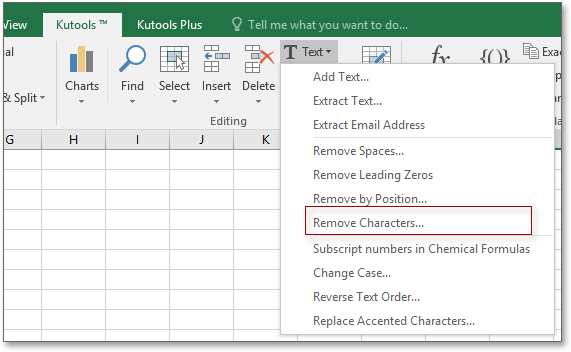
Web 1 Select the cells you want to remove the specific characters and then click Kutools gt Text gt Remove Characters See screenshot 2 Then in the Remove Characters dialog check Custom option only then type the characters you want to remove from strings it is case sensitive you can see the result in the Preview pane See screenshot 3