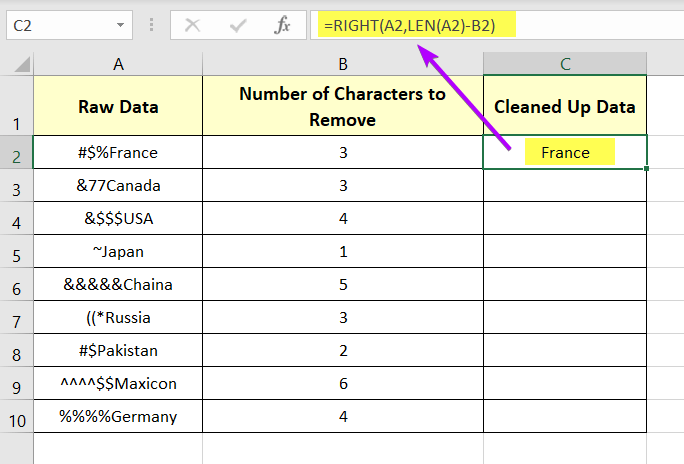
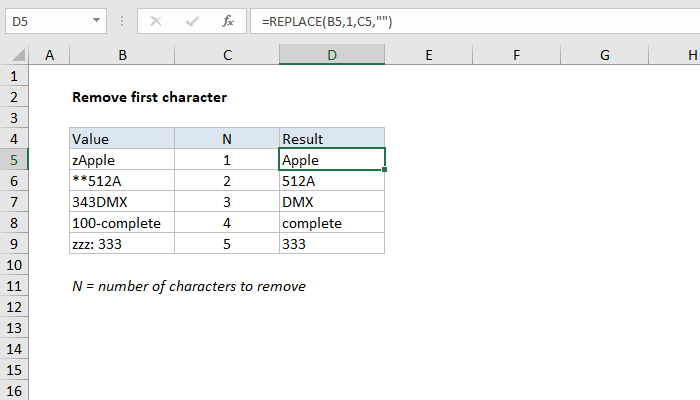
Excel Formula To Remove Characters From Left A F rmula De Excel Remover Caracteres Da Esquerda Gelee Royale How To Remove Characters From Left In Excel Williams Tang1987 Riset Quickly Remove Or Delete Characters From Beginning End Of Text Strings In Excel EXCEL Eliminar ltimos N Caracteres TRUJILLOSOFT Excel Formula Remove First Character Exceljet Web Apr 28 2022 nbsp 0183 32 Easiest Way to Remove Characters from Left in Excel The easiest way to clear characters from the left is to insert a formula using the REPLACE function Syntax REPLACE old text start num num chars new text Usage Guide Step 1 Type the formula in the top cell of column Cleaned Up Data REPLACE A2 1 B2 quot quot Formula
Web This step by step tutorial will assist all levels of Excel users in removing characters from the left side of a cell using two different methods Figure 1 Final result Remove characters from left side of a cell Formula 1 REPLACE C4 1 D4 quot quot Formula 2 RIGHT C4 LEN C4 D4 Syntax of the REPLACE function Web To remove text from a cell by position you can use the REPLACE function In the example shown the formula in C6 is REPLACE B6 1 24 quot quot which replaces the first 24 characters in the text with an empty string quot quot Generic formula REPLACE text start characters quot quot Explanation
Excel Formula Remove First Character Exceljet Removing Characters In Excel How To Remove Unwanted Characters Earn Excel 7 Methods To Remove Characters From Left In Excel How To Use The RIGHT Function In Excel To Remove Characters From The End Of A String Technology Excel How To Remove 9 Characters From Left 2 Characters Microsoft Community Remove Unwanted Characters Excel Formula Exceljet Remove Characters From Left In Excel Easy Formulas Trump Excel Remove Unwanted Characters In Excel How To Use Substring Functions In Excel LEFT MID RIGHT
Excel Formula To Remove Characters From Left
 Excel Formula To Remove Characters From Left
https://d295c5dn8dhwru.cloudfront.net/wp-content/uploads/2018/10/21101805/Figure-1.-Final-result-Remove-characters-from-left-side-of-a-cell.png
Web The LEFT function extracts a given number of characters from the left side of a supplied text string The second argument called num chars controls the number of characters to extract If num chars is not provided it defaults to 1 If num chars is greater than the number of characters available LEFT returns the entire text string Examples To
Templates are pre-designed documents or files that can be utilized for numerous functions. They can conserve time and effort by offering a ready-made format and layout for creating various type of content. Templates can be utilized for personal or expert tasks, such as resumes, invitations, flyers, newsletters, reports, presentations, and more.
Excel Formula To Remove Characters From Left

Remove Characters From Left In Excel Easy Formulas Trump Excel

Removing Characters In Excel How To Remove Unwanted Characters Earn Excel
7 Methods To Remove Characters From Left In Excel
How To Use The RIGHT Function In Excel To Remove Characters From The End Of A String Technology
Remove Unwanted Characters Excel Formula Exceljet

Remove Characters From Left In Excel Easy Formulas Trump Excel

Web Oct 5 2023 nbsp 0183 32 1 Using the REPLACE Function to Remove Characters from Left To remove characters from the left we are going to use the REPLACE function In this case we are going to replace our characters from the left with an empty string The Basic Syntax of the REPLACE Function REPLACE string 1 num chars Steps 1

Web Mar 13 2023 nbsp 0183 32 REPLACE A2 1 1 quot quot RIGHT A2 LEN A2 1 Remove characters from left To remove leading characters from the left side of a string you also use the REPLACE or RIGHT and LEN functions but specify how many characters you want to delete every time REPLACE string 1 num chars quot quot Or RIGHT string LEN string
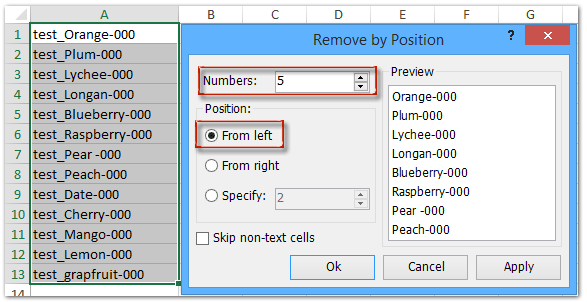
Web Formula Remove first 1 character from left RIGHT A1 LEN A1 1 Remove first 2 characters from left RIGHT A1 LEN A1 2 Remove first 3 characters from left RIGHT A1 LEN A1 3 Remove first 4 characters from left RIGHT A1 LEN A1 4 Remove first 5 characters from left RIGHT A1 LEN A1 5 Remove first 6 characters

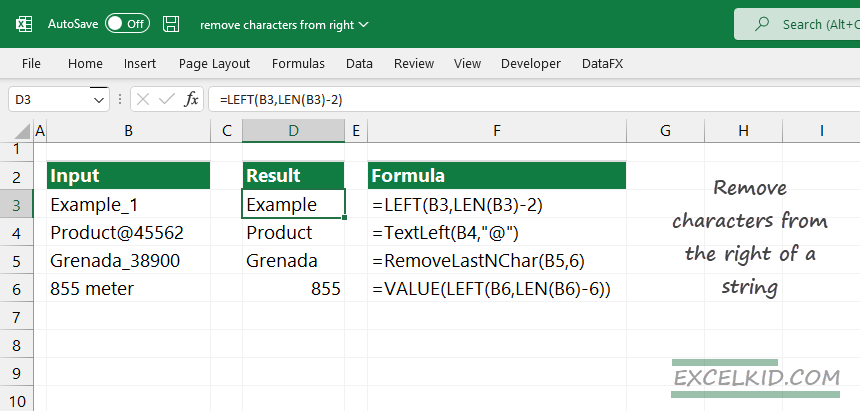
Web Mar 10 2023 nbsp 0183 32 For instance you can remove the last character from A2 using this formula LEFT A2 LEN A2 1 To delete any n characters from the end of a string please see How to remove characters from right in Excel Remove text after a specific character To delete everything after a given character the generic formula is
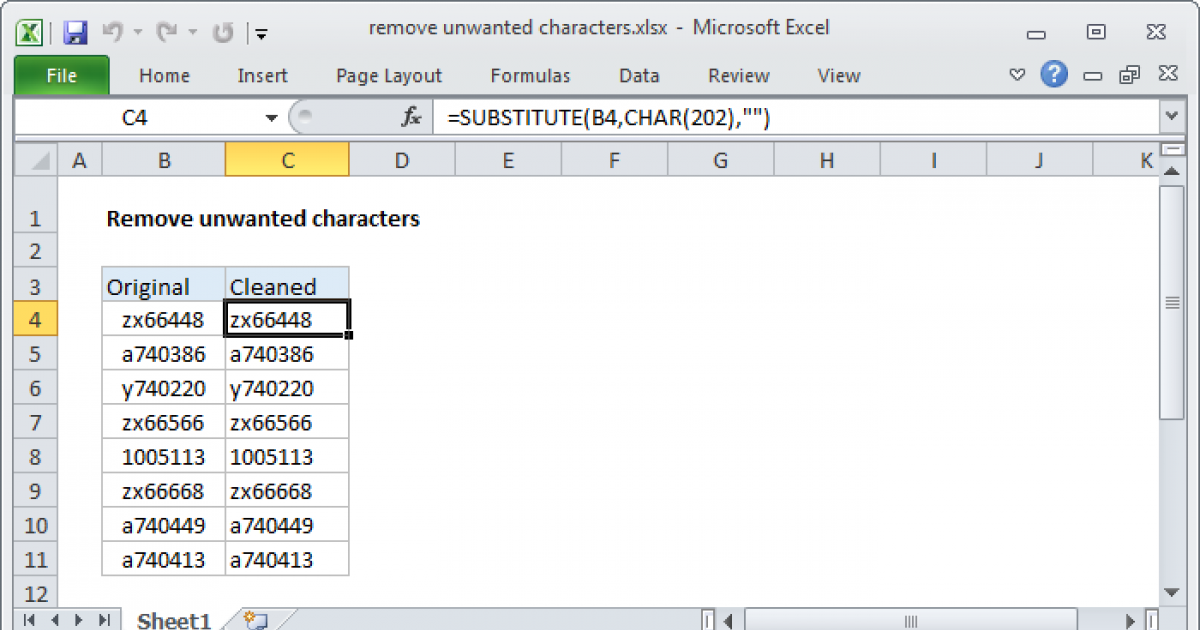
Web To remove specific unwanted characters in Excel you can use a formula based on the SUBSTITUTE function In the example shown the formula in C4 is SUBSTITUTE B4 CHAR 202 quot quot Which removes a series of 4 invisible characters at the start of each cell in column B Generic formula SUBSTITUTE B4 CHAR code quot quot Explanation
[desc-11] [desc-12]
[desc-13]