Excel Escape Special Characters Escape Special Characters In Excel Excel Tutorial Escape Special Characters In Excel Excel Tutorial Enduro GAS GAS EC 300 2018 4900 En Tarragona Motos How To Escape Special Characters In JavaScript How To Search With Escape special Characters In Outlook Web You can use the backslash to escape characters like the colon In your example then you can use the format 1 Oddly a format like splits up a number to display a
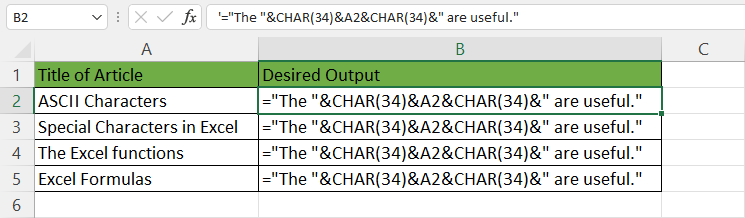
Web Explanation To include double quotes inside a formula you can use additional double quotes as escape characters By escaping a character you are telling Excel to treat the quot character as literal text Web How can these characters be escaped Microsoft says quot You can use the wildcard characters question mark and asterisk for the criteria A question mark matches
How To Search With Escape special Characters In Outlook Escape Special Characters In Excel Excel Tutorial Display Product Rating Icons Dynamically In APEX Report How Can I Escape Special Characters In Cell Formatting In Excel 4 How To Escape Special Characters In Java StackHowTo APEX Tree Region Escape Special Characters Stack Overflow Java IOException Incorrect AV Format Updated Ideas Tex LaTex How To Automatically Escape Special Characters In Your Own Oracle APEX 2019 10 31
Excel Escape Special Characters
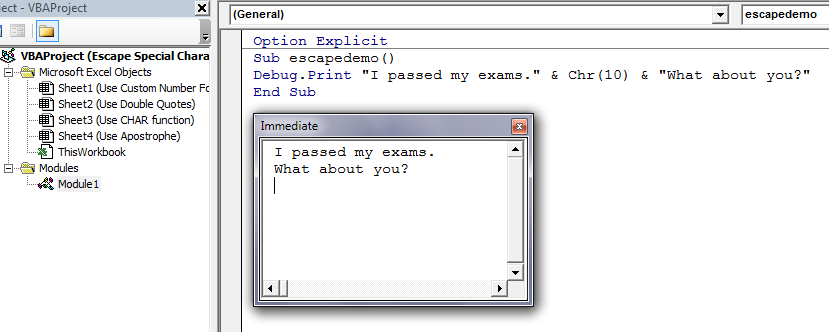 Excel Escape Special Characters
https://officetuts.net/excel/wp-content/uploads/sites/2/2022/06/linefeed.png
Web Try using double tildes VLOOKUP SUBSTITUTE C1 quot quot quot quot A B 2 false The tilde is the special character in Excel to escape other special characters Use a tilde to make the
Pre-crafted templates offer a time-saving solution for creating a varied series of documents and files. These pre-designed formats and layouts can be utilized for numerous personal and expert jobs, including resumes, invitations, flyers, newsletters, reports, discussions, and more, improving the material production procedure.
Excel Escape Special Characters

JavaScript Escape Special Characters
Escape Special Characters In Excel Excel Tutorial
Display Product Rating Icons Dynamically In APEX Report

How Can I Escape Special Characters In Cell Formatting In Excel 4

APEX Tree Region Escape Special Characters Stack Overflow
Java IOException Incorrect AV Format Updated Ideas

Web You can use the backslash to escape characters like the colon In your example then you can use the format 1 Oddly a format like splits up a number to display a number of digits to the right of the colon

Web The tilde is an escape character for special and wildcard characters in Excel You can use escape characters to provide literal representations of characters that otherwise

Web May 19 2019 nbsp 0183 32 acts as an escape character for the immediately subsequent character entered but is particularly used in cell data type formatting or custom formatting rather

Web Apr 12 2023 nbsp 0183 32 Remove special character from Excel cell To delete a specific character from a cell replace it with an empty string by using the SUBSTITUTE function in its
Web To include double quotes inside a formula you can use additional double quotes as escape characters By escaping a character you are telling Excel to treat the quot character as literal text You ll also need to include
Web Insert symbols and special characters from the symbols menu The first method uses Excel s built in Symbols Menu To open the Symbols menu 1 Click the Insert tab in the Web Nov 19 2023 nbsp 0183 32 Use Find amp Replace Feature to Replace Special Characters in Excel Case 1 Replace All Occurrences of a Character Case 2 Replace a Character with
Web Here is a summary of all the Excel number format characters that the worksheet understands Character Character Value Definition Escape The character following