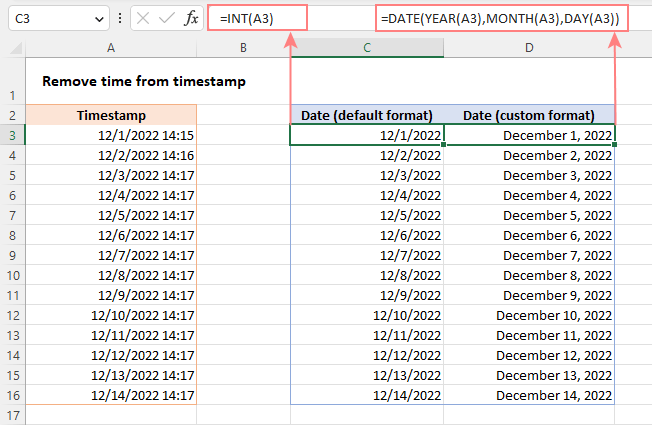
Excel Create Timestamp From Date And Time How To Insert Timestamp In Excel Google Sheets Automate Excel MySQL Workbench Add Timestamp Fields Stack Overflow How To Remove Timestamps From Date In Excel 4 Easy Ways How To Remove Timestamps From Date In Excel 4 Easy Ways SQL Commands To Check Current Date And Time Timestamp In SQL Server Web To extract the date part of a date that contains time i e a datetime you can use the INT function In the example shown the formula in cell D5 is INT B5 Generic formula INT date Explanation Excel handles
Web Summary To extract the time from a date that contains time sometimes called a quot datetime quot you can use a formula based on the MOD function In the example shown the formula in D5 is MOD B5 1 which returns the Web May 19 2021 nbsp 0183 32 How to add a timestamp to an Excel record Published May 19 2021 Written By Susan Harkins Like many Excel tasks there s an easy way and a better way
SQL Commands To Check Current Date And Time Timestamp In SQL Server How To Insert Current Time In Excel Timestamp Shortcut NOW Formula VBA How To Remove Timestamps From Date In Excel 4 Easy Ways How To Remove Timestamps From Date In Excel 4 Easy Ways How To Remove Timestamps From Date In Excel 4 Easy Ways Excel Convert Time To Text Basic Resume Examples Extract Date And Time From Timestamp In SAS Datepart DataScience Made Simple Create Timestamp In Sharepoint Microsoft Community Hub How To Edit File Timestamps With Windows PowerShell DENGINEER ICT
Excel Create Timestamp From Date And Time
 Excel Create Timestamp From Date And Time
https://www.automateexcel.com/excel/wp-content/uploads/2021/11/Timestamp-Intro.png
Web Mar 27 2010 nbsp 0183 32 3 Answers Sorted by 9 Create a cell with the value Now Format it how you want like yyyy mm dd HH mm ss for a full timestamp in 24 hour time Now as long
Templates are pre-designed files or files that can be utilized for various functions. They can conserve effort and time by providing a ready-made format and layout for developing various type of content. Templates can be utilized for personal or expert projects, such as resumes, invitations, flyers, newsletters, reports, discussions, and more.
Excel Create Timestamp From Date And Time

How To Remove Timestamps From Date In Excel 4 Easy Ways
How To Insert Current Time In Excel Timestamp Shortcut NOW Formula VBA

How To Remove Timestamps From Date In Excel 4 Easy Ways

How To Remove Timestamps From Date In Excel 4 Easy Ways
Excel Convert Time To Text Basic Resume Examples
Extract Date And Time From Timestamp In SAS Datepart DataScience Made Simple

Web Dec 21 2023 nbsp 0183 32 In this article you will learn 5 suitable ways to insert a timestamp in Excel with 5 practical applications of timestamp in Excel The ways are Using keyboard

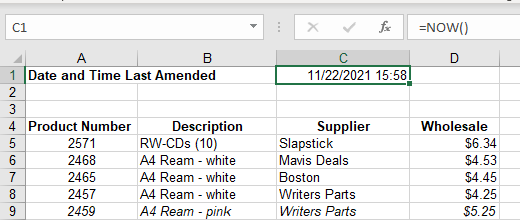
Web Jul 9 2021 nbsp 0183 32 The syntax is easy Type NOW and hit enter It is important to note that Excel stores date and times as numbers so ensure that your cell formatting is correct to display date and time Right click on your

Web May 12 2024 nbsp 0183 32 Insert a Timestamp in Excel 6 Easy Ways Method 1 Using the NOW Function to Insert a Timestamp The NOW function returns date and time with format

Web 26 rows nbsp 0183 32 Use date and time functions to create formulas that return serial numbers display a specific date or time or that calculate the difference between dates or times
Web Sep 5 2023 nbsp 0183 32 1 Using a Keyboard Shortcut to Insert a Timestamp There are two different shortcuts to insert a date and a time And here we need to use both of them
Web Apr 29 2024 nbsp 0183 32 Steps Select Cell C5 Copy the following formula with the DATE function in that cell B5 86400 DATE 1970 1 1 Press Enter Drag the Fill Handle tool to Autofill up Web May 27 2021 nbsp 0183 32 There are multiple ways to insert Date and Timestamp in Excel These methods include both static and dynamic methods 1 Inserting Date And Timestamp
Web There are several ways to insert the current date and time in a cell Windows macOS Web Insert a static date or time into an Excel cell A static value in a worksheet is one that