Excel Combine Rows With Same Value Excel Combine Rows With Same ID 3 Quick Methods Excel Combine Rows With Same ID 3 Quick Methods Como Combinar Linhas Com Mesmo ID Nome No Excel Excel Combine Rows With Same ID 3 Quick Methods Excel Combine Rows With Same ID How To Do It Right The add in sorts merged values as text strings To use the same delimiter in each column click the Choose delimiter drop down list at the top You can either enter your own separator or select one from the predefined options Standard delimiters include a semicolon comma period space and a line break
Worksheet function Merge Rows and Sum Single Value in Excel Super User I want to merge rows with mostly similar data but sum their quantity values using the unique quot id quot value while keeping the rest of the data in the row intact The raw output looks like th Stack Exchange Network Combine data using the CONCAT function Select the cell where you want to put the combined data Type CONCAT Select the cell you want to combine first Use commas to separate the cells you are combining and use quotation
Excel Combine Rows With Same ID How To Do It Right Excel Combine Rows With Same ID 3 Quick Methods Excel Combine Rows With Same ID 3 Quick Methods Excel Combine Rows With Same ID 3 Quick Methods Excel Combine Rows With Same ID How To Do It Right Excel Combine Rows With Same ID 3 Quick Methods Excel Combine Rows With Same ID 3 Quick Methods Excel Combine Rows With Same ID 3 Quick Methods Excel Combine Rows With Same ID 3 Simple Methods Excel Curve
Excel Combine Rows With Same Value
 Excel Combine Rows With Same Value
https://www.exceldemy.com/wp-content/uploads/2021/10/Excel_Combine_Rows_with_Same_ID2-788x780.png
Where the title columns match I want to merge the data in the two rows to end up with one single row with all the data combined ending up with One entry for widget A Title Value 1 Value 2 Value 3 and so on Thanks so much in advance for any help
Templates are pre-designed documents or files that can be utilized for numerous functions. They can conserve effort and time by offering a ready-made format and layout for creating various sort of material. Templates can be utilized for personal or expert tasks, such as resumes, invitations, flyers, newsletters, reports, presentations, and more.
Excel Combine Rows With Same Value
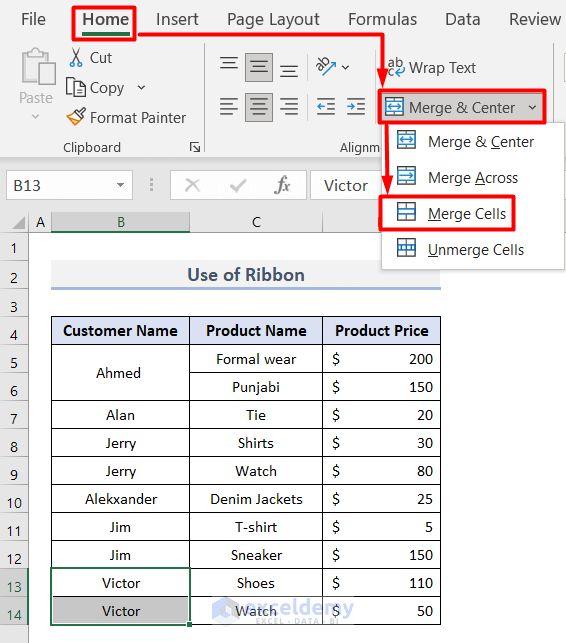
How To Merge Rows With Same Value In Excel 5 Quick Ways

Excel Combine Rows With Same ID 3 Quick Methods

Excel Combine Rows With Same ID 3 Quick Methods

Excel Combine Rows With Same ID 3 Quick Methods

Excel Combine Rows With Same ID 3 Quick Methods

Excel Combine Rows With Same ID 3 Quick Methods

3 Methods to Combine Cells with Same Value in Excel 1 Using IF CONCATENATE Functions in Excel to Combine Cells with Same Value First I will show you how to combine cells with the same value using the IF and the CONCATENATE functions together STEP 1 CREATING AN INTERMEDIATE COLUMN

Merge rows and separate the values with comma and space CONCATENATE A1 A2 A3 A1 A2 A3 Merge rows with spaces between the data CONCATENATE A1 A2 A3 A1 A2 A3 Combine rows and separate the values with commas without spaces

Below are the steps to do this Copy the headers of the original data and paste it where you want the consolidated data Select the cell below the leftmost header Click the Data tab In the Data Tools group click on the Consolidate icon In the Consolidate dialog box select Sum from the function drop down if not already selected by default

How to Merge Rows in Excel Sometimes multiple cells may have the same value Using Excel combine rows into one cell function can help you reduce the visual clutter in your spreadsheet This method will combine the data from cells into one meaning you may lose your data Here is how to merge two rows in Excel

1 Use Consolidate Option to Merge Duplicate Values in Excel In this first method we will merge rows with the Consolidate option in Excel Let s see how the process works First select Data Data Tools Consolidate
Select the cell where you want to get a new data range e g E1 and in the Ribbon go to Data Consolidate In the Consolidate window leave the default Function Sum and click on the Reference icon to select the range for consolidation Sub CombineRowsRevisitedStep Dim currentRow As Long Dim lastRow As Long lastRow Cells Rows Count 1 End xlUp Row For currentRow lastRow To 2 Step 1 If Cells currentRow 1 Cells currentRow 1 1 And Cells currentRow 4 Cells currentRow 1 4 Then Cells currentRow 1 3 Cells currentRow 3
Excel combining rows of data I need help with merging multipul rows in excel I need rows by the same name and date to merge together into one line joining the tasks done into one row date currently I am manually merging around 1000 rows of data please see example below