Excel Change Multiple Cells To Absolute Reference Change Multiple Cells At Once In Excel Save And Switch Excel Input Excel How To Merge Cells In A Table Boutiqueserre Tocol And Torow Functions In Excel Change Multiple Array Data Into Vba Worksheet Change Multiple Cells How To Make A Cell Reference Absolute In Excel Techwalla Absolute references There may be times when you do not want a cell reference to change when filling cells Unlike relative references absolute references do not change when copied or filled You can use an absolute reference to keep a row and or column constant An absolute reference is designated in a formula by the addition of a dollar sign before the column and row
Is there a way to make all the different cells references absolute in one shot without F4 Hello All I have a long formula with many different cell references Excel Make all cells references in a long formula absolute I realise that my proposed solution was overkill in that I set out to change multiple relative references to a given In one or several formulas you can use a cell reference to refer to Data from one or more contiguous cells on the worksheet Data contained in different areas of a worksheet Data on other worksheets in the same workbook The value in cell C2 The values in all cells but you must press Ctrl Shift Enter after you type in your formula
How To Make A Cell Reference Absolute In Excel Techwalla Convert Cells From Number Format To Text Format In Excel Change Absolute Reference Keyboard Shortcut In Excel Excel Change Multiple Chart Styles 2022 Multiplication Chart Printable Convert Cell Reference To Relative Absolute Reference In Excel Vba Worksheet Change Multiple Cells How To Change Multiple Cells At The Same Time Issue 1655 Excel 2013 Relative And Absolute Cell References Relative And Absolute Reference In Excel
Excel Change Multiple Cells To Absolute Reference
 Excel Change Multiple Cells To Absolute Reference
https://i.ytimg.com/vi/ePd5m0hL8E4/maxresdefault.jpg
Absolute referencing across multiple cells Guys If I highlight a group of cell say from F4 H25 and in each cell I have a different formula how do I when the range is highlighted make each cell formula an absolutre reference i know pressing F4 will do it to one cell but it does not spread it across the range of cells highlighted any ideas
Pre-crafted templates provide a time-saving solution for creating a diverse series of documents and files. These pre-designed formats and designs can be made use of for different personal and professional tasks, consisting of resumes, invitations, flyers, newsletters, reports, discussions, and more, improving the content production procedure.
Excel Change Multiple Cells To Absolute Reference

Vba Worksheet Change Multiple Cells

Convert Cells From Number Format To Text Format In Excel Change

Absolute Reference Keyboard Shortcut In Excel

Excel Change Multiple Chart Styles 2022 Multiplication Chart Printable

Vba Worksheet Change Multiple Cells

How To Change Multiple Cells At The Same Time Issue 1655

Select all of the cells you want to change Press F2 to get into edit mode Add the symbol where you need it applied Press CTRL Enter instead of just enter and every cell highlighted will have the same value If your physical formula has the Cell Reference A1 then what I said will not work

The cells I selected in Screenshot are relatively the same What I want to do now is reuse that upper table by copying the lower table below but don t change values I was thinking if I could at the same time selected cells turn to absolute by pressing F4 I could easily copy them below without changing anything if I could apply F4 for all selected cells

To change the type of cell reference Select the cell that contains the cell reference that you want to change In the formula bar click the cell reference that you want to change Press T to move through the combinations The following table summarizes what happens if a formula in cell A1 which contains a reference is copied

If you want to change just the selected cells not all formulas in the entire sheet use the following macro Sub Formulas To AbsoluteReference Dim oCell As Range With Selection For Each oCell In Cells SpecialCells Type xlCellTypeFormulas oCell Formula Application ConvertFormula oCell Formula xlA1 xlA1 xlAbsolute Next End With
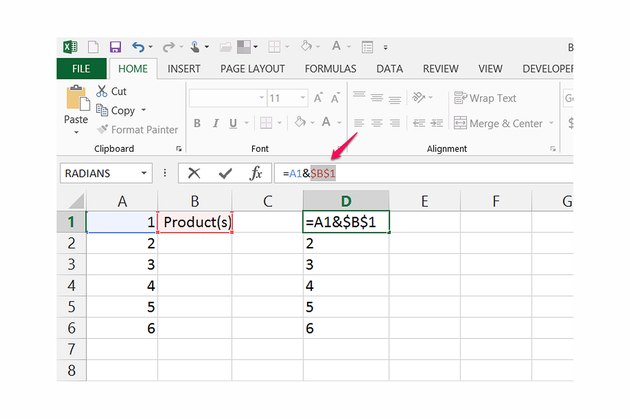
To change the type of cell reference Select the cell that contains the formula In the formula bar select the reference that you want to change Press F4 to switch between the reference types The table below summarizes how a reference type updates if a formula containing the reference is copied two cells down and two cells to the right For
In Excel conditional formatting rules mixed cell references are used most often indicating that a column letter or row number is to remain fixed when the rule is applied to all other cells in the selected range In Excel conditional formatting cell references are relative to the top left cell in the applied range So when making a new rule The examples below explain what happens when you insert copy delete or move worksheets that are included in a 3 D reference Each of these examples use the formula SUM Sheet2 Sheet6 A2 A5 to add cells A2 through A5 on worksheets 2 through 6 Insert or copy If you insert or copy worksheets between Sheet2 and Sheet6 the endpoints in this example Excel includes all values in cells A2
Prompt Prompt 2 Make all cell references both column and row RELATIVE vbCrLf Prompt Prompt 3 Make all COLUMN references ABSOLUTE and all ROW references RELATIVE vbCrLf Prompt Prompt 4 Make all COLUMN references RELATIVE and all ROW references ABSOLUTE Capture current calculation setting