Environment Variables Not Working Javascript Environment Variables Not Working For Hiding Firebase API Javascript Environment Variables Not Working On Vercel With Nuxt System Environment Variables Not Working Issue 2450 Microsoft WSL Solved Environment Variables Not Working In Microsoft 9to5Answer Node js Postman Environment Variables Not Working Stack Overflow In the System Properties window click Environment Variables Click on the variable you d like to change click Edit Many environment variables will simply take a name and value like Number of processors All you have to do to edit them is to change the value and click OK Adding an environment variable works the exact same way
1 Correct Method to Set an Environment Variable The Environment variable may not be working in Windows 11 because they have not been created correctly You can follow the correct step by step process to create environment variables in Windows 11 and to make the system more accessible for you 1 You can edit PATH using the Advanced System Window Environment Variables You can also open an Admin Command prompt and use the PATH command to see the entire path That may help you with seeing what you need to edit Replacing the particular entry from System variables to User variables may fix the issue for you
Node js Postman Environment Variables Not Working Stack Overflow How To Edit Environment Variables In Windows Easily YouTube Environment Variables env With Java YouTube How To Set Environment Variables In Windows YouTube How To Set Environment Variable For Android SDK YouTube Working With Environment Variables In Python Properly Set Environment Variables For Angular Apps With Gulp ng config Environment Variables In Postman Postman Tutorial API Testing Python PyCharm Pytest And Environment Variables Not Working Stack
Environment Variables Not Working
 Environment Variables Not Working
https://i.stack.imgur.com/zfWZu.png
When I update my PATH using either the built in Environment Variables dialog or something like Path Editor and then open up a command prompt the changes to my PATH will not register with the console depending on where the command prompt was started from
Templates are pre-designed documents or files that can be utilized for different purposes. They can save time and effort by supplying a ready-made format and layout for creating different sort of content. Templates can be utilized for individual or professional projects, such as resumes, invitations, flyers, newsletters, reports, presentations, and more.
Environment Variables Not Working

Environment Variables Not Working In Microsoft Visual Studio Code

How To Edit Environment Variables In Windows Easily YouTube

Environment Variables env With Java YouTube
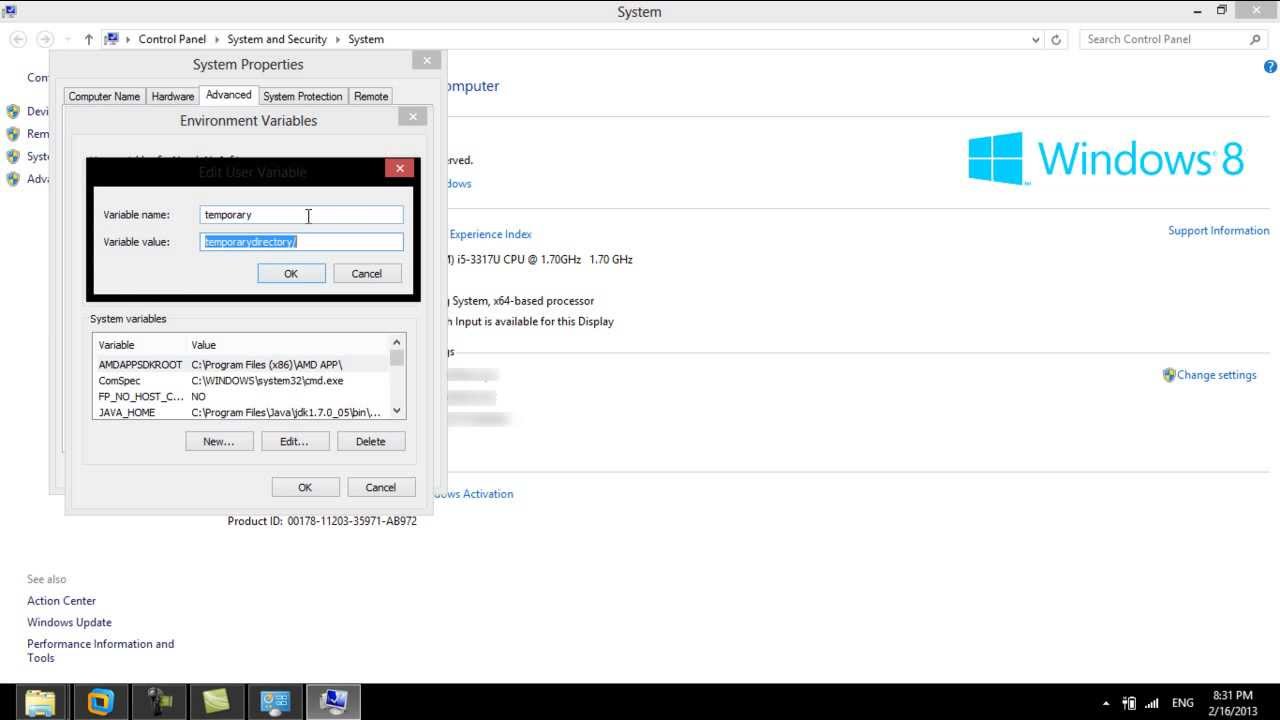
How To Set Environment Variables In Windows YouTube
Working With Environment Variables In Python

Properly Set Environment Variables For Angular Apps With Gulp ng config

New Environment Variables Not Working in Windows 10 I am trying to put in paths to my php install and php composer Here s what I got C xampp php C xampp htdocs bill dev site I have also tried it without the trailing slash which doesn t work as well

Click the Environment Variables button Locate Path under the System variables section Click to highlight it Click Edit The Edit environment variable modal window pops up There are lots of paths listed in the listbox Click New to add a new item A blank space for the new folder is highlighted in the listbox Click Browse
1 Run a malware scan In a normal working PC the Environment variables should work fine without any issues as they are not accessed by us If they are not working suddenly and you

83 6 Does this answer your question Visual Studio Code error dotnet is not recognized as an internal or external command Ascendise Nov 18 2022 at 10 10 As I said I can run dotnet directly from the install directory The NET Core is installed even reinstalled and even multiple versions besides the latest samu 242

When you type environment into the start menu you will see two similar options Edit the system environment variables Edit environment variables for your account These may appear in a different order to the screenshots below depending on which one you opened last Make sure you select the shortcut with system in it
1 Your framework doesn t automatically load env files While some frameworks and packages come built in support for environment variables using env many packages like Express js don t Instead you ll need to load them yourself or through a library like dotenv Environment variable not working I have created an Env var named croot set to the value C When I try to use this in the command prompt to change the dir it works But I have also created an Env var named froot set to the value F When I try to use this in the command prompt to change the dir it DOESN T work
Why won t Environment GetEnvironmentVariable variableName get a variable s value if the call is made from within a webMethod hosted on IIS and it will work if I call it from a console application on the same machine Where do I set up those variables to be visible to IIS web services