Edit Svg Image In Css SVG CSS DevsDay ru How To Change Svg Image Color In Css How To Change Svg Image Color On The Best 15 Background Image Html Or Css Desktop Wallpaper How To Zoom The Background Image In Css Amelia How To Add SVGs With CSS background image SVG Backgrounds SVGs are interactive and styleable with CSS and JavaScript SVG comes with built in graphics effects such as clipping and masking operations background blend modes and filters This is basically the equivalent of having Photoshop photo editing capabilities right in the browser SVGs are accessible
Basic coloring can be done by setting two attributes on the node fill and stroke Using fill sets the color inside the object and stroke sets the color of the line drawn around the object You can use the same CSS color naming schemes that you use in HTML whether that s color names like red rgb values like rgb 255 0 0 hex values Vector images are defined using algorithms a vector image file contains shape and path definitions that the computer can use to work out what the image should look like when rendered on the screen The SVG format allows us to create powerful vector graphics for use on the Web To give you an idea of the difference between the two let s
How To Add SVGs With CSS background image SVG Backgrounds How To Create A Class In Css File V rias Classes Css How To Change The Color Of An Svg Which Is Used As A Background Css gg Npm How To Edit An SVG File Online Vector Ink Mask Image With SVG Shape And Add A Border Stack Overflow How To Comment In CSS with Pictures WikiHow 71 Background Image In Css Images MyWeb How To Use SVG Images In CSS And HTML A Tutorial For Beginners
Edit Svg Image In Css
 Edit Svg Image In Css
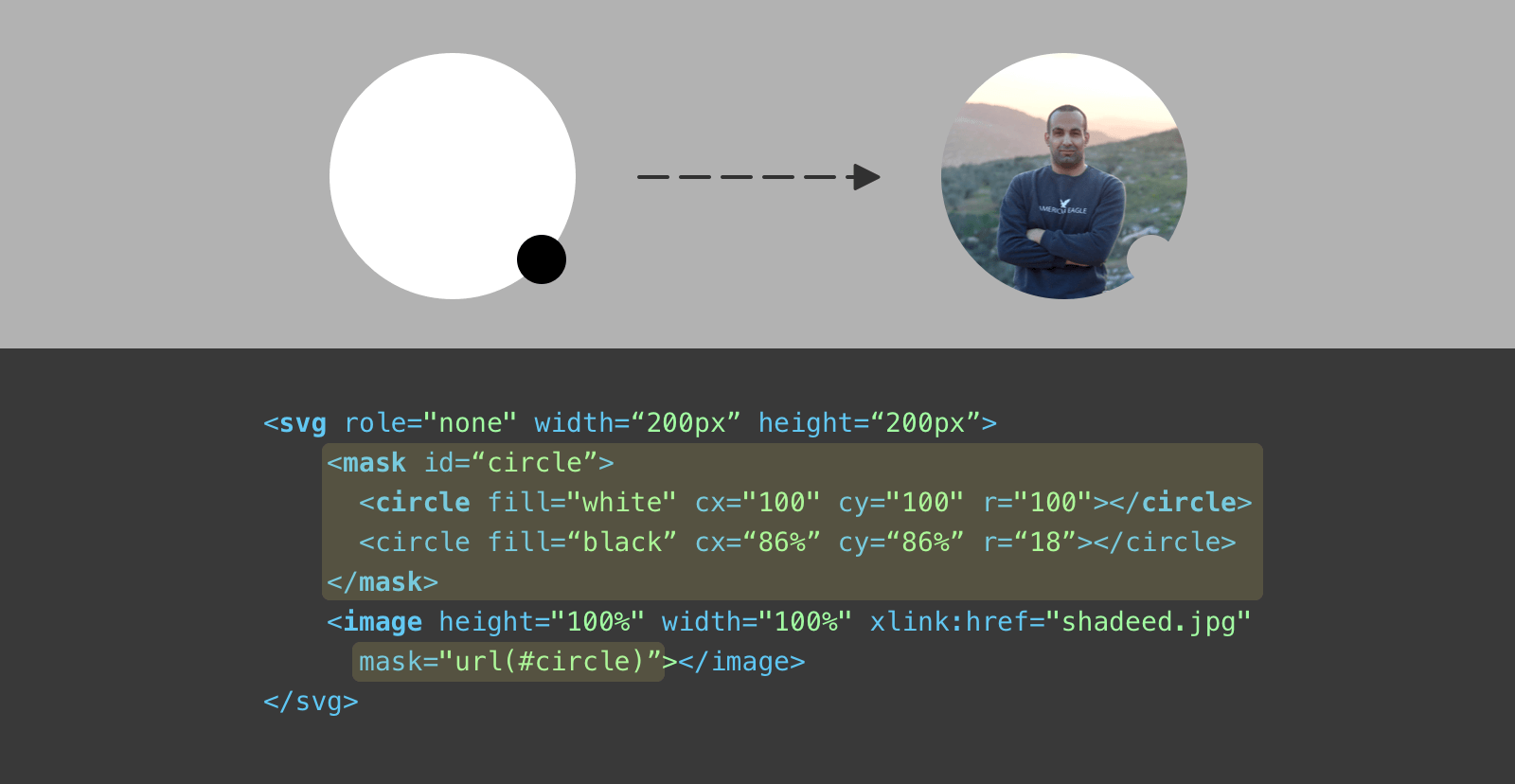
https://ishadeed.com/assets/svg-css-components/cut-out-avatar-1-3.png
SVG stands for Scalable Vector Graphics a powerful way to create images with code In this tutorial you will learn how to code images with 12 examples ranging from simple shapes to complex animations You will also learn how to use SVG in CSS and HTML and how to optimize your SVG files for the web Whether you want to create icons logos diagrams or illustrations this tutorial will help
Pre-crafted templates provide a time-saving option for developing a varied variety of documents and files. These pre-designed formats and layouts can be utilized for different personal and professional projects, consisting of resumes, invites, leaflets, newsletters, reports, discussions, and more, enhancing the material production procedure.
Edit Svg Image In Css
Html Object Svg Maekawa2005 jp

How To Create A Class In Css File V rias Classes

Css How To Change The Color Of An Svg Which Is Used As A Background
Css gg Npm

Mask Image With SVG Shape And Add A Border Stack Overflow

How To Comment In CSS with Pictures WikiHow
Solution 1 Edit SVG to point to the currentColor svg fill currentColor stroke currentColor svg Then you can control the color of the stroke and the fill from your CSS content svg color blue Or any color of your choice Pros and cons Simple and uses conventional supported CSS Suitable if You control the SVG

SVG is a powerful and flexible image format for vector graphics In this article you will learn how to use SVG in your web design projects from embedding it inline to styling it with CSS You will also find useful resources and tips from CSS Tricks a website dedicated to all things CSS and SVG
SVG and CSS This page illustrates the application of CSS to the specialized language for creating graphics SVG Below you ll create a simple demonstration that runs in your SVG enabled browser Note Elements referenced by use elements inherit the styles from that element So to apply different styles to them you should use CSS custom

There are many Scalable Vector Graphics SVG but only certain attributes can be applied as CSS to SVG Presentation attributes are used to style SVG elements and can be used as CSS properties Some of these attributes are SVG only while others are already shared in CSS such as font size or opacity For example to change the color of a element to red use the fill property in CSS

Standard UTF 8 text encoding rather than base64 can be used so it s easier to edit the SVG image if necessary You can use SVG as a background image in CSS by using the url function in
SVG stands for Scalable Vector Graphics SVG is used to define vector based graphics for the Web SVG defines graphics in XML format Each element and attribute in SVG files can be animated SVG is a W3C recommendation SVG integrates with other standards such as CSS DOM XSL and JavaScript I am trying to resize height and width of an svg with css but doing so the image is cut off I gave it a width and height of 50px but this is what it looks like what I need is to reduce its size to 50px This is the html structure of the button
Preserve the high quality of your SVG image no matter where you use it Edit SVG files for free on Canva and produce stunning graphics to promote your brand across websites online ads and social media SVG s vector file format allows unlimited resizing so you can scale your image up or down to fit your needs with the same clarity and