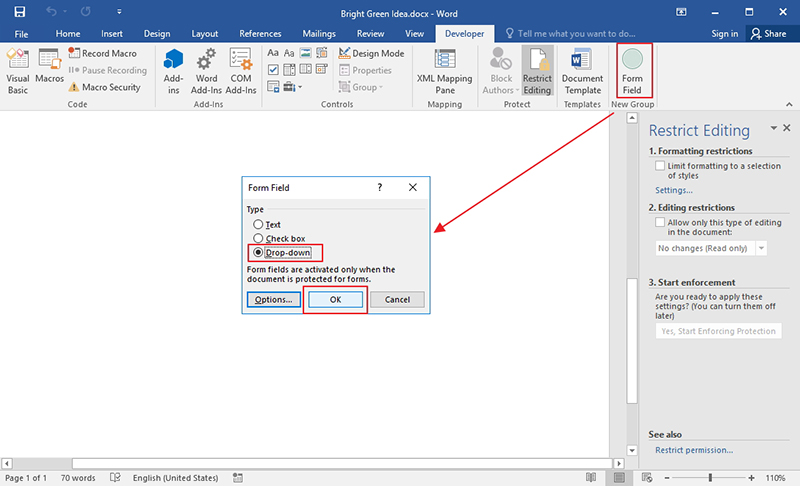
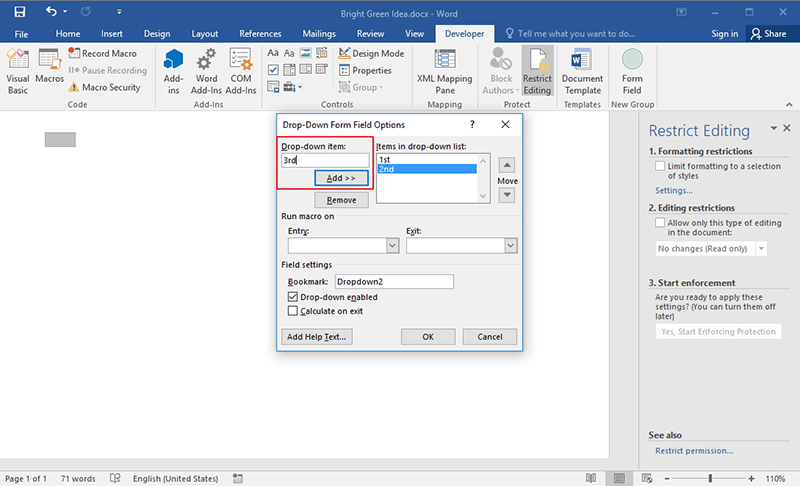
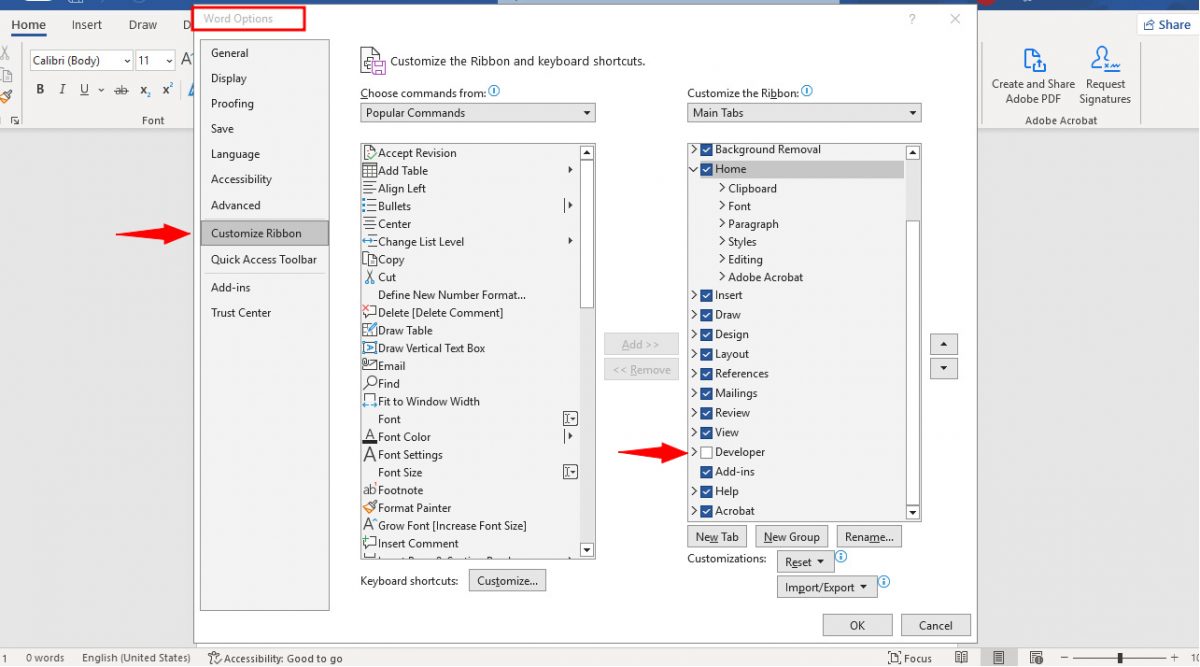
Edit Drop Down List In Word Table HOW TO EDIT MICROSOFT WORD DROP DOWN LIST Mcilepri56 Blog How To Edit Drop down List In Word 2007 0 Result Images Of Edit Drop Down List In Word PNG Image Collection How To Insert A Drop Down List In Word YouTube How To Edit A Drop Down List In Microsoft Excel Vrogue 1 First have a check that if you can find Developer tab in your Word If not click File Options and switch to Customize Ribbon pane in Word Options 2 Check Developer in the list of Main Tabs under Customize the Ribbon to enable it and click OK to confirm the change 3 Place your cursor at where you want to add a drop down list
Use a drop down list box when you want to Enable users to choose a single selection in a list of predefined items Hide the list entries on the form by default Display the values retrieved from a fixed list from the form template s data source or from an external data source such as a database or Microsoft Windows SharePoint Services list Launch Word click the File tab then select Options at the bottom right of the window Select Customize Ribbon in the Word Options window Select Main Tabs and then click the
How To Edit A Drop Down List In Microsoft Excel Vrogue Hong Kong Sopprimere Dizionario Drop Down List Content Control Word Schiudere Celebrazione Risorsa Steps To Create Word Drop Down List In 2020 Steps To Create Word Drop Down List In 2020 0 Result Images Of Edit Drop Down List In Microsoft Word PNG Image Collection Microsoft Word Add Drop down List GHacks Tech News Create Dependent Drop Down List In Word Fillable Forms Microsoft Word YouTube 0 Result Images Of Edit Drop Down List In Word PNG Image Collection How To Insert A Drop Down List In Word
Edit Drop Down List In Word Table
 Edit Drop Down List In Word Table
https://i.ytimg.com/vi/RJLdqllFw2A/maxresdefault.jpg
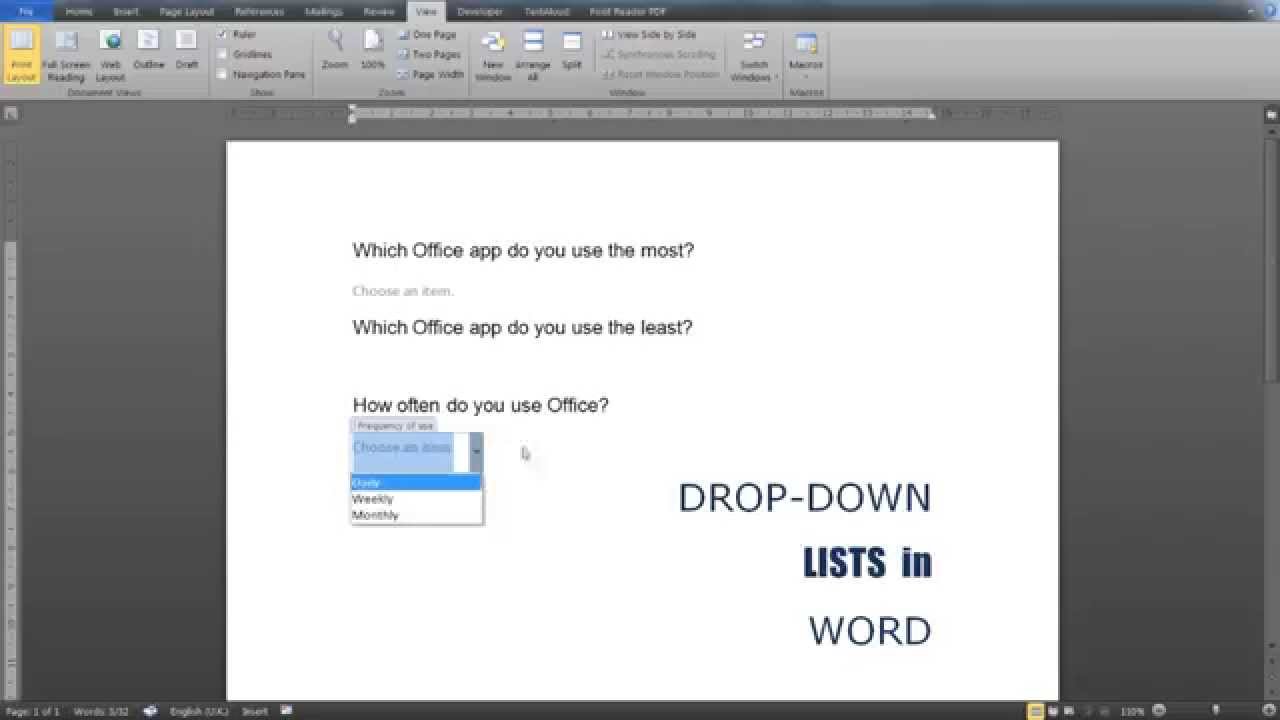
Add Drop Down choices Change Choose an item text Another drop down list example Add something to the list Go Combo Drop down lists can be for anywhere there s a selection of options Choosing a product department location We ll stick with the most common use the honorific Dear at the start of a letter
Pre-crafted templates provide a time-saving solution for creating a diverse variety of documents and files. These pre-designed formats and layouts can be utilized for various individual and professional jobs, consisting of resumes, invites, leaflets, newsletters, reports, presentations, and more, improving the content production procedure.
Edit Drop Down List In Word Table
Hong Kong Sopprimere Dizionario Drop Down List Content Control Word Schiudere Celebrazione Risorsa

Hong Kong Sopprimere Dizionario Drop Down List Content Control Word Schiudere Celebrazione Risorsa
Steps To Create Word Drop Down List In 2020
Steps To Create Word Drop Down List In 2020
Microsoft Word Add Drop down List GHacks Tech News
Create Dependent Drop Down List In Word Fillable Forms Microsoft Word YouTube

How to modify a drop down box in Word Microsoft Community Doug Robbins MVP Office Apps Services Word Ask a new question DO Donald 777 Created on January 25 2018 How to modify a drop down box in Word How to add additional numbers to an existing drop down box in Word Thank you This thread is locked

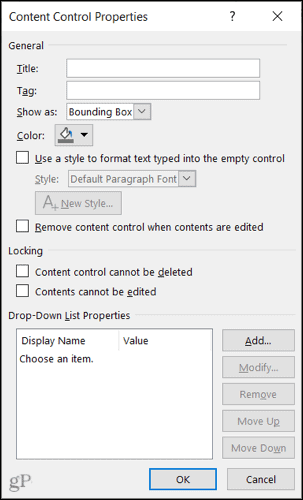
To add a drop down list to your Microsoft Word document click the Developer tab at the top and then select Drop Down List Content Control This drop down list will be empty by default and you ll have to customize it to add useful options to the text box To customize the drop down box click once inside the box
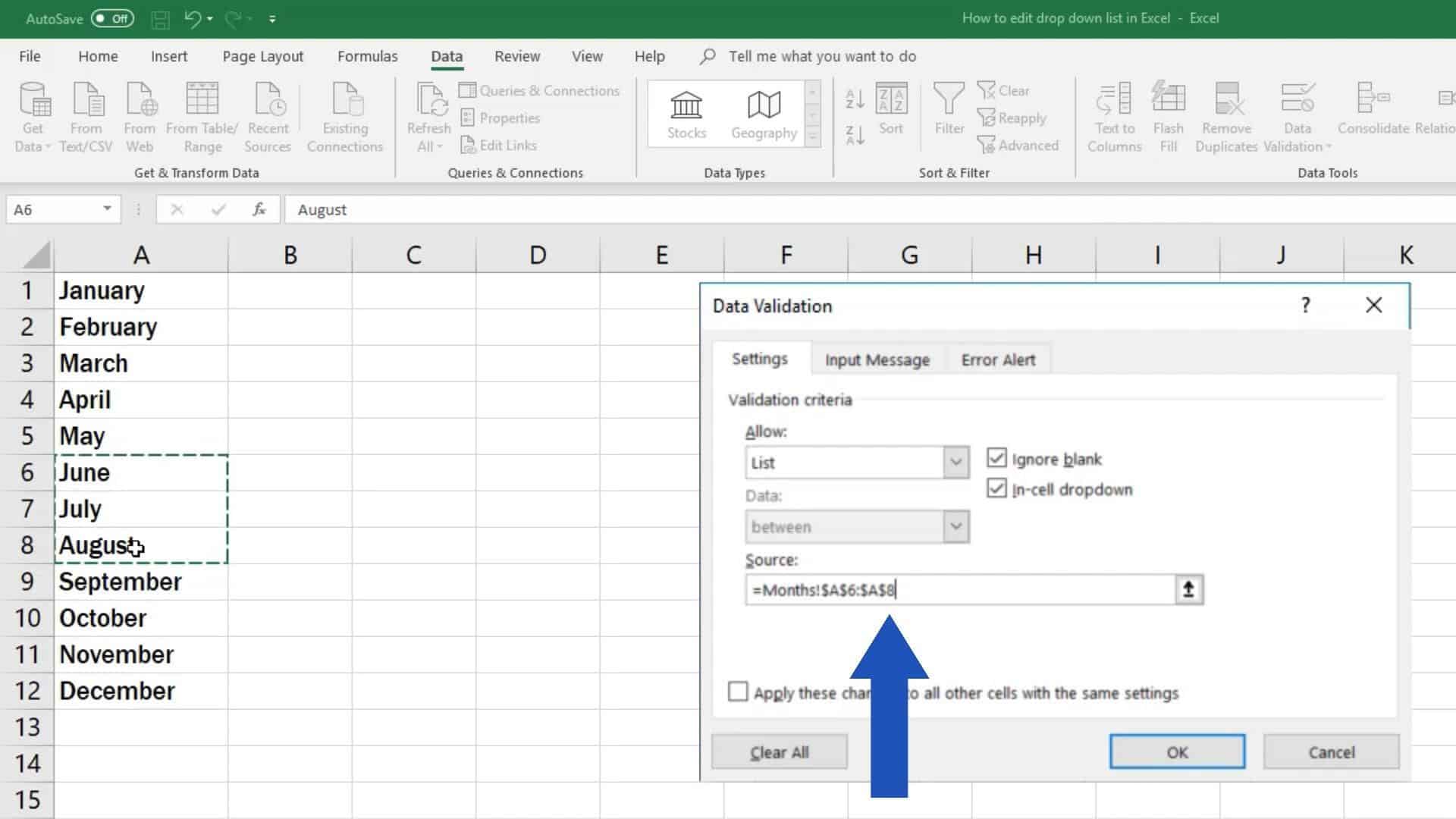
Edit a drop down list that s based on an Excel Table If you set up your list source as an Excel table then all you need to do is add or remove items from the list and Excel will automatically update any associated drop downs for you To add an item go to the end of the list and type the new item To remove an item press Delete

Drop down lists in Word How to insert a drop down list box modify a drop down list s items and use a format to style its contents to match surrounding text or make them stand
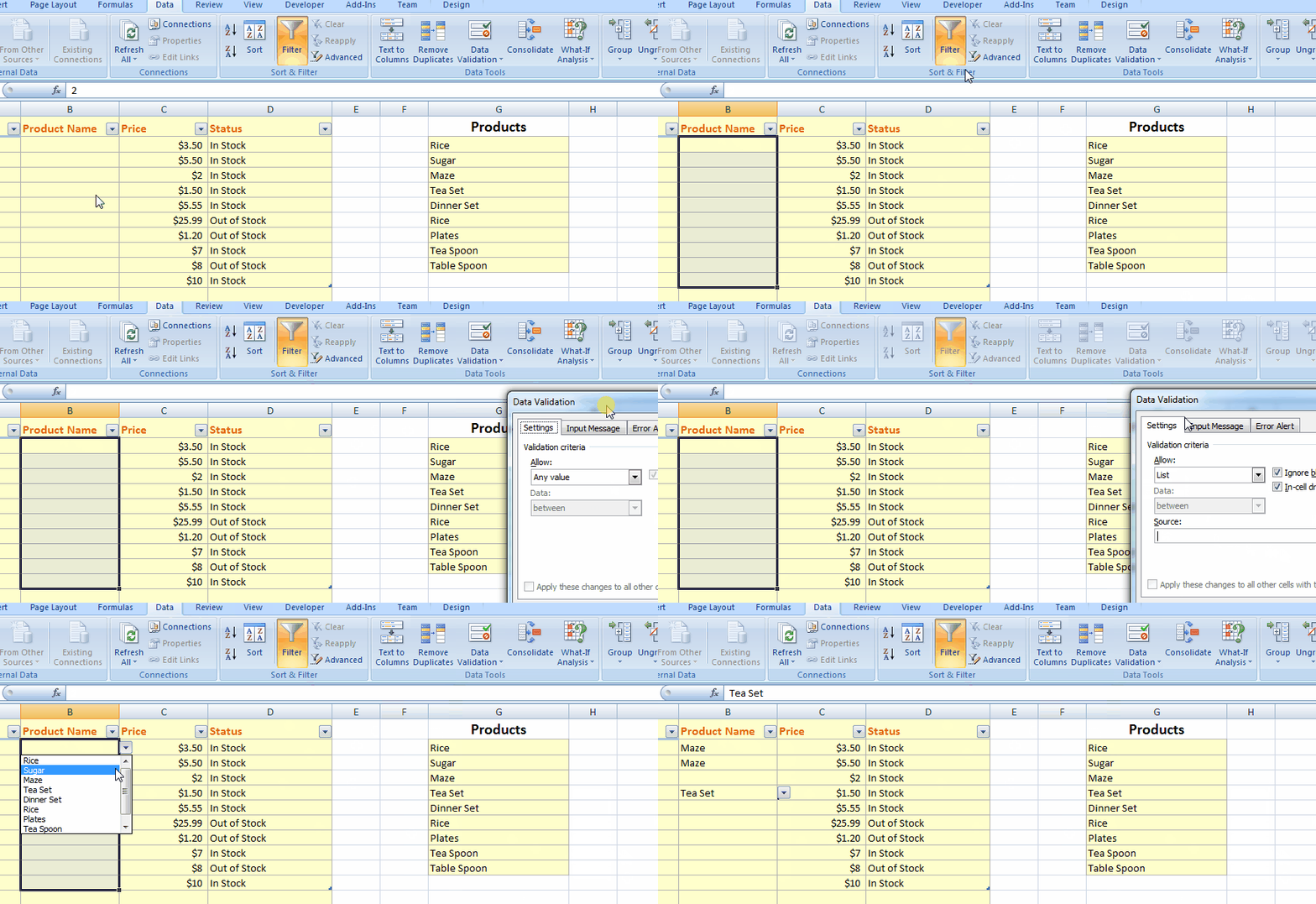
Go to the Developer tab and click the Drop Down List Content Control button You ll see the control pop into your document as a box with Choose an item inside You can then move on to
In this video you can learn how to add a drop down list in a Word Document Learn how to add or modify the drop down list in Word through the developer tab Step 3 Add Items to the Drop Down List Select the drop down box and click on Properties in the Developer tab to add items to your list In the Properties pane click on Add under the Drop Down List Properties Here you can type in the display name and value for each item you want to appear in your drop down menu
Click the File tab and select Options Click Customize Ribbon on the left Under Main Tabs check the box next to Developer Click OK You should now see the Developer tab in the ribbon Selecting the Drop Down List To edit a drop down list you first need to select it Click anywhere in the document to deselect any objects