Eclipse Python Pip Not Installed How To Uninstall Pip Python Packages Python In Visual Studio Code Terminal Pip Not Recognized Hitlikos Download Eclipse Python For Mac Tacticaltree Pip Not Installed Issue 175 Deadsnakes issues GitHub How To Install Eclipse For Python On Windows Tutorials24x7 Create and Use Virtual Environments Create a new virtual environment venv for Python 3 allows you to manage separate package installations for different projects It creates a virtual isolated Python installation When you switch projects you can create a new virtual environment which is isolated from other virtual environments
Open up your Terminal Command Prompt and type in the following command python m pip install PACKAGE NAME HERE This will install a pip package using the Python command just in case A pip command not found error occurs when you fail to properly install the package installer for Python pip needed to run Python on your computer To fix it you will either need to re install Python and check the box to add Python to your PATH or install pip on your command line And an error message from DOS command line
How To Install Eclipse For Python On Windows Tutorials24x7 H ng D n Pip Not Installed With Python Ubuntu Pip Kh ng c C i t How To Check Pip Is Installed Or Not In Python Kodeazy Pip Freeze From Python Best 22 Answer Brandiscrafts Django Eclipse How To Install A Python Package In Eclipse Using PIP Eclipse IDE For Python Developers Behind The Scenes Flappy Bird Using Pygame Python Project Projects With Python Python Pip Not Working But Can t Install Pip Stack Overflow
Eclipse Python Pip Not Installed
 Eclipse Python Pip Not Installed
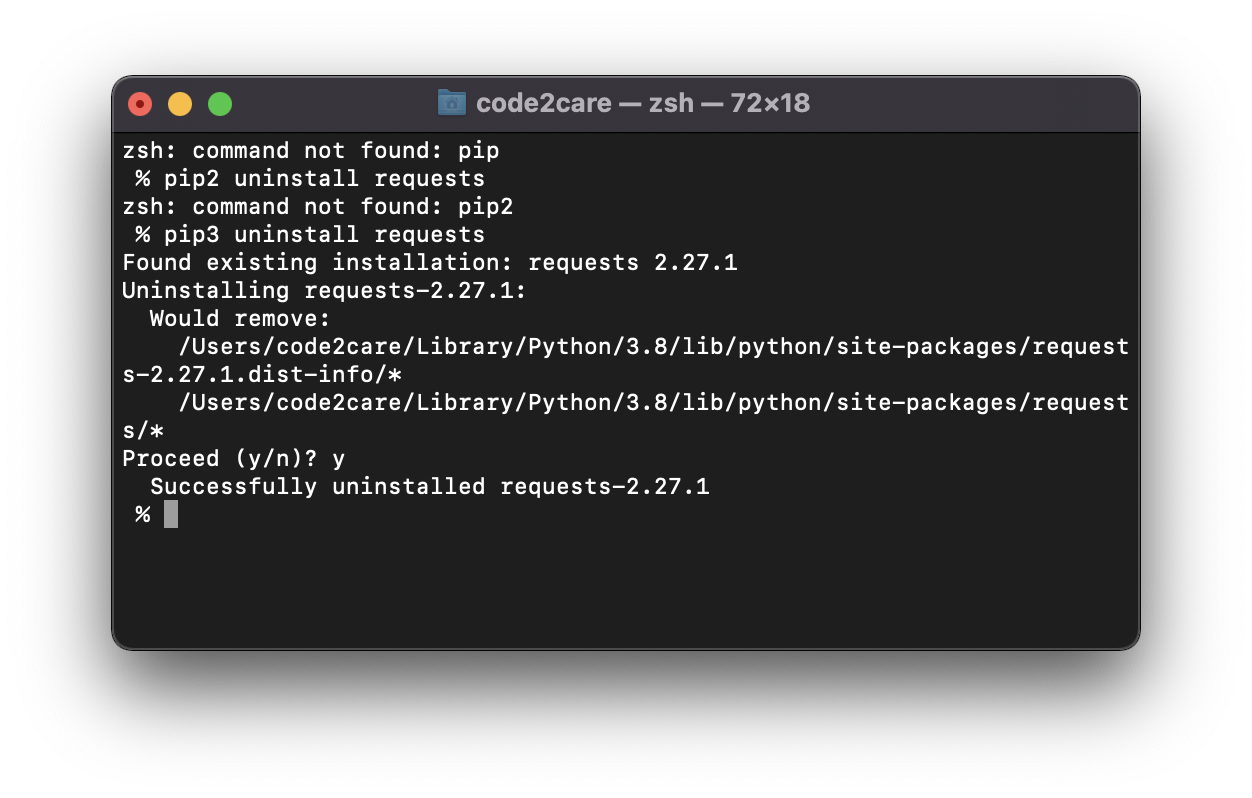
https://code2care.org/q/how-to-uninstall-pip-python-packages/images/pip unistall package.png
Key terms pip is the preferred installer program Starting with Python 3 4 it is included by default with the Python binary installers A virtual environment is a semi isolated Python environment that allows packages to be installed for use by a particular application rather than being installed system wide venv is the standard tool for creating virtual environments and has been part
Pre-crafted templates provide a time-saving option for developing a varied series of files and files. These pre-designed formats and layouts can be made use of for various individual and professional tasks, including resumes, invites, flyers, newsletters, reports, presentations, and more, enhancing the content production process.
Eclipse Python Pip Not Installed

Python In Visual Studio Code Terminal Pip Not Recognized Hitlikos

H ng D n Pip Not Installed With Python Ubuntu Pip Kh ng c C i t

How To Check Pip Is Installed Or Not In Python Kodeazy
Pip Freeze From Python Best 22 Answer Brandiscrafts
How To Install A Python Package In Eclipse Using PIP

Eclipse IDE For Python Developers Behind The Scenes
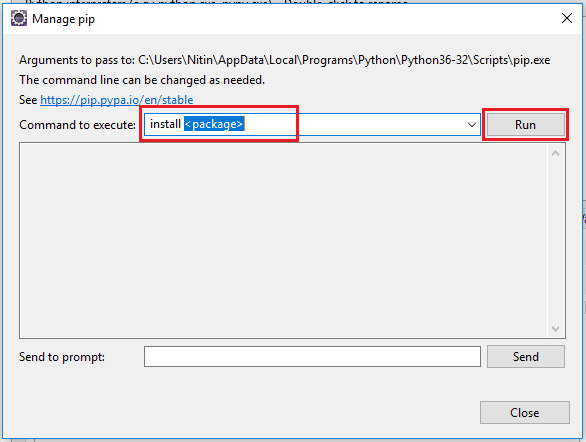
To use pip in Eclipse go to Window Preferences and in the pop up window navigate to PyDev Interpreters Python Interpreter Click on the button Install Uninstall with pip This will open the Manage pip window The textbox Command to execute is where the pip commands are entered and then executed by clicking on the Run button
Method 1 Install python3 pip for Python 3 Recent Ubuntu and Debian versions ship with Python 3 pre installed Try installing the Python 3 version of pip sudo apt install python3 pip This will install the pip package for Python 3 x Verify successful installation with pip3 version

Double click installer On the initial installation screen ensure that Checkbox Add Python 3 10 to PATH or whatever the version you are installing is selected Click on Customize installation In the Optional Features screen just click Next In the Advanced Options step ensure that Install for all users checkbox is selected
If your Python environment does not have pip installed there are 2 mechanisms to install pip supported directly by pip s maintainers ensurepip get pip py ensurepip Python comes with an ensurepip module 1 which can install pip in a Python environment Linux python m ensurepip upgrade MacOS Windows

To check if the PIP installation is in your PATH variable follow these steps Press Windows key R to open the Run dialog box Type cmd and press Enter to open Command Prompt Run dialog cmd In the Command Prompt window type echo PATH and press Enter This command lists all locations in the PATH variable
Possible reasons are as follows Pip is not installed Pip is not added to the PATH environment Pip is installed but it is not compatible with the current environment How to Fix the Pip Install Not Working Issue If you encounter the pip command not found or pip is not recognized error you can try the following methods to solve them 6 Answers Sorted by 3 To locate the path to your pip and python installations which python usr bin python which python3 usr local bin python3 which pip usr local bin pip which pip3 usr local bin pip3 If the which command doesn t find pip you need to install it
1 2 3 Eclipse exe get pip py 1 Eclipse 2 3 Python 4 pip 5 install Register as a new user and use Qiita more conveniently You get articles that match your needs You can efficiently read back useful information You can use dark theme What you can do with signing up