Docker Remove All Volumes Force Storm Water Reticulation TeMa South Africa Removing All Docker Volumes At Once Server Management Support Docker Stop All Containers Now Soft Creative Ltd Modificare Insegnare Portoghese Docker Delete All Images Without Tag Explaining Docker Volumes With Examples OSTechNix Web Oct 17 2018 nbsp 0183 32 Removing all unused volumes To remove all unused volumes run the docker image prune command docker volume prune WARNING This will remove all local volumes not used by at least one container Are you sure you want to continue y N Use the f or force option to bypass the prompt Removing Docker Networks
Web May 24 2020 nbsp 0183 32 In this quick tutorial we will show you how to remove all unused volumes in Docker Also how to remove one or more volume by providing VOLUME NAME Removing Docker Volumes 1 Remove one or more volumes To remove one or more Docker volumes use the docker volume ls command to find the VOLUME NAME of the Web Aug 21 2023 nbsp 0183 32 Remove All Unused Volumes In Docker removing unused volumes is as critical as removing images or containers To free up disk storage you can use the docker volume prune command Remove a Specific Volume by Name Removing a specific volume in Docker is useful for removing unused volumes Here s the command to
Explaining Docker Volumes With Examples OSTechNix Docker Tips Machinery Removals Sydney CMI How To Remove Other Volumes In Container On Mac How To Stop And Remove All Docker Containers Ankur Sheel Docker F r Windows Und Host Volumes IllucIT Software GmbH Docker Remove Image How To Delete Docker Images Explained With Examples Docker Image Guide How To Delete Docker Images Stop Containers And Construc ii Navale A Sustine C t De Des Remove All Docker Images And
Docker Remove All Volumes Force
 Docker Remove All Volumes Force
https://www.temasouthafrica.com/wp-content/uploads/2020/07/IMG_2831-scaled.jpg
Web docker system prune a volumes WARNING This will remove all stopped containers all networks not used by at least one container all volumes not used by at least one container all images without at least one container associated to them all build cache Are you sure you want to continue
Templates are pre-designed files or files that can be utilized for numerous purposes. They can conserve effort and time by offering a ready-made format and layout for creating various type of content. Templates can be utilized for individual or professional jobs, such as resumes, invitations, leaflets, newsletters, reports, discussions, and more.
Docker Remove All Volumes Force

Docker Remove All Unused Local Volumes Level Up

Docker Tips

Machinery Removals Sydney CMI
How To Remove Other Volumes In Container On Mac
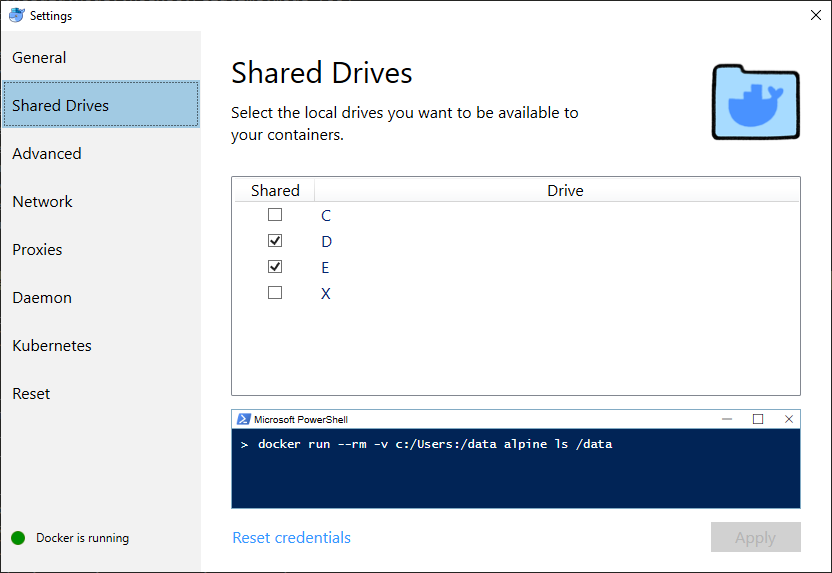
Docker F r Windows Und Host Volumes IllucIT Software GmbH

Docker Remove Image How To Delete Docker Images Explained With Examples
Web The label filter accepts two formats One is the label label lt key gt or label lt key gt lt value gt which removes volumes with the specified labels The other format is the label label lt key gt or label lt key gt lt value gt which removes volumes without the specified labels

Web Nov 17 2016 nbsp 0183 32 To locate them to confirm you want to remove them you can use the docker volume ls command with a filter to limit the results to dangling volumes When you re satisfied with the list you can remove them all with docker volume prune List docker volume ls f dangling true Remove docker volume prune Remove a container and its
Web Aug 21 2017 nbsp 0183 32 Kill all running containers docker kill docker ps q Delete all stopped containers docker rm docker ps a q Delete all images docker rmi docker images q Remove unused data docker system

Web Jan 7 2016 nbsp 0183 32 docker uses reference counting to check if a volume is still in use this is all done in memory this may be a bug or a race condition somehow which resulted in the container being removed but the counter not being updated A restart of the daemon should resolve this but yes it s possible there s a bug somewhere

Web Jul 4 2023 nbsp 0183 32 First to get all Docker volume IDs use the following command docker volume ls If you want to remove a certain volume use this command followed by the VOLUME NAME docker volume rm VOLUME NAME To remove all unused volumes using a single command you can use the following docker volume prune
Web Nov 25 2021 nbsp 0183 32 Below is an example of a command to clean all containers images volumes networks and undefined containers created with docker compose docker compose down rmi all v remove orphans docker compose down is the exact opposite of docker compose up By default it deletes created objects such as containers and Web Apr 19 2015 nbsp 0183 32 In Docker 1 9 there is the ability to manage volumes better with docker volume see this PR docker version Docker version 1 9 0 build 76d6bc9 docker volume Usage docker volume OPTIONS COMMAND Manage Docker volumes Commands create Create a volume inspect Return low level information on a volume ls
Web Nov 8 2019 nbsp 0183 32 4 On the docker documentation it says the following docker volume prune Remove all unused local volumes To test that I ve set up a MongoDb container with the official latest image from docker hub Doing so created 2 volumes behind the scenes which are probably needed by the container to store the data