Display Inline Block Font Size 0 Understanding CSS Display None Block Inline And Inline Block Fuente Big Shoulders Inline Display Descargar 3 Letter Acrylic Blank Block Style Font Moxie Vinyls Block Level Vs Inline CodeBridePlus CSS Layout Display Inline block YouTube Official Display amp Video 360 Help Center where you can find tips and tutorials on using Display amp Video 360 and other answers to frequently asked questions
Studio display iMac iMac studio display iMac 4 5K 11499 Pro Display XDR Pro Display XDR Pro
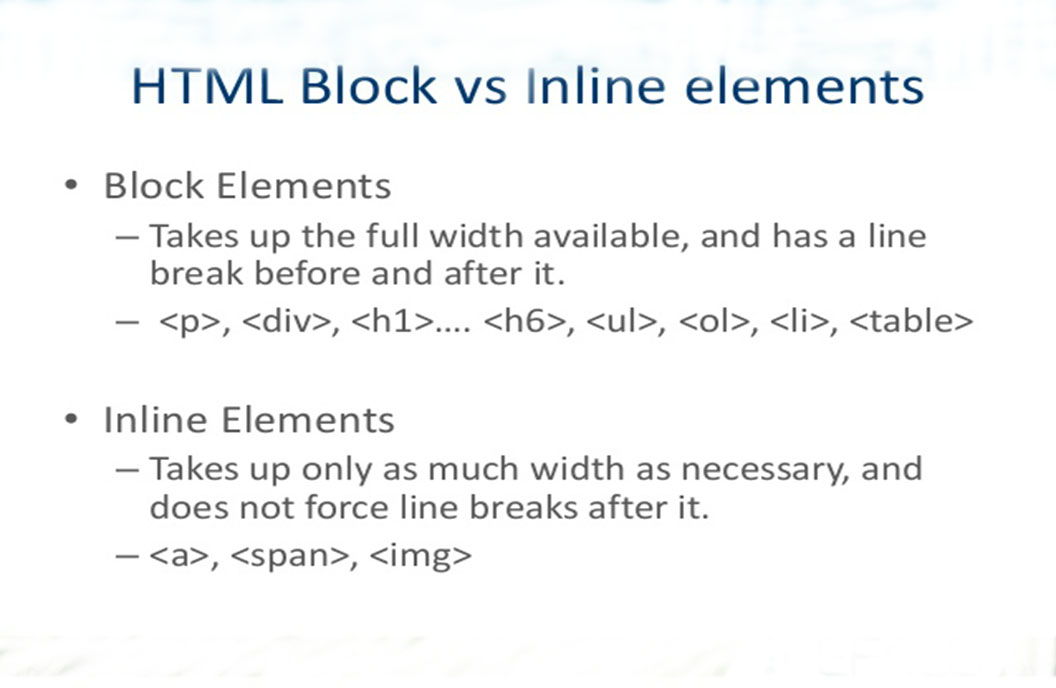
CSS Layout Display Inline block YouTube 14 CSS Display Inline Block YouTube CSS Display Block Inline Inline Block Explained CSS Block level Elements Within Display Inline block YouTube HTML CSS CSS Display Inline Block Inline block 1 Display Inline block CSS 3 YouTube Learn CSS Fundamentals In Arabic 2022 31 Display Inline Block CSS Display Inline Block With Widths As Percent YouTube CSS Inline Inline block Block display
Display Inline Block Font Size 0
https://cdn-images-1.medium.com/max/1600/0*kyWyeqghPnWCRnbr
Aug 30 2024 nbsp 0183 32 quot Make this my main display quot doesn t switch the monitor numbers it only instructs Windows where to locate the Start Menu amp taskbar 1 You need to modify the Registry to hide
Templates are pre-designed files or files that can be utilized for various functions. They can conserve effort and time by supplying a ready-made format and design for producing various kinds of content. Templates can be utilized for individual or expert tasks, such as resumes, invites, leaflets, newsletters, reports, discussions, and more.
Display Inline Block Font Size 0

Display Inline Block CSS CSS Tutorial YouTube

14 CSS Display Inline Block YouTube

CSS Display Block Inline Inline Block Explained

CSS Block level Elements Within Display Inline block YouTube

Display Inline block CSS 3 YouTube

Learn CSS Fundamentals In Arabic 2022 31 Display Inline Block
May 1 2021 nbsp 0183 32 Select a display to rearrange and use the Up Down Left and Right arrow keys to move it You will also see any connected wireless display appear here You can click tap on

Oct 12 2017 nbsp 0183 32 I have two extra displays connected to my laptop and my largest one technically a TV but whatever is appearing the wrong size relative to my internal laptop display My laptop s

DP Display Port HDMI HDMI DP DP 1 4 10bit 4K 120Hz 8K 60Hz
Display P3 sRGB D65 DCI P3 2 6 sRGB 2 2 Display P3 2 2

Nov 8 2021 nbsp 0183 32 The adaptive brightness feature in Windows monitors ambient light sensors to detect changes in ambient light and automatically adjust the display brightness as needed to
[desc-11] [desc-12]
[desc-13]