Disable Proxy Automatically Detect Settings Gpo Automatically Detect Settings Windows 10 Proxy Automatically Detect Settings Registry AD Settings Are Not Saving In AD Connect Sync Hosting Controller Solved Windows Could Not Automatically Detect This Network s Proxy Auto detect Proxy Settings On Or Off Windows 10 Forums 02 Jan 2024 How to Enable or Disable Passwordless Sign in for Microsoft Accounts in Windows 10 Windows Hello is a more personal more secure way to get instant access to your Windows 10 devices using fingerprint or facial recognition Most PC s with fingerprint readers already work with Windows Hello making it easier and safer to sign into
Dec 7 2020 nbsp 0183 32 How to Enable or Disable Developer Tools in Microsoft Edge Chromium Microsoft has adopted the Chromium open source project in the development of Microsoft Edge on the desktop to create better web compatibility Dec 29 2020 nbsp 0183 32 3 Click tap on Profiles on the left side If you are not already using the profile you want to turn off sync click tap on the Switch button on the right side for the profile you want to turn off sync see screenshot below If you do not see a left pane then either click tap on the 3 bars menu button towards the top left OR widen the horizontal borders of the Microsoft Edge
Auto detect Proxy Settings On Or Off Windows 10 Forums Windows 10 Can t Detect Network Proxy Settings Here 5 Working Como Fazer Capinha De Celular Com Cola Quente How To Disable Proxy Settings In Windows 10 Step By Step ERR CONNECTION CLOSED 4 Proven Ways To Fix It Proxy Server Ps4 8080 How To Disable Proxy SaferVPN Haproxy Metrics Prometheus Openshift Internet Explorer Proxy Einstellungen Automatisch Erkennen
Disable Proxy Automatically Detect Settings Gpo
 Disable Proxy Automatically Detect Settings Gpo
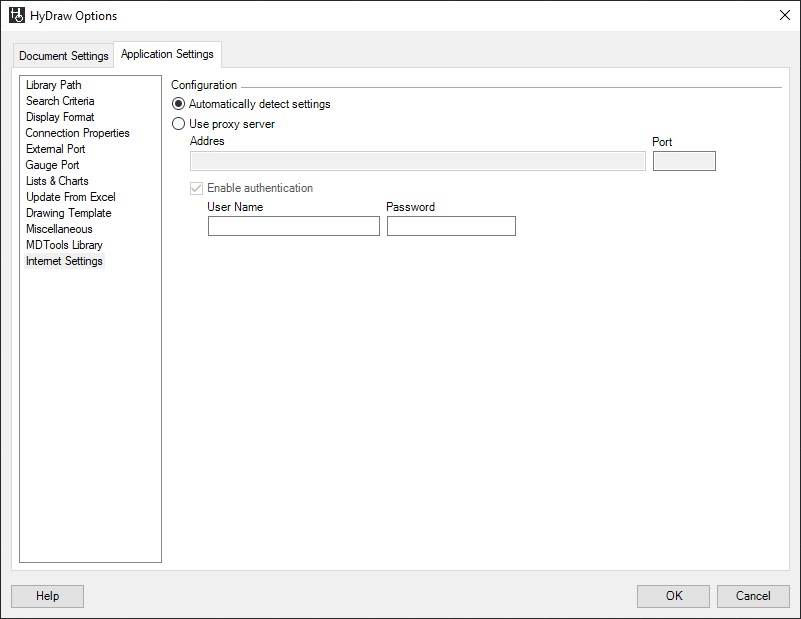
https://vestusa.com/Help/HyDraw-CAD-2022/HyDraw-CAD-2021-Help_files/Proxy_Automatic.jpg
Apr 17 2021 nbsp 0183 32 How to Turn On or Off High Contrast Mode in Windows 10 If it s hard to read text on your screen because you need more color contrast you can turn on high contrast mode High contrast mode makes text and apps easier to see by using more distinct colors S
Templates are pre-designed files or files that can be used for different functions. They can conserve effort and time by supplying a ready-made format and design for producing different kinds of material. Templates can be used for personal or professional tasks, such as resumes, invitations, flyers, newsletters, reports, discussions, and more.
Disable Proxy Automatically Detect Settings Gpo
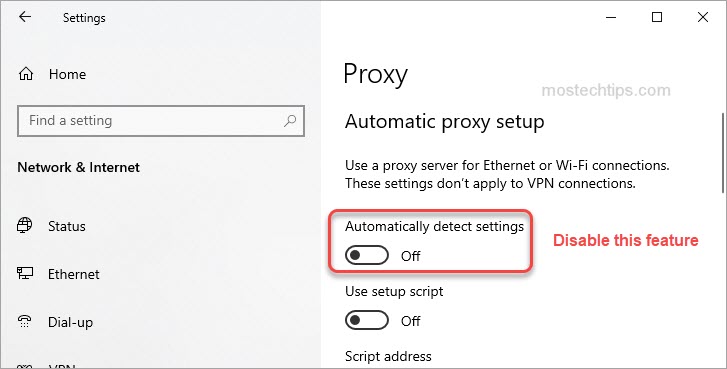
Disable automatically detect proxy settings Mos Tech Tips

Windows 10 Can t Detect Network Proxy Settings Here 5 Working

Como Fazer Capinha De Celular Com Cola Quente
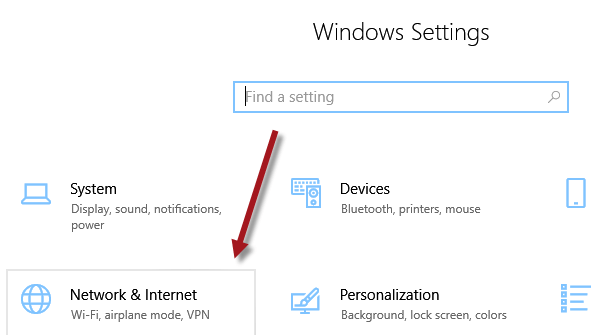
How To Disable Proxy Settings In Windows 10 Step By Step

Proxy Server Ps4 8080

How To Disable Proxy SaferVPN
Aug 5 2020 nbsp 0183 32 How to Enable Disable or Force Sign in to Microsoft Edge Chromium Published by Shawn Brink Category Browsers amp Email 05 Aug 2020 How to Enable Disable or Force Sign in to Microsoft Edge Chromium Microsoft has adopted the Chromium open source project in the development of Microsoft Edge on the desktop to create better web compatibility

Dec 7 2020 nbsp 0183 32 Enable or Disable Use of Windows Hello Biometrics in Local Group Policy Editor The Local Group Policy Editor is only available in the Windows 10 Pro Enterprise and Education editions All editions can use Option Two below 1 Open the Local Group Policy Editor
Apr 25 2021 nbsp 0183 32 Enable or Disable Automatically Lock Computer in Local Security Policy This option is only available in the Windows 10 Pro and Enterprise editions All editions can use Option Two below 1 Press the Win R keys to open the Run dialog type secpol msc into Run and click tap on OK to open Local Security Policy

Oct 12 2020 nbsp 0183 32 If you like you can use the InPrivateModeAvailability policy to enable disable or force the InPrivate mode feature in Microsoft Edge for all users on the computer This tutorial will show you how to enable disable or force the InPrivate browsing mode feature in the Chromium based Microsoft Edge for all users

Jun 8 2023 nbsp 0183 32 How to Enable or Disable Touchpad in Windows 10 Published by Shawn Brink Category Hardware amp Drivers 08 Jun 2023 How to Enable or Disable Touchpad in Windows 10 If your Windows 10 PC ex laptop has a built in touchpad you may want to enable or disable on demand This tutorial will show you how to enable or disable the touchpad in Windows 10
[desc-11] [desc-12]
[desc-13]