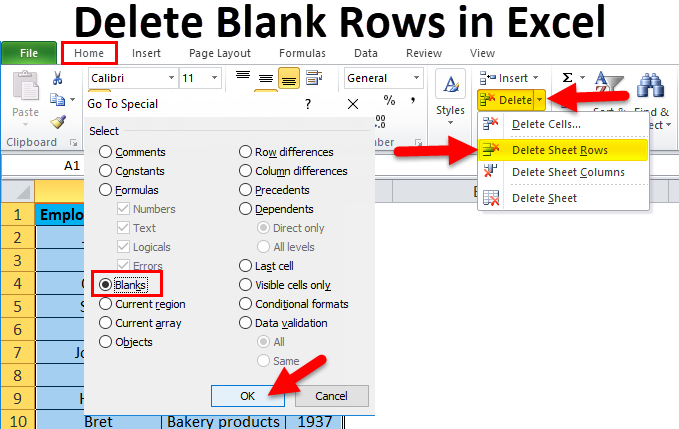
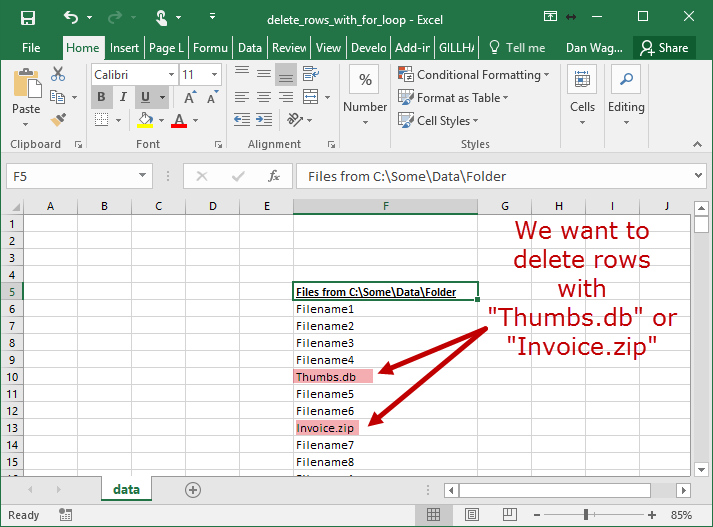
Delete Rows With No Value In Excel How To Delete Rows With Blank Cells In Libreoffice Hopdenitro How To Make Excel Delete Rows With Value Of Your Choosing Using VBA Iso Lateral Lat Pulldown Muscle D Farmihomie How To Delete Rows With Blank Cells Wesip How To Delete Rows With Range AutoFilter Dan Wagner Co 1 In the Home tab click the Find Select button on the right side of the Ribbon so you can start to find blank rows 2 Select Go To Special 3 Select Blanks and click OK This select only the blank cells in your data Now you need to delete entire rows instead of just the selected cells 4
To insert a macro in your workbook perform these steps Open the worksheet where you want to delete blank rows Press Alt F11 to open the Visual Basic Editor On the left pane right click ThisWorkbook and then click Insert Module Paste the code in the Code window Press F5 to run the macro To delete rows with blanks using the Find Select feature in Excel use Go To Special In the Ribbon go to Home Find Select Go To Special In the Go To Special dialog box select Blanks and click OK Now all the blank cells in that range are selected To delete these blank cells right click anywhere in the selected range
How To Delete Rows With Range AutoFilter Dan Wagner Co Remove Blank Rows In Excel Examples How To Delete Blank Rows Mysql How To Select Rows With No Null Values in Any Column In SQL How To Delete Rows In Excel With Specific Text 3 Methods ExcelDemy Excel Vba Delete Rows That Have The Same Id And Based On A Date Www Pandas Delete Rows Based On Column Values Data Science Parichay CLOUD How To Count Rows With Value In Google Sheets 3 Examples Statology How To Run Delete Rows With No Data In Excel Moplacards How To Delete Blank Rows In Excel Quickly And Easily Techyv
Delete Rows With No Value In Excel
 Delete Rows With No Value In Excel
https://www.gingerling.co.uk/wp-content/uploads/2018/04/2018-04-06-15_37_02-Untitled-1-LibreOffice-Calc.png
Step 1 Click on the Go To Special command The first thing you need to do is to locate and click on the Go To Special command To do this just head to the Home tab and click on the Find Select You will then be able to see Go To Special Figure 1 Using Go To Special to delete rows with empty cells
Templates are pre-designed files or files that can be used for numerous functions. They can conserve time and effort by providing a ready-made format and design for developing various type of material. Templates can be used for personal or expert tasks, such as resumes, invitations, leaflets, newsletters, reports, discussions, and more.
Delete Rows With No Value In Excel
How To Run Delete Rows With No Data In Excel Pnahardware
Remove Blank Rows In Excel Examples How To Delete Blank Rows

Mysql How To Select Rows With No Null Values in Any Column In SQL
How To Delete Rows In Excel With Specific Text 3 Methods ExcelDemy

Pandas Delete Rows Based On Column Values Data Science Parichay CLOUD

How To Count Rows With Value In Google Sheets 3 Examples Statology
5 Answers Sorted by 48 You can do this very quickly if the cells are truly blank using SpecialCells Manual Select Column C Press F5 then Special Check Blanks then OK see this step in the pic at bottom Delete the rows that are now selected e g right click in selection Delete cells Entire row or via the ribbon see second screenshot

Select all the filtered records Right click on any of the selected cells and click on Delete Row In the dialog box that opens click on OK At this point you will see no records in the dataset Click the Data tab and click on the Filter icon This will remove the filter and you will see all the records except the deleted ones

What if you are not so lucky or you do not have a backup copy Further in this article I will show you 3 fast and reliable ways to remove empty rows from your Excel worksheets If you want to save your time go straight to the 3rd way Remove blank rows using a key column

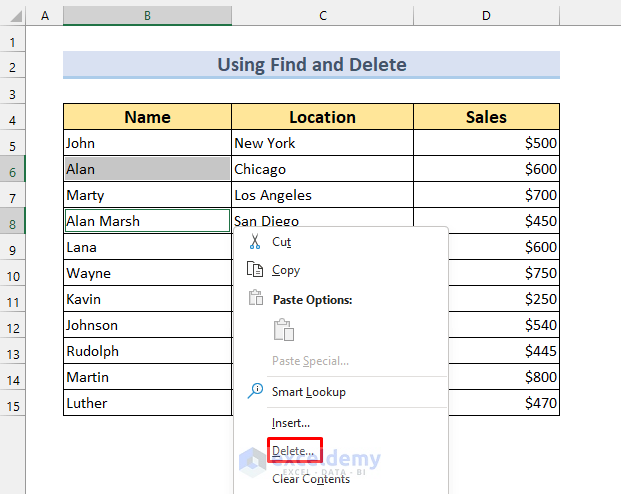
If you want to delete one row you can delete the row manually Select the row Click its heading or select a cell in the row and press Shift spacebar Right click the selected row heading A drop down menu appears Select Delete In this article we ll review 5 ways to delete blank rows Delete blank rows using the context menu
You can automatically remove blank rows in Excel by first selecting your dataset opening in the ribbon Find Select Go To Special and then selecting Blanks Finally in the ribbon click Delete Delete Sheet Rows Want to remove all the blank rows from your dataset
Select the blank rows we want to delete Hold Ctrl key and click on a row to select it When the rows we want to delete are selected then we can right click and choose Delete from the menu We can also delete rows using a ribbon command Go to the Home tab click on the Delete command then choose Delete Sheet Rows 1 Press Alt F11 to open the Microsoft Visual Basic for Applications window 2 In the Microsoft Visual Basic for Applications window click Insert Module Then copy and paste the below VBA code into the Code window VBA code Delete rows with missing blank values in certain columns
Select one column Ctrl G Special Blanks Right Click Delete Entire row Beware of Scammers posting fake Support Numbers here