Delete Rows By Column Value Pandas How To Filter Rows In Pandas 6 Methods To Power Data Analysis 2023 Filter Table Rows By Column Value JQuery Tablesearch js Free JQuery Python Pandas Tutorial How To Remove A Row From Pandas Dataframe Based On The Length Of The Delete Rows Based On Column Values In Pandas DataFrames 7 Answers Sorted by Reset to default This answer is useful 303
drop Method to Delete Row on Column Value in Pandas DataFrame drop method accepts a single or list of columns names and deletes the rows or columns For rows we set parameter axis 0 and for column we set axis 1 by default axis is 0 We can also get the series of True and False based on condition applying on column value in Pandas DataFrame Example Codes Remove rows or columns by specifying label names and corresponding axis or by directly specifying index or column names When using a multi index labels on different levels can be removed by specifying the level See the user guide for more information about the now unused levels Parameters labelssingle label or list like
Delete Rows Based On Column Values In Pandas DataFrames Pandas Get Unique Values In Column Spark By Examples Pandas How To Get Cell Value From DataFrame Spark By Examples Pandas 010 How To Delete Indices Rows Or Columns YouTube How To Convert Pandas Column To List Spark By Examples Pandas Drop First N Rows From DataFrame Spark By Examples Pandas Replace Blank Values empty With NaN Spark By Examples Pandas DataFrame drop duplicates Examples Spark By Examples Pandas Get First Row Value Of A Given Column Spark By Examples
Delete Rows By Column Value Pandas
 Delete Rows By Column Value Pandas
https://blog.hubspot.com/hs-fs/hubfs/pandas-filter-rows-598px.png?width=595&height=400&name=pandas-filter-rows-598px.png
Use drop method to delete rows based on column value in pandas DataFrame as part of the data cleansing you would be required to drop rows from the DataFrame when a column value matches with a static value or on another column value
Templates are pre-designed files or files that can be used for different purposes. They can conserve effort and time by offering a ready-made format and layout for producing various sort of content. Templates can be used for individual or professional tasks, such as resumes, invitations, flyers, newsletters, reports, discussions, and more.
Delete Rows By Column Value Pandas

Worksheets For Python Pandas Column Names To List

Pandas Get Unique Values In Column Spark By Examples

Pandas How To Get Cell Value From DataFrame Spark By Examples
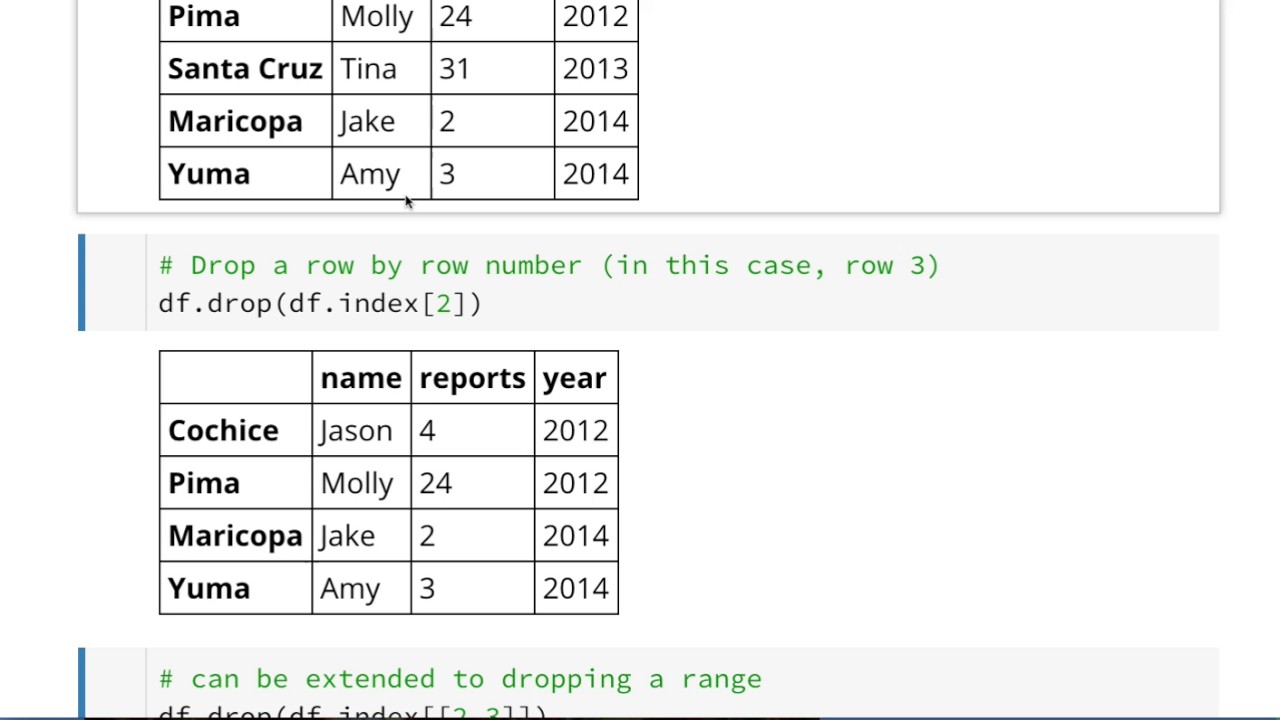
Pandas 010 How To Delete Indices Rows Or Columns YouTube

Pandas Drop First N Rows From DataFrame Spark By Examples

Pandas Replace Blank Values empty With NaN Spark By Examples

To delete rows based on column values you can simply filter out those rows using boolean conditioning For example let s remove all the players from team C in the above dataframe That is all the rows in the dataframe df where the value of column Team is C remove rows by filtering df df df Team C display the dataframe df
Pandas provide data analysts a way to delete and filter data frame using dataframe drop method We can use this method to drop such rows that do not satisfy the given conditions Let s create a Pandas dataframe import pandas as pd details Name Ankit Aishwarya Shaurya Shivangi Priya Swapnil

How to Delete Rows Based on Column Value There are several ways to delete rows in a DataFrame based on column value which we ll explore here Method 1 Using Boolean Indexing Boolean indexing is a powerful feature in Pandas that allows us to select data based on the actual values in the DataFrame

You can use the following syntax to drop rows in a pandas DataFrame that contain any value in a certain list define values values value1 value2 value3 drop rows that contain any value in the list df df df column name isin values False The following examples show how to use this syntax in practice

To delete rows from a DataFrame based on a specific column value you can use the drop method in Pandas The drop method takes an argument index which is a list of row labels to delete Here s an example of how to delete rows from a DataFrame based on a specific column value
Deleting rows from pandas DataFrames based on specific conditions relevant to column values is among the most commonly performed tasks In today s short guide we are going to explore how to perform row deletion when a row contains i e is equal to specific column value s a particular column value of a row is not equal to another value In Pandas you can delete a row in a DataFrame based on a certain column value by using the drop method and passing the index label of the row you want to delete For example if you have a DataFrame named df and you want to delete a row where the value in the Age column is 30 you can use the following code df df df Age 30 Watch a
1 Delete a single row By default Pandas drop will remove the row based on their index values Most often the index value is an 0 based integer value per row Specifying a row index will delete it for example delete the row with the index value 1 df drop 1 It s equivalent to