Delete Is A Word BEST GUIDE Deleting A Page In Microsoft Word 2010 Ei En Korutonta El m Aamukahvilla Jenna Fischer Is A Hottie R ladyladyboners How To Remove A Blank Page In Word with Pictures WikiHow The Power Of Delete HuffPost Delete a file by using File Explorer Open a File Explorer window Tip A quick way to get to File Explorer is to press Windows Key E Locate the file that you want to delete Select the file and press your Delete key or click Delete on the Home tab of the ribbon Tip You can also select more than one file to be deleted at the same time
Step 1 Open Microsoft Word Step 2 Select the File tab at the top left of the window Step 3 Choose the Open tab at the left side of the window Step 4 Browse to the location of the file that you want to delete Step 5 Right click the desired file then choose the Delete option Note that if there are multiple Word documents in this folder Step 3 Select Delete From the right click menu choose Delete This will move the document to the recycle bin or trash Selecting Delete won t permanently remove the file from your computer it will send it to the recycle bin or trash Think of this as a safety net where you can recover files if you delete them accidentally
The Power Of Delete HuffPost Abigail Breslin Is A Twilight Teen Abigail Breslin Photo 15687622 This Is A Bucket R MLPLounge Delete Text In MS Word Felt Delete Might Cute Later R trans This Is A True Youtube Add R crappyoffbrands This Is Something My Mom almost 98 And I Recently Did Together She s File Cleveland From Superior Viaduct jpg Wikipedia The Free Encyclopedia File Connecticut State Capitol February 24 2008 jpg Wikipedia The
Delete Is A Word
 Delete Is A Word
http://appuals.com/wp-content/uploads/2015/10/delete-a-page-in-word-2010-1024x403.jpg
To delete a page break click it to select it and then press Delete If you have the Word desktop application you can use the Open in Word command to open the document and delete section breaks Once you have the document open in Word see Delete a page in Word If you don t have Word you can try or buy it in the latest version of Office now
Pre-crafted templates offer a time-saving solution for creating a varied variety of files and files. These pre-designed formats and layouts can be made use of for numerous personal and professional tasks, consisting of resumes, invitations, leaflets, newsletters, reports, discussions, and more, streamlining the material creation procedure.
Delete Is A Word

Why Square Root Of A Complex Number Is A Complex Number Only read Body

Abigail Breslin Is A Twilight Teen Abigail Breslin Photo 15687622

This Is A Bucket R MLPLounge
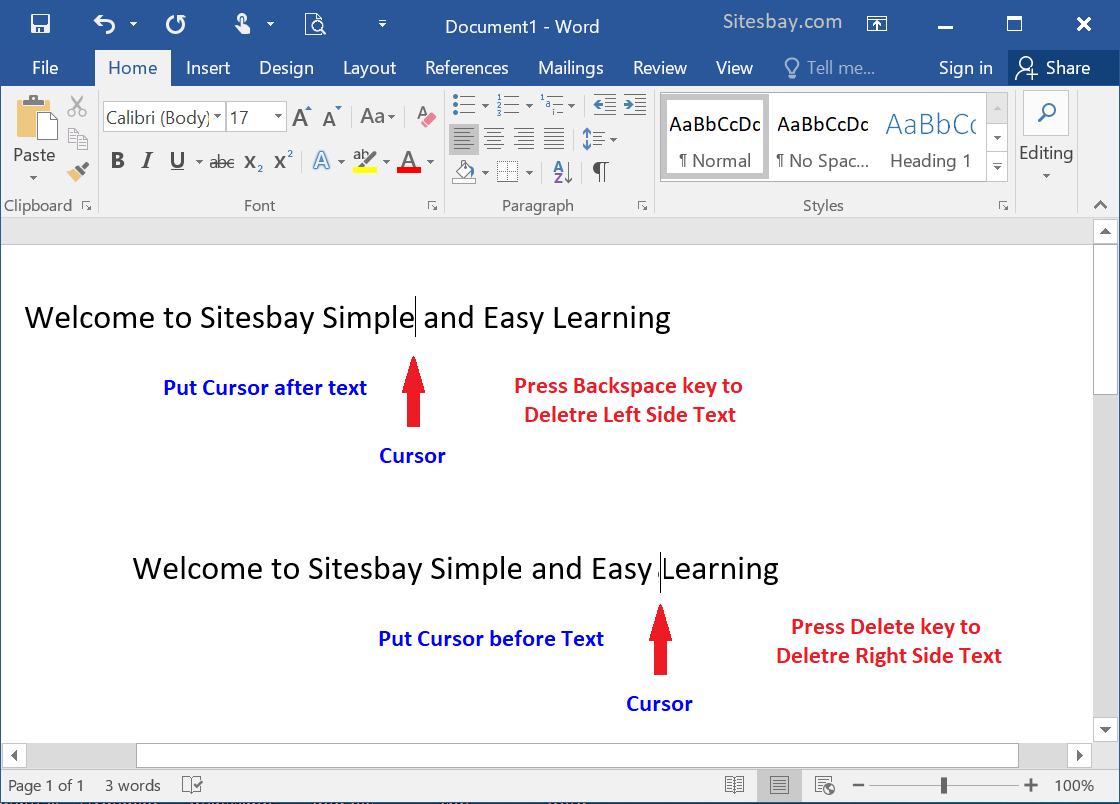
Delete Text In MS Word

This Is A True Youtube Add R crappyoffbrands

This Is Something My Mom almost 98 And I Recently Did Together She s
Select the document and press the Delete key on your keyboard or select the Bin icon on the ribbon Alternatively right click the file and select the Bin icon on the context menu You can delete multiple Word documents simultaneously in the File Explorer Press and hold the Ctrl key choose the files and select the Delete Bin icon on the

In Word you can delete a page in the middle or at the end of a document using several strategies You can delete blank pages or pages that contain text and other content Blank pages can be caused by unnecessary hard returns pressing Enter too many times manual page breaks section breaks paragraph formatting and tables so you will need to determine what is causing a blank page to remove it

On Windows or Mac Step 1 Launch the Word app on your Windows or Mac computer Search or scroll down to locate the document you want removed from the Word app Step 2 Right click on the file and

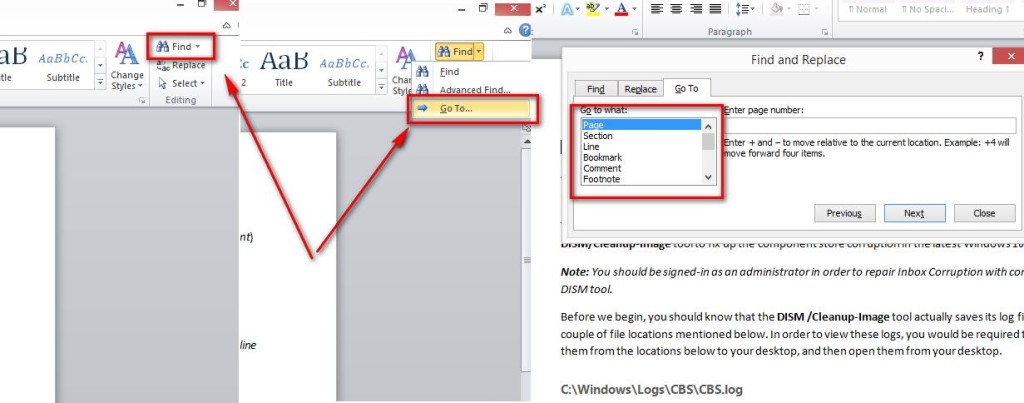
Click or tap anywhere in the page you want to delete press Ctrl G In the Enter page number box type page Press Enter on your keyboard and then select Close Verify that a page of content is selected and then press Delete on your keyboard To remove blank pages in the middle or at the end of your document see Delete a blank page

Close the Find and Replace dialog box and then press only once on the F8 key on your keyboard Advertisement Next open the Find and Replace tool again using the same keyboard shortcuts F5 or Ctrl G Select Page and this time enter the number of the page that comes after the last one you want to delete
Press and hold Ctrl Shift or Command Shift on a Mac At the same time press the Down Arrow on the keyboard to highlight one paragraph at a time Continue until all the text you want to remove is highlighted and release all three keys Alternatively use the mouse or touchpad to highlight all the text on the page you want to delete Possibly the easiest way to delete a single page is to use Word s Navigation pane It requires only a few clicks Click the View tab and then click Navigation pane in the Show group
Delete a Document in Microsoft Word Open Microsoft Word Select the File tab Choose Open Select the File Right Click the Document Select Delete Confirm Yes Microsoft Word a powerful word processing tool simplifies the creation and editing of documents However managing your documents efficiently is equally crucial