Databricks Write To Azure Sql Database Python Azure SQL Database Reference Architecture Community Azure SQL Database Azure SQL Database And Azure Synapse How To Connect Azure SQL Database From Python Function App Using Asserting Common Availability Of Databricks SQL Tech4Seo Pro SSMS Connect And Query Data Azure SQL Database SQL Managed 1 I have a database table in Azure DataBricks that already has data in it I need to append data to that table I have my pandas dataframe df allfeatures that I want to append to my database The function that I use to write to my database table
In Azure Databricks the table is already created in the Azure SQL warehouse and I d like to perform an update to the existing in the azure sql database or overwrite it s contents when my job runs I am able to append but I am facing issues to perform update overwrite for performing etl Hi Philippe CRAVE Databricks Runtime contains JDBC drivers for Microsoft SQL Server and Azure SQL Database See the Databricks runtime release notes for the complete list of JDBC libraries included in Databricks Runtime This article covers how to use the DataFrame API to connect to SQL databases using JDBC and how to control the parallelism of reads through the JDBC interface
SSMS Connect And Query Data Azure SQL Database SQL Managed Databricks Write To Azure Data Explorer Writes Suddenly Become Slower Modern Analytics Architecture With Azure Databricks Azure Connect To Azure SQL Database Using Python MariaDBTips 2022 SQL Database Developer Cover Letter Velvet Jobs How To Access Azure Databricks Account Admin Microsoft Q A Data Analytics And Data Virtualization With Azure Databricks And Issues Connecting To Azure SQL Database Python Microsoft Q A Configure The Max Degree Of Parallelism MAXDOP In Azure SQL Database
Databricks Write To Azure Sql Database Python
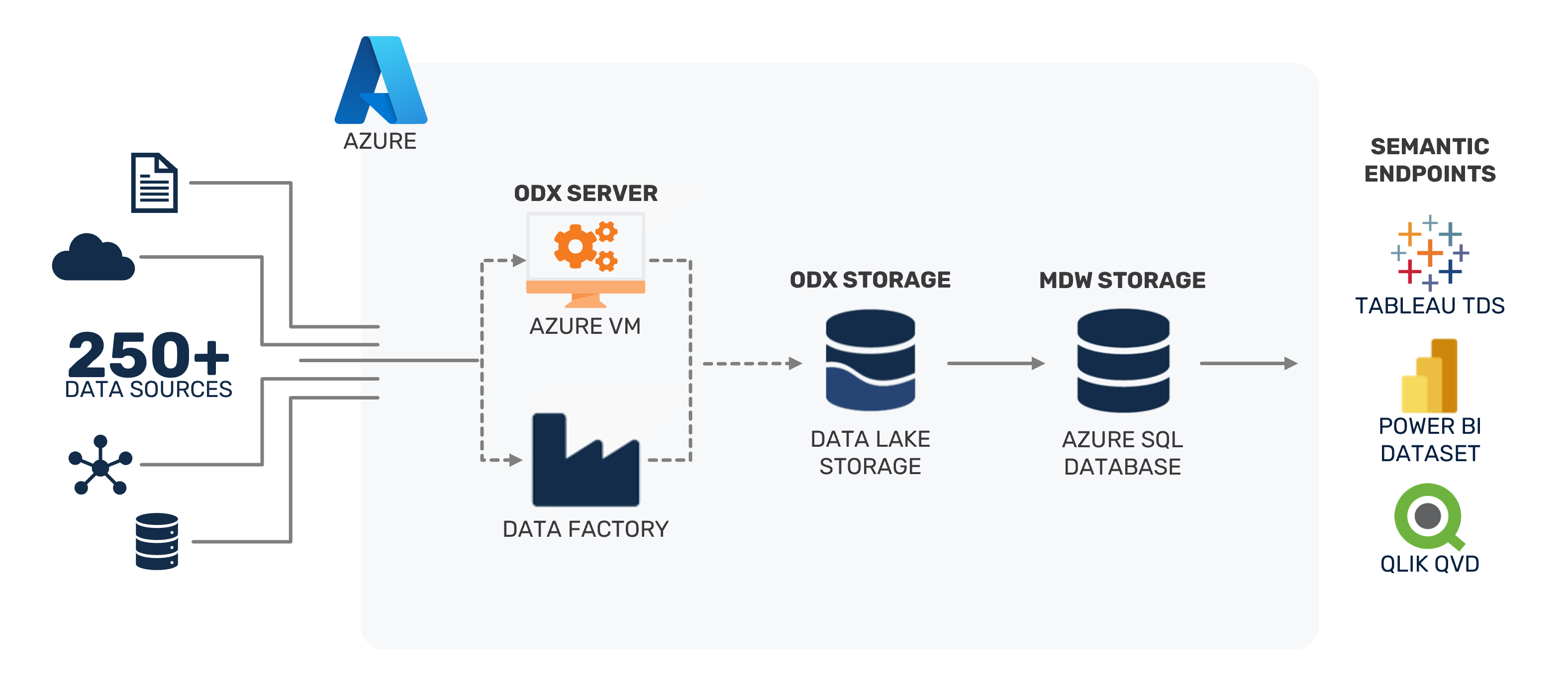 Databricks Write To Azure Sql Database Python
https://uploads-eu-west-1.insided.com/timextender-en/attachment/141fe0f6-770b-4428-98e6-ab300c055f2b_thumb.png
Azure Databricks is an Apache Spark based analytics platform optimized for the Microsoft Azure cloud services platform that integrates well with Azure databases and stores along with Active Directory and role based access It excels at big data batch and stream processing and can read data from multiple data sources to provide quick insights on
Pre-crafted templates offer a time-saving solution for creating a diverse variety of files and files. These pre-designed formats and designs can be utilized for numerous personal and professional tasks, including resumes, invitations, leaflets, newsletters, reports, discussions, and more, simplifying the material creation procedure.
Databricks Write To Azure Sql Database Python

Azure Cosmos DB HTAP Using Azure Synapse Link SQLServerCentral

Databricks Write To Azure Data Explorer Writes Suddenly Become Slower

Modern Analytics Architecture With Azure Databricks Azure

Connect To Azure SQL Database Using Python MariaDBTips 2022
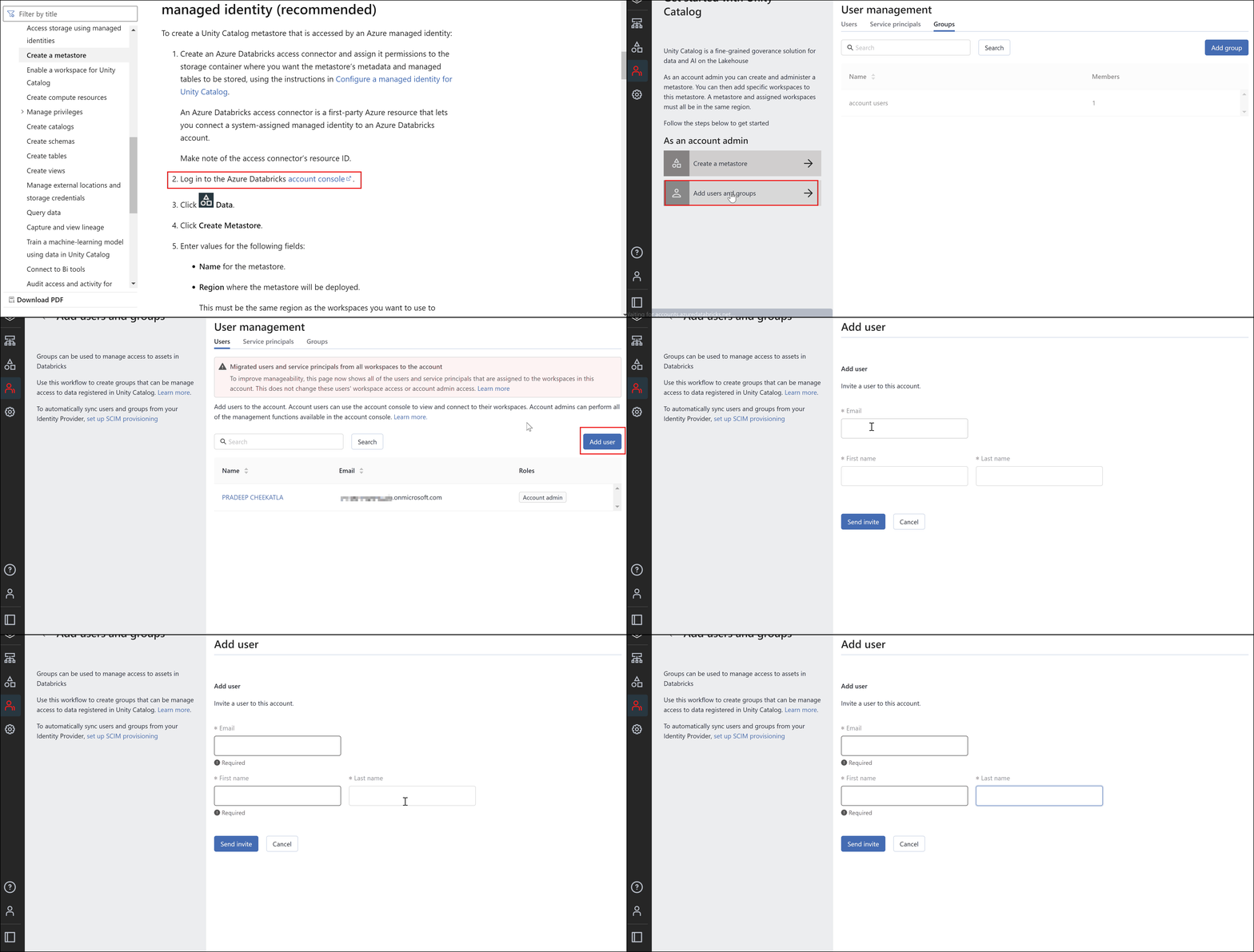
How To Access Azure Databricks Account Admin Microsoft Q A
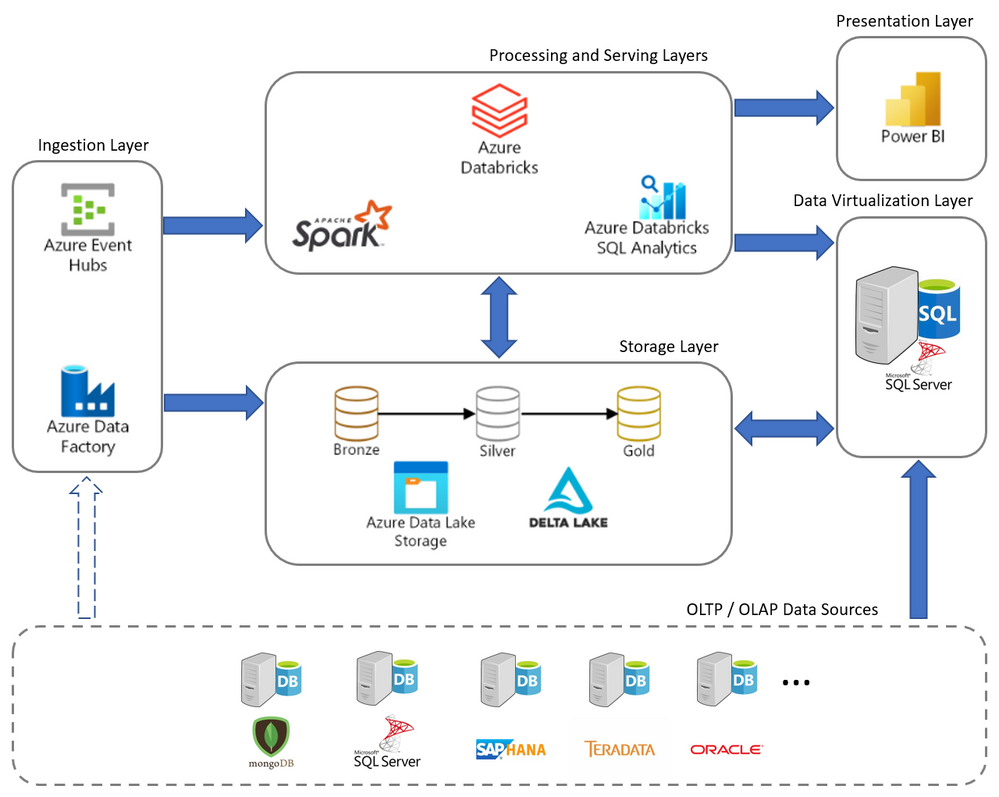
Data Analytics And Data Virtualization With Azure Databricks And
Click on the Data icon on the left vertical menu bar and select the Add Data button Browse and choose the file that you want to upload on Azure Databricks Once uploaded you can see the file 1000 Sales Records csv being uploaded on the Azure Databricks service

Scala val username dbutils secrets get scope jdbc key username val password dbutils secrets get scope jdbc key password To reference Databricks secrets with SQL you must configure a Spark configuration property during cluster initilization For a full example of secret management see Secret workflow example

Please try to refer to PySpark offical document JDBC To Other Databases to directly write a PySpark dataframe to SQL Server via the jdbc driver of MS SQL Server Here is the sample code
Requirements Step 1 Create a DataFrame with Python Step 2 Load data into a DataFrame from files Show 4 more This article shows you how to load and transform U S city data using the Apache Spark Python PySpark DataFrame API in Azure Databricks

This article shows how you can connect Azure Databricks to Microsoft SQL server to read and write data Note You may prefer Lakehouse Federation for managing queries on SQL Server data See Run queries using Lakehouse Federation Configure a connection to SQL server
Write to a table Show 7 more This tutorial introduces common Delta Lake operations on Azure Databricks including the following Create a table Upsert to a table Read from a table Display table history Query an earlier version of a table Optimize a table Add a Z order index Vacuum unreferenced files You can access Azure Synapse from Azure Databricks using the Azure Synapse connector which uses the COPY statement in Azure Synapse to transfer large volumes of data efficiently between an Azure Databricks cluster and an Azure Synapse instance using an Azure Data Lake Storage Gen2 storage account for temporary staging Note
Enable Security Features for Azure SQL Database Azure Defender for SQL Azure SQL database has an inbuilt feature that will detect all potential threats and provide security alerts Auditing The auditing feature will automatically track all the logs for various operations that happen in the Azure SQL Database Audit logs can be stored in the