Correct Date And Time In Linux How To Set The Date And Time In Linux Using Timedatectl Systran Box How To Display Date And Time Using Linux Command Line Linuxteaching How To Check Os Installation Date And Time In Linux 229092 Dora Gyula EATON MWRS A1 Kulcsos Kapcsol 2 ll s Reteszel How To Display The File Creation Time In Linux Systran Box WEB Oct 1 2020 nbsp 0183 32 Linux date command displays and sets the system date and time This command also allows users to print the time in different formats and calculate future and past dates Read on to learn how to use the date command in Linux
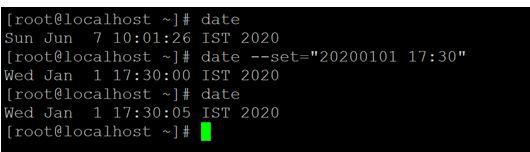
WEB Jul 4 2024 nbsp 0183 32 To set the date and time on Linux open your terminal and use the date command for direct adjustments by typing sudo date s quot YYYY MM DD HH MM SS quot Alternatively use the timedatectl command with sudo timedatectl set time YYYY MM DD HH MM SS for more comprehensive control WEB Sep 15 2021 nbsp 0183 32 To set both the date and time use the following syntax sudo timedatectl set time YYYY MM DD HH MM SS For example sudo timedatectl set time 2021 06 21 13 15 11 Note the use of sudo changing the system timezone requires root administrative privileges Confirm the change by again running timedatectl
How To Display The File Creation Time In Linux Systran Box How To Change Date Time And Time Zone In Linux Mint 20 VITUX How To Get The Formatted Current System Date And Time Via WSO2 ESB By Php How To Display Date Only In PHP ITecNote How To Find Time Taken By A Command In Linux Systran Box How To Show Date And Time In Linux Terminal Using Date Comma How To Find And Sort Files Based On Modification Date And Time In Linux How To Sync Time In Kali Linux Systran Box Set File Modifcation Time To Oldest File Time Mvhac
Correct Date And Time In Linux
 Correct Date And Time In Linux
https://syscdn.systranbox.com/1665121570325.png
WEB Apr 5 2024 nbsp 0183 32 UNIX date command examples syntax amp help Explains how show the date amp time using a shell prompt on BSD AIX HP UX amp Unix like systems
Templates are pre-designed files or files that can be used for numerous functions. They can conserve time and effort by providing a ready-made format and design for developing different type of material. Templates can be used for personal or expert jobs, such as resumes, invitations, flyers, newsletters, reports, presentations, and more.
Correct Date And Time In Linux

How To Change Time In Kali Linux YouTube

How To Change Date Time And Time Zone In Linux Mint 20 VITUX

How To Get The Formatted Current System Date And Time Via WSO2 ESB By
Php How To Display Date Only In PHP ITecNote

How To Show Date And Time In Linux Terminal Using Date Comma

How To Find And Sort Files Based On Modification Date And Time In Linux

WEB Jun 25 2023 nbsp 0183 32 Fortunately Linux provides several methods to change and adjust the system time Whether you need to set the time manually synchronize it with a time server or tweak specific time related settings this guide will walk you through three commonly used approaches for changing the time in Linux

WEB Oct 2 2006 nbsp 0183 32 Linux users can use date command to print or set the system date and time Systemd based Linux users can use timedatectl to control the system time and date You can also set new timzone using Linux command line

WEB Jul 12 2024 nbsp 0183 32 To set the date and time in Linux use the date command with the appropriate format For example to set the date to 25th December 2024 and the time to 10 30 AM sudo date s quot 2024 12 25 10 30 00 quot You may need to restart the timedatectl service to apply changes sudo systemctl restart systemd timesyncd
WEB Nov 8 2023 nbsp 0183 32 The date command in the Bash shell can be used to display the current date and time in various formats allowing for customization By using the quot quot sign and various option codes the output of the date command can be formatted to include specific information such as the day month year or timezone

WEB Mar 8 2023 nbsp 0183 32 Keep track of time on Linux by configuring the system date and time using the timedatectl command
WEB Jun 12 2013 nbsp 0183 32 Manually setting the date For setting the time and date manually use the following syntax date set quot STRING quot For example to set the date to 2 Oct 2006 18 00 00 type the following command as root user date s quot 2 OCT 2006 18 00 00 quot OR date set quot 2 OCT 2006 18 00 00 quot WEB Feb 8 2024 nbsp 0183 32 In this tutorial am going to take you through the ways you can manage time on your Linux system by setting the date time timezone and synchronize time with NTP from the terminal using the new timedatectl command
WEB Oct 12 2012 nbsp 0183 32 The date command is fundamental to understanding time options on Linux For example the panel clock in Xfce4 supports using the standard date options to customize the date and time display Figure 1 shows what mine looks like