Copyright Symbol Mac Make The Copyright Symbol On Windows Or MacOS Computers Copyright Symbol Icon 568822 Vector Art At Vecteezy Copyright Symbol Registered Trademark Symbol Copyright Notice PNG 1280x1280px Copyright Mac Copyright Symbol Tastenkombination TechFrage How To Make The Copyright Symbol On Your Computer The copyright symbol serves as a hallmark of ownership and a shield for intellectual property As a content creator writer or business professional there s a good chance you ll need to type this symbol at some point But let s face it it s not exactly waving at you from the keyboard Whether you re rocking a Windows PC
You can insert the symbol on a Windows PC or laptop easily with a keyboard combination We ve listed all of the steps below Open the document in Word Press and hold the Alt key on your To see all Mac key symbols you need to select Show Emoji Symbols option from the same language flag menu or use a shortcut Control Cmd Space Here you ll see all kinds of categories on the left Emoji Arrows Currency Symbols etc In the center are all the characters within a given category And on the right you can pick a font
How To Make The Copyright Symbol On Your Computer Keyboard Shortcut For Copyright Symbol Mac Eleschools How To Type Copyright Symbol On Windows And Mac Keyboard Shortcut For Copyright Symbol Mac Eleschools Copyright Symbol Button On A Silver Mac Style Background Stock Photo Alamy Keyboard Shortcut For Copyright Symbol Mac Eleschools Keyboard Shortcut For Copyright Symbol Mac Keyboard Shortcut For Copyright Symbol Mac Treelong C Copyright Symbol Copy And Paste Templatesulsd
Copyright Symbol Mac
 Copyright Symbol Mac
https://www.lifewire.com/thmb/EvDzW6XjMwkBgUeO3WyaABux8BM=/2000x2000/filters:fill(auto,1)/copyright-symbol-57f50a675f9b586c3542e128.png
To create the trademark symbol On a Mac computer press Option 2 On a Windows PC enable Num Lock press and hold Alt then use the numeric keypad on the keyboard to type 0153 Or type Character Map in the Windows search box then select a copyright or trademark symbol in any font In programming for the web using HTML enter
Templates are pre-designed files or files that can be used for different purposes. They can conserve effort and time by offering a ready-made format and layout for developing different type of content. Templates can be used for personal or professional jobs, such as resumes, invitations, flyers, newsletters, reports, discussions, and more.
Copyright Symbol Mac
Copyright Symbol On Keyboard Win 8 1 Clevermertq

Keyboard Shortcut For Copyright Symbol Mac Eleschools

How To Type Copyright Symbol On Windows And Mac

Keyboard Shortcut For Copyright Symbol Mac Eleschools

Keyboard Shortcut For Copyright Symbol Mac Eleschools

Keyboard Shortcut For Copyright Symbol Mac

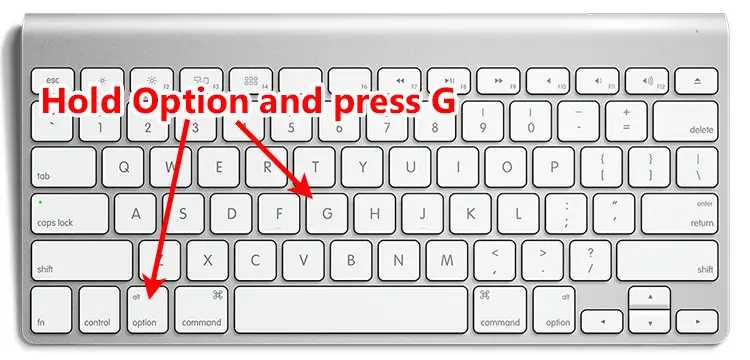
Pressing the key Option G on Mac or key ALT 0169 on Windows can easily type a copyright symbol Part 2 How to Use Symbols and Emojis The menu for symbols and emojis are used to insert a very wide variety of symbols either in a document or an application on a Mac It is like the copyright symbol on Mac

Here s how to insert copyright registered and trademark symbols using the Character Viewer in macOS Press Control Cmd Space or go to Edit Emoji Symbols in any app to open the Character Viewer Select Letter like Symbols in the left menu Double click the symbol you want to insert The Character Viewer is handy because it allows you

You can add a copyright symbol in a document to indicate that a work is protected by copyright law In Windows you can press Alt 0169 on the numeric keyboard On a Mac insert the copyright

First place the cursor where you want to insert the copyright symbol Next press the Option G keys on your keyboard You can also use the emoji keyboard to insert the copyright symbol Press Control Command Space to open the emoji keyboard Then click the Next icon two right arrows in the menu bar at the bottom

Press Option G to type the copyright symbol Press Option R to type the registered symbol Press Option 2 to type the trademark symbol Follow these steps to reveal more keyboard shortcuts to type other special characters 1 Open System Preferences and click Keyboard 2 Click Input Sources
Video of the Day The simplest way to type a copyright symbol on a Mac is to use the copyright keyboard shortcut Hold down the Option key and press the g key on the keyboard There are a variety of special symbols you can type by using the Option key plus another key Here is a step by step breakdown of copying and pasting the trademark copyright or registered symbols on a Mac 1 Double click on any symbols with your mouse or trackpad to highlight it in blue 2 Right click on the highlighted symbol then select the Copy option
In the ever evolving digital landscape mastering the art of copyright symbol usage on your Mac is paramount Whether you re a content creator a blogger a web designer or just someone who wants to protect their intellectual property knowing how to insert the copyright symbol on Mac is a fundamental skill