Copyright Symbol Iphone How To Type Trademark Copyright Symbols On IPhone And IPad How To Type Trademark Copyright Symbols On IPhone And IPad HOW TO TYPE COPYRIGHT SYMBOL On IPhone Android Word Computer Copyright Symbol Iphone File Iphone With Icons Svg Apple Phone Case How To Type The Copyright Symbol On Keyboard With Shortcuts YouTube Type the Copyright Symbol on iPhone and iPad Insert the Copyright Symbol via the Emoji Keyboard Copy Paste the Copyright Sign From an Online Source Set Up the Copyright Symbol as a Text Replacement Use the Copyright Symbol Shortcut iPad Only Insert the Copyright Symbol in ChromeOS and Linux Insert Copyright Symbol in MS Word and Google Docs
Type trademark copyright registered symbols on your iPhone Using Quicktype Open the app where you want to type these symbols I considered the Notes app Here s how to do it Type to add Trademark Copyright Registered When you type these you ll get the appropriate option in the suggestion bar above your keyboard 1 Open the app where you want to type the copyright mark 2 Simply type Copyright to request a symbol replacement from the Quicktype keyboard 3 Now tap on the corresponding QuickType symbol Also Read How to Type Copyright Symbol in Windows Method 2 Use Emoji Keyboard
How To Type The Copyright Symbol On Keyboard With Shortcuts YouTube HOW TO TYPE COPYRIGHT SYMBOL On IPhone Android Word Computer Copyright PNG Make The Copyright Symbol On Windows Or MacOS Computers Copyright Symbol 1 Free Stock Photo Public Domain Pictures Copyright Symbol December 29 2017 Macramotiv Copyright Symbol Registered Trademark Symbol PNG 980x980px Copyright Copyright PNG
Copyright Symbol Iphone
 Copyright Symbol Iphone
http://cdn.osxdaily.com/wp-content/uploads/2017/02/type-trademark-copyright-symbols-iphone-5.jpg
How to type copyright trademark registered and other symbols on iPhone and iPad You see a few special characters when you tap 123 and then tap on your iPhone or iPad keyboard But these don t show copyright trademark and registered keys For example for the copyright symbol you can put copr as the shortcut Copr isn
Templates are pre-designed files or files that can be used for different purposes. They can save time and effort by supplying a ready-made format and layout for developing different type of content. Templates can be used for individual or professional tasks, such as resumes, invites, leaflets, newsletters, reports, discussions, and more.
Copyright Symbol Iphone

Copyright Logo Chrome Copyright Symbol Free Stock Photo Public
HOW TO TYPE COPYRIGHT SYMBOL On IPhone Android Word Computer

Copyright PNG

Make The Copyright Symbol On Windows Or MacOS Computers

Copyright Symbol

December 29 2017 Macramotiv

Follow these steps to type copyright trademark and registered symbols on iPhone and iPad 1 Copy the copyright trademark or the registered symbol from here or any other site on the web 2 Open the Settings app and go to General Keyboard Text Replacement 3 Tap the plus button
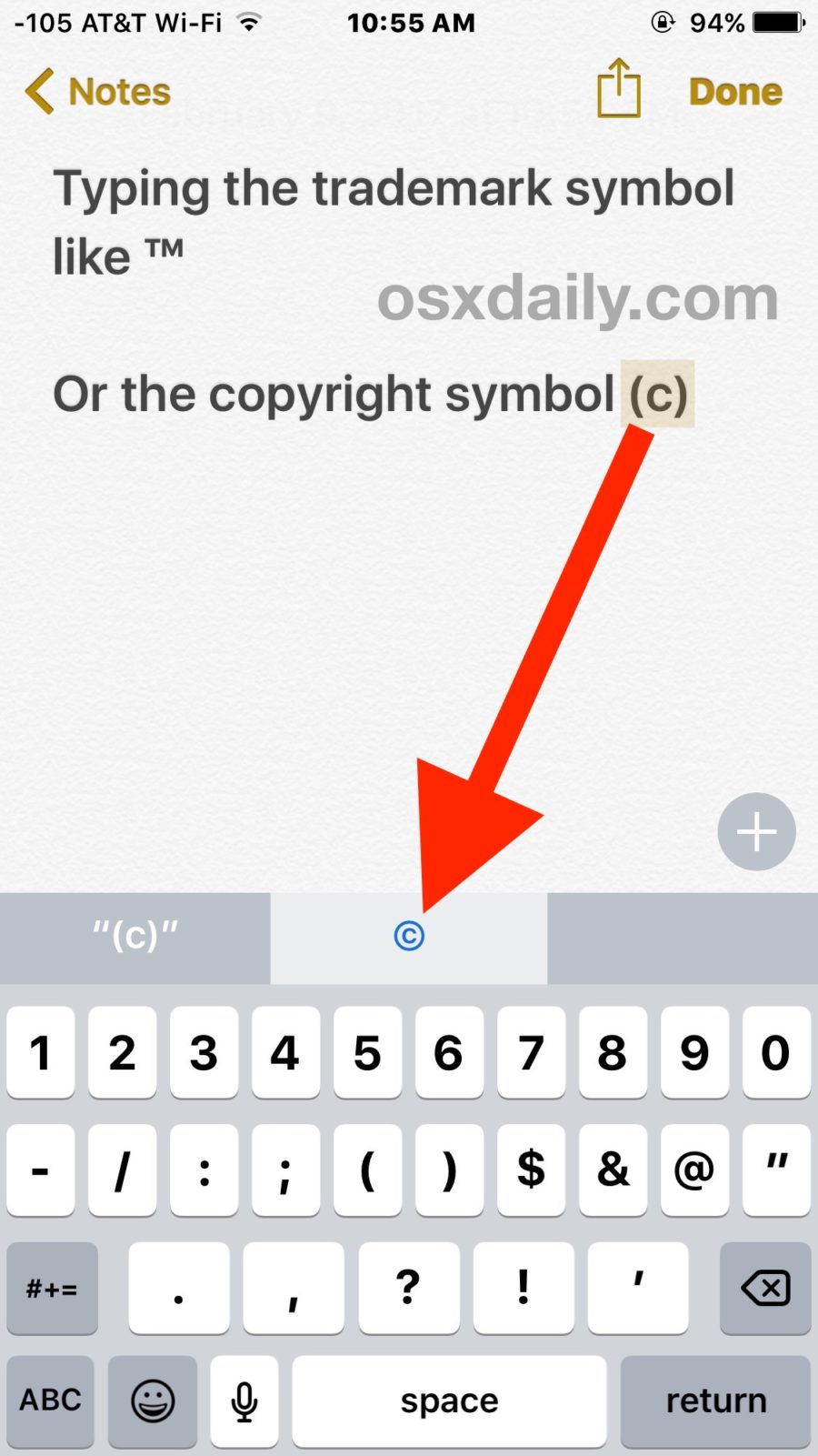
The first trick to typing the trademark symbol the registered symbol or the copyright symbol will utilize the QuickType suggestion bar on the iOS keyboard and the second trick uses the Emoji keyboard to type the same special character symbols Typing Trademark Copyright Symbols on iOS with QuickType
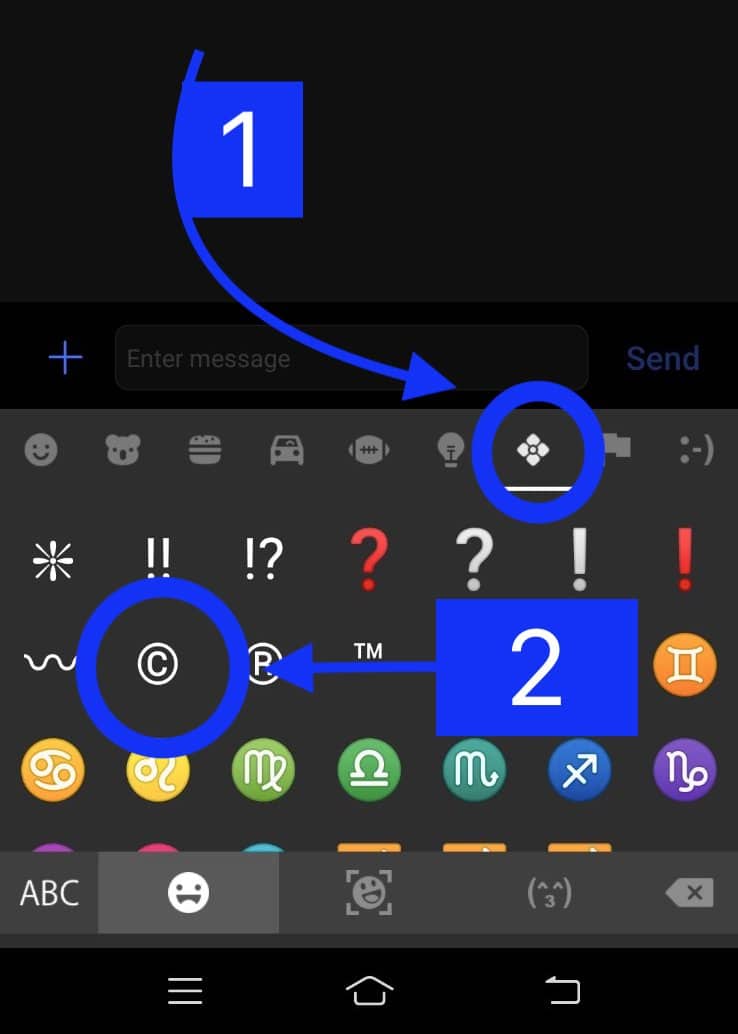
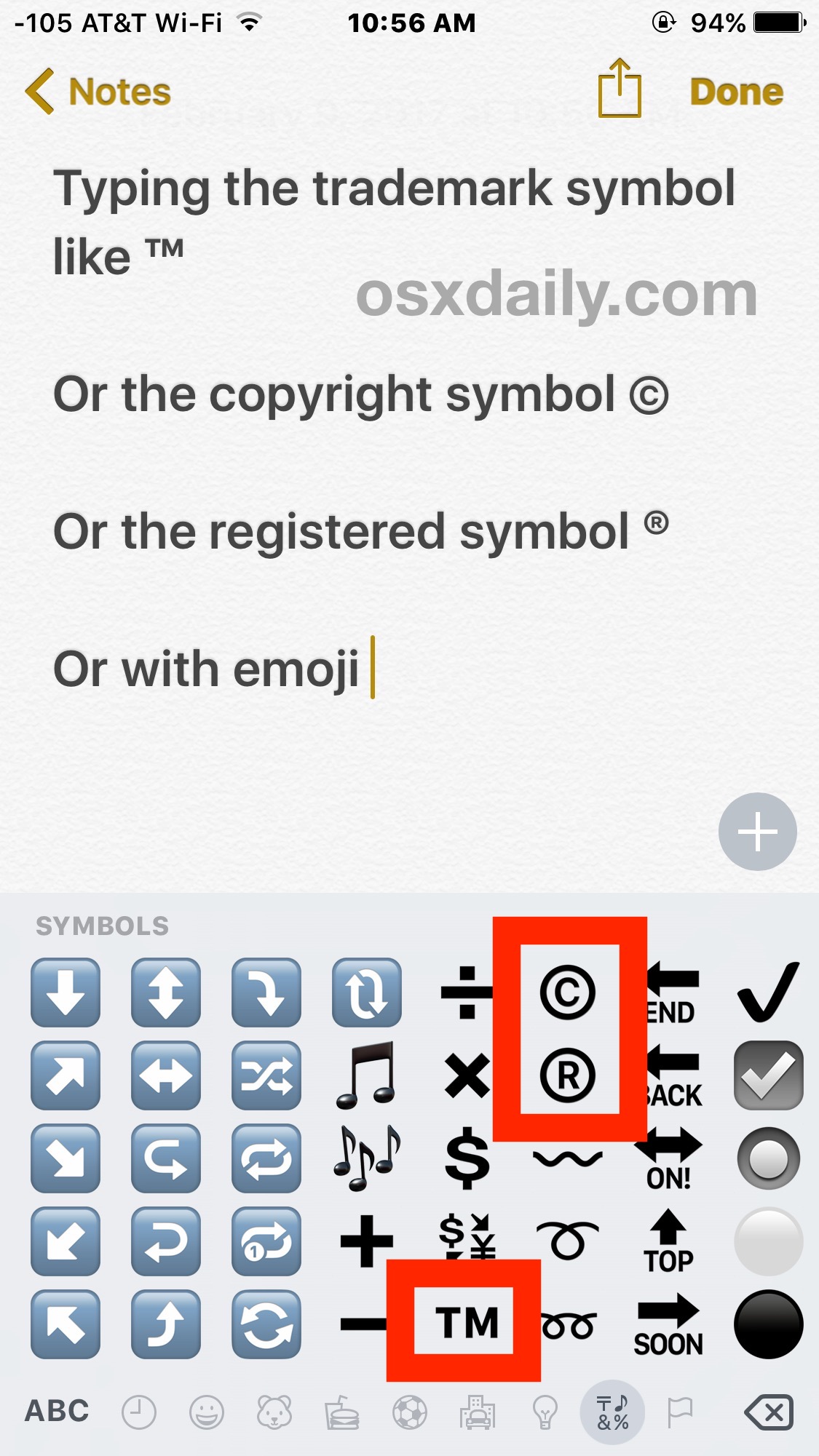
When you re ready to use the copyright symbol in your text message tap on the smiley face or globe icon on the lower left of your screen Now look to the right of your emoji menu and tap on the option with the musical note and percentage sign in it Next tap on the C symbol that s inside a circle that s the copyright symbol
IPhone iOS The copyright symbol on iPhone is on the emoji keyboard To use it switch to the emoji keyboard and go to the section marked with a musical note a percentage sign and two other symbols Find the symbol and tap it Android Phone On an Android device you can easily find the copyright symbol on the Numbers and Symbols keyboard

IPhone models Models compatible with iOS 17 iPhone XR iPhone XS iPhone XS Max iPhone 11 iPhone 11 Pro iPhone 11 Pro Max iPhone SE 2nd generation iPhone 12 mini iPhone 12 iPhone 12 Pro iPhone 12 Pro Max iPhone 13 mini iPhone 13 iPhone 13 Pro iPhone 13 Pro Max iPhone SE 3rd generation iPhone 14 iPhone 14 Plus iPhone 14 Pro
Step 1 Go to Settings General Keyboard and make sure Emoji keyboard is added If not add it by using Add New Keyboard Step 2 Open the app where you need to type trademark or copyright symbols and tap the emoji button Step 3 Tap the Symbols tab Step 4 Swipe left until you see the grey symbols screen Here are easy ways to insert a copyright symbol We ll show how in a Microsoft Word document on a Mac or on an iOS or Android device
How To Type and Insert Trademark TM Registered R and Copyright C Symbols on iPhone iPad IOSLearn how to type the tm symbol r symbol and copyright sym