Connect To Postgres From Command Line Connect To Postgres From Command Line In Windows Database Tutorials Postgresql Cannot Connect To Postgres Password Unknown Stack Overflow Remote local Connect To Postgres DB Via Python WebSofter 008 Postgres Command Line Psql Another Function Example Cloudy 003 Postgres Command Line Psql List All Databases In A Postgres SQL Shell is a command line tool to connect and work with the PostgreSQL database You can use it to create alter delete databases tables etc in the PostgreSQL database Let s connect to the default postgres database using SQL Shell psql
To connect using psql you will first need to locate its location on the operating system that you might be using i On Linux The easiest way to connect is to check whether you already have psql in your environment variables on not You can try the following command on the terminal root localhost data which psql usr bin psql To connect to PostgreSQL from the command line follow these steps Log in to your A2 Hosting account using SSH At the command line type the following command Replace dbname with the name of the database and username with the database username Copy psql dbname username At the Password prompt type the database user s password
003 Postgres Command Line Psql List All Databases In A Postgres 007 Postgres Command Line Psql Create A Function That Returns A How To Connect To PostgreSQL Database Complete Tutorial Unable To Connect To Postgres With Docker compose Issue 345 Stream Data From PostgreSQL CDC To Snowflake With Striim Cloud Striim Seamless Transition From Oracle 19c To Postgres Through Command Line PSQL Fabridata Banco De Dados E BI Business Intelligence How To Run An SQL File In Postgres How To Connect Postgres Database In Linux Command Line Systran Box
Connect To Postgres From Command Line
 Connect To Postgres From Command Line
https://dbtut.com/wp-content/uploads/2020/10/connectpostgrescommandline-1.jpg
The psql client the native command line client for PostgreSQL can connect to database instances to offer an interactive session or to send commands to the server It is especially useful when implementing your initial settings and getting the basic configuration in place prior to interacting with the database through application libraries
Templates are pre-designed documents or files that can be utilized for different functions. They can save effort and time by providing a ready-made format and design for developing different type of material. Templates can be utilized for personal or expert projects, such as resumes, invitations, flyers, newsletters, reports, discussions, and more.
Connect To Postgres From Command Line

Postgresql Cannot Connect To Postgres Over External Ip Stack Overflow
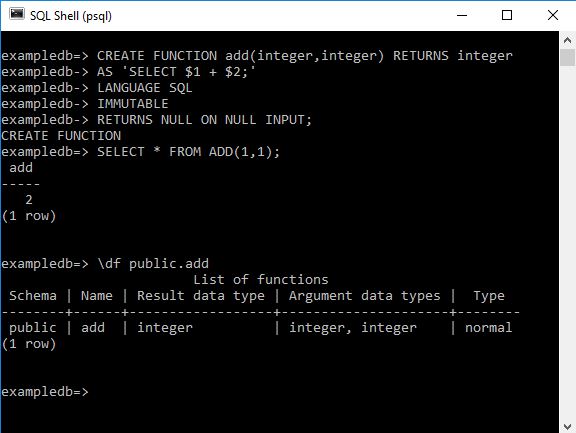
007 Postgres Command Line Psql Create A Function That Returns A

How To Connect To PostgreSQL Database Complete Tutorial
Unable To Connect To Postgres With Docker compose Issue 345
Seamless Transition From Oracle 19c To Postgres Through Command Line

PSQL Fabridata Banco De Dados E BI Business Intelligence
How to connect to PostgreSQL through CLI Ask Question Asked 9 years 1 month ago Modified 2 years 9 months ago Viewed 22k times 14 I am trying to access postgresql through the command line However whenever it is time for me to enter my password I get the following error Fatal password authentication failed for user RMehta

How to Connect to Postgres from Command Line Before logging into a PostgreSQL database ensure that you have the necessary client tools installed on your system These tools include the PostgreSQL command line client psql which allows you to interact with the database from the terminal

We open the command line to connect to postgres and run the following command and go to the path where psql exe is 1 c Program Files x86 pgAdmin 4 v4 runtime After going to the path above we list the files in it with the dir command Connect To Postgres Database from command line in Windows
Option 1 Connect to a database with the command line Open a terminal You can make sure psql is installed by typing psql version You should see psql PostgreSQL version number where version number is the version of PostgreSQL that s installed on your machine In my case it s 14 1 Checking psql version via the command line
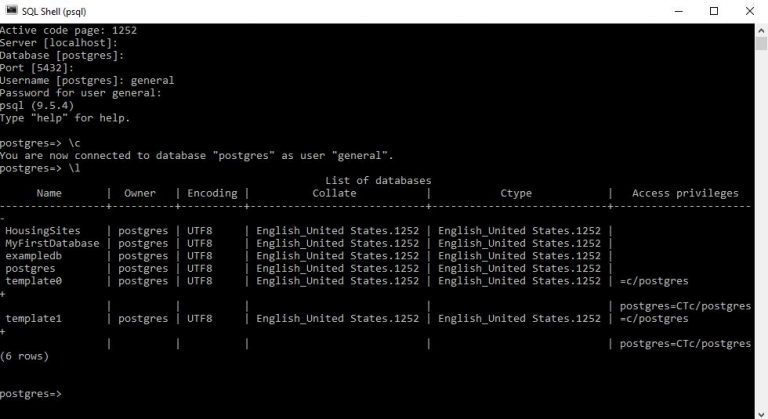
To connect to your DB instance from an EC2 instance you can install a PostgreSQL client on the EC2 instance To install the psql client on Amazon Linux 2023 run the following command sudo dnf install postgresql15 To install the psql client on Amazon Linux 2 run the following command sudo amazon linux extras install postgresql14
With the client installed you can connect to a PostgreSQL server using the psql command and specifying the host h port p and the name of the database d to connect to psql h localhost p 5432 d database name Connect to PostgreSQL Database on Linux Windows This tutorial shows you various ways to connect to PostgreSQL database on different platform by using interactive terminal program called psql and pgAdmin GUI application w3resource Home PostgreSQL Home PostgreSQL Installation Connect to PostgreSQL PostgreSQL Connector and APIs Data Types
Description psql is a terminal based front end to PostgreSQL It enables you to type in queries interactively issue them to PostgreSQL and see the query results Alternatively input can be from a file or from command line arguments