Compare Two Columns And Find Missing Data In Excel Vlookup To Find Missing Data In Excel Sheet YouTube Macro To Compare Two Columns In Excel And Highlight Differences How To Cross Reference In Excel To Find Missing Data 6 Ways Compare Two Columns Or Lists To Find And Return Differences In Excel Compare Two Columns In Excel To Find Differences TeladegX Web You can apply similar formula IF ISERROR VLOOKUP A2 Fruit List 2 A 2 A 22 1 FALSE A2 quot quot A2 is the fruit in Fruit List 1 and Fruit List 2 A 2 A 22 is the range whose missing values you are looking for to find out missing values in Fruit List 2 see below screenshots and then highlight these missing values in Fruit List 1 manually
Web Apr 27 2023 nbsp 0183 32 Formula for differences To find cells in the same row with different values simply replace the equals sign with the non equality sign lt gt IF A2 lt gt B2 quot No match quot quot quot Matches and differences And of course nothing prevents you from finding both matches and differences with a single formula IF A2 B2 quot Match quot quot No match quot Or Web Jun 30 2012 nbsp 0183 32 11 I have two CSV documents The first has 10 000 rows with 50 columns with the first column being a unique SKU stock keeping unit The second document with 9 500 rows using the same columns and identifiers I simply want to create a third document with the 500 missing records Is this possible with excel microsoft excel csv
Compare Two Columns In Excel To Find Differences TeladegX How To Stack Columns Of Data Into One Column In Excel Nandeshwar info How To Compare Two Columns And Return Common Values In Excel How To Deal With Missing Data In Excel 6 Suitable Ways Excel Formula To Compare Two Columns And Return A Value 5 Examples How To Compare Two Columns In Excel 4 Methods BSuite365 How To Match Two Columns In Excel All Things How Excel Compare Two Columns And Find Differences Between Numbers from BEST Way To Excel Compare Two Columns For Missing Values
Compare Two Columns And Find Missing Data In Excel
 Compare Two Columns And Find Missing Data In Excel
https://i.ytimg.com/vi/R2Fdzokv1v0/maxresdefault.jpg
Web The Excel IF function statement allows you to make a logical comparison between a value and what you expect by testing for a condition and returning a result if True or False the value in C2 in the range C5 C17 If the value is found then return the corresponding value from the same row in column D VLOOKUP B9 B2 C6 2 TRUE Similarly
Templates are pre-designed files or files that can be used for numerous functions. They can conserve time and effort by providing a ready-made format and layout for producing different kinds of content. Templates can be used for individual or expert projects, such as resumes, invites, flyers, newsletters, reports, discussions, and more.
Compare Two Columns And Find Missing Data In Excel
How To Compare Two Columns In Excel For Missing Values SpreadCheaters
How To Stack Columns Of Data Into One Column In Excel Nandeshwar info

How To Compare Two Columns And Return Common Values In Excel

How To Deal With Missing Data In Excel 6 Suitable Ways
How To Compare Two Columns In Excel 4 Methods BSuite365

How To Match Two Columns In Excel All Things How
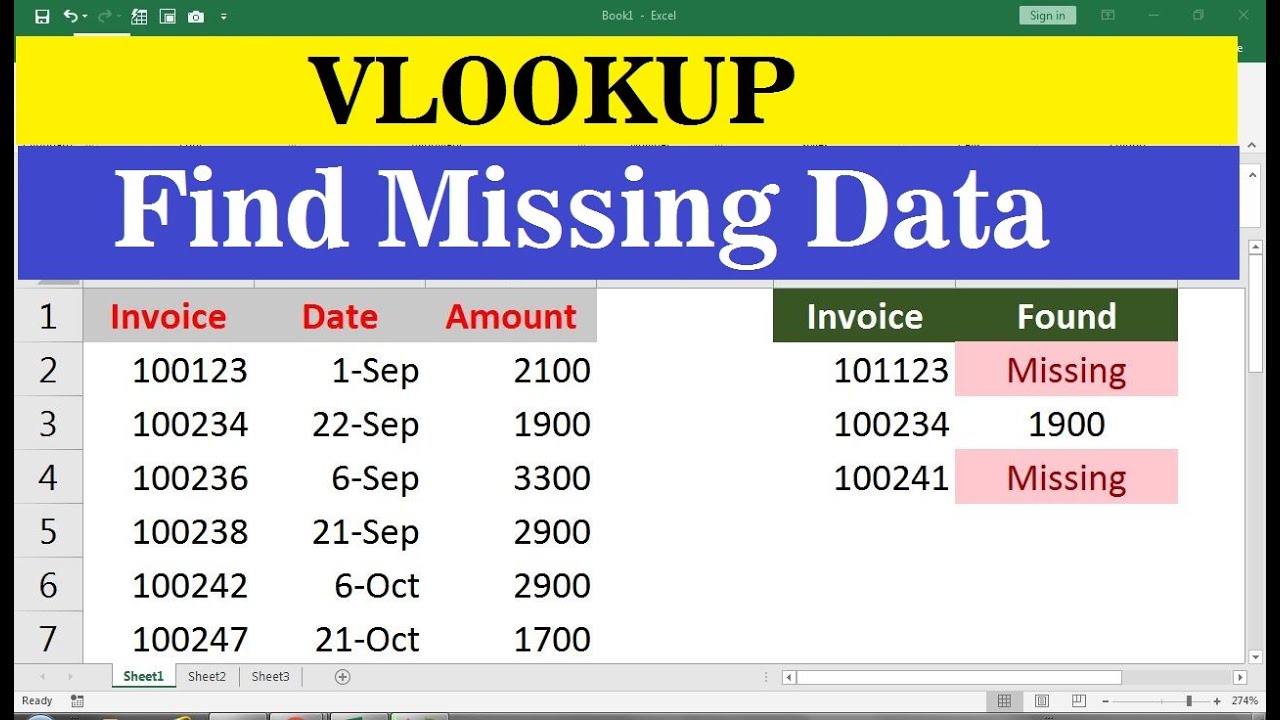
Web Mar 13 2023 nbsp 0183 32 VLOOKUP to compare two columns in Excel for common values and missing data by Svetlana Cheusheva updated on March 13 2023 The tutorial shows how to use VLOOKUP formula in Excel to compare two columns to return common values matches or find missing data differences

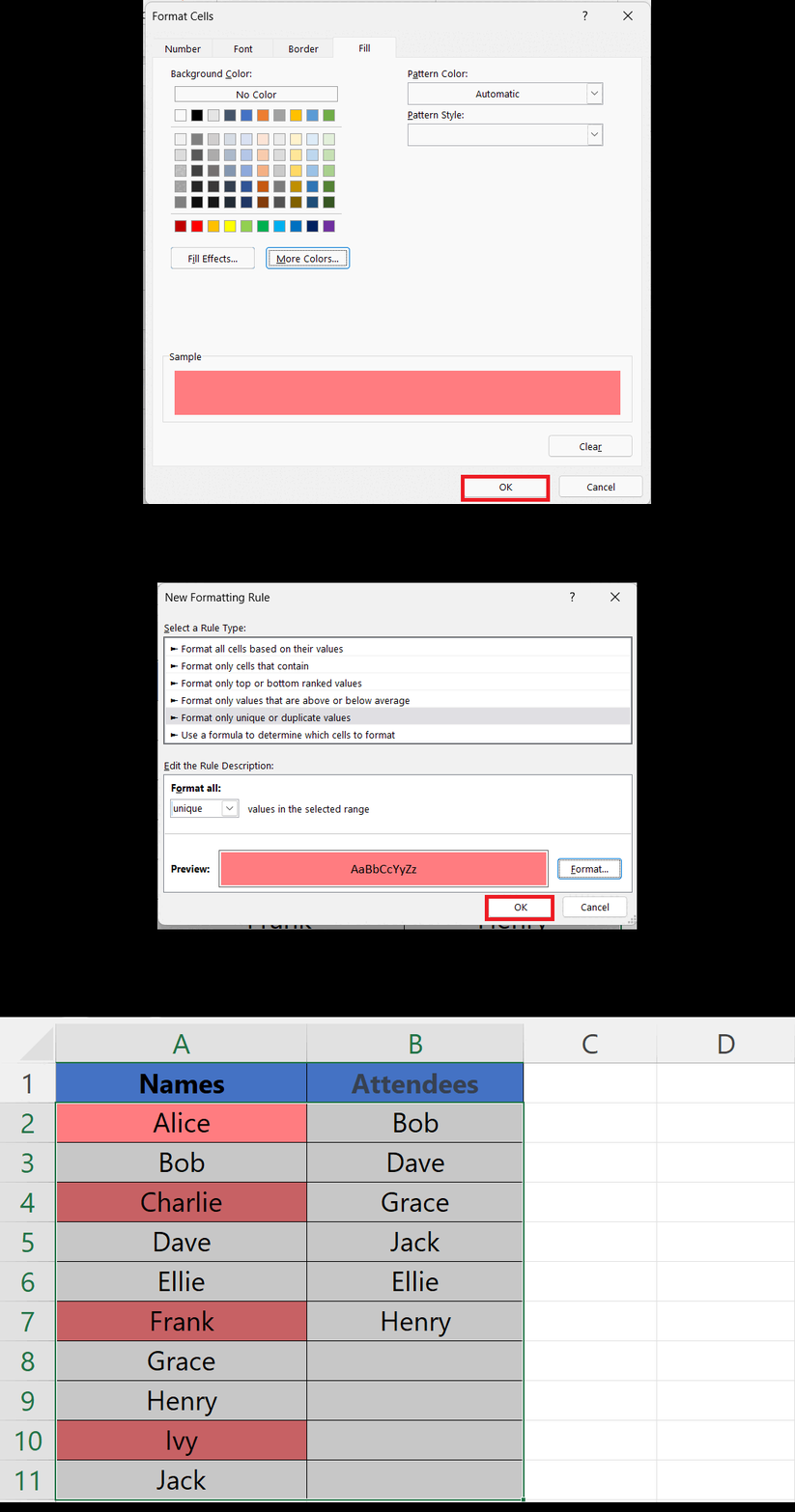
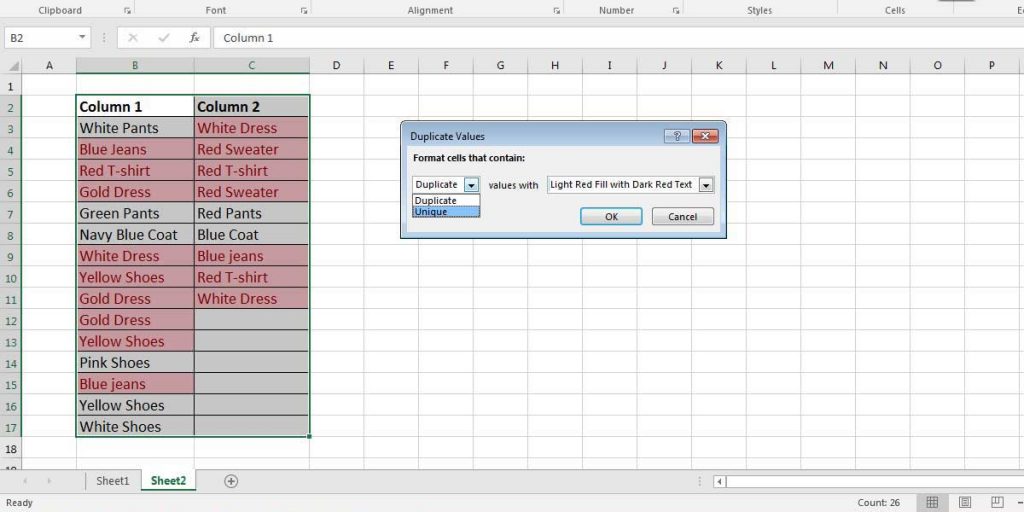
Web Apr 11 2023 nbsp 0183 32 Comparing two columns for missing values in Excel means identifying the cells in one column that do not have corresponding values in another column This is commonly used when dealing with large sets of data where there are multiple columns with related information

Web Jun 3 2022 nbsp 0183 32 In this tutorial I ll show you how to use VLOOKUP in Excel to find missing records in one data set when compared to a comprehensive list I m using Microsoft 365 desktop on a Windows 10

Web Compare Two Columns and Find Missing Data Points If you want to identify whether a data point from one list is present in the other list you need to use the lookup formulas Suppose you have a dataset as shown below and you want to identify companies that are present in column A but not in Column B
Web Let me show you two examples where we compare two columns in Excel using the VLOOKUP function to find matches and differences Compare Two Columns Using VLOOKUP and Find Matches Suppose we have a dataset as shown below where we have some names in columns A and B
Web Aug 16 2016 nbsp 0183 32 Go back to your workbook and assuming that you ve kept the columns as before A B amp C and with row 2 as the first data row go to cell C2 and type ShowMissingZips A2 B2 You should see what you re after It s not pretty and I d normally add error handling but it ll do for a quick fix Web Using the equals operator quot quot we can compare the values in two columns for equalness As an example we will be working on comparing shipping and billing addresses to see if they match each other Here is the formula to compare the value of two cells using the equals operator B3 C3
Web May 27 2011 nbsp 0183 32 The comparing can be done with Excel VBA code The compare process can be made with the Excel VBA Worksheet Countif function Two columns on different worksheets were compared in this template It found different results as an entire row was copied to the second worksheet Code