Command To Start Mariadb MariaDB How To Show Database Command Linux NixCraft Linux Unix Forum 4 Ways To Check MySQL Or MariaDB Version On Linux Linux Shout Synology Community Mysql GPG Failed To Start Mariadb service Unit Not Fou MariaDB Web If your MariaDB server supports TLS encryption configure your clients to establish only secure connections and to verify the server certificate This procedure describes how to enable TLS support for all users on the server 2 5 1 Configuring the MariaDB client to use TLS encryption by default
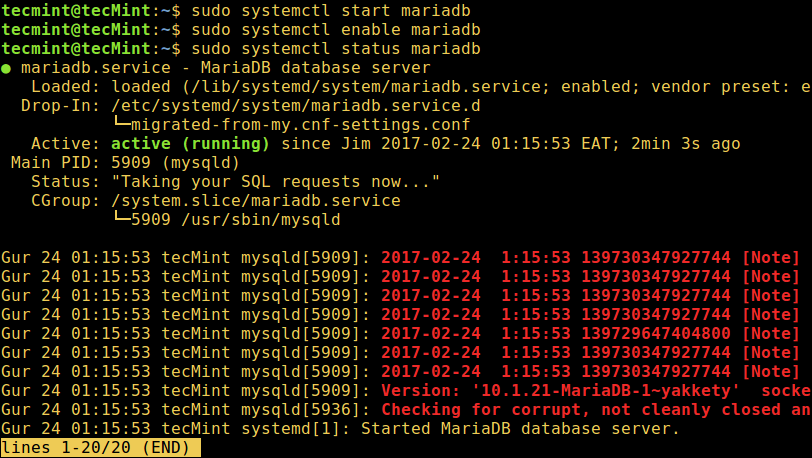
Web Jun 28 2022 nbsp 0183 32 sudo systemctl start mariadb Additionally consider enabling MariaDB to start every time on system startup as shown sudo systemctl enable mariadb The above command ensures that MariaDB starts automatically every time the server is rebooted or powered on Step 3 Configure MariaDB Web Oct 16 2014 nbsp 0183 32 Starting the MariaDB server For CentOS and Fedora we now need to start the server and set the MariaDB root user password like so su service mysql start mysqladmin password newpassword
MariaDB Unable To Start MariaDB 10 3 On AaPanel 6 5 1 AaPanel Hosting BHow To Start Mariadb Server In Linux Systran Box Centos7 yum mariaDB Database Laboratory Start XAMPP And MySQL MariaDB MariaDB 10 RHEL 8 How To Install MariaDB 10 On Debian And Ubuntu Yum mariadb Failed To Start Mariadb service Unit Not Found Failed To Start MariaDB 10 3 Database Server SOLVED Pren Host
Command To Start Mariadb
 Command To Start Mariadb
https://www.nixcraft.com/uploads/default/original/1X/323627f1776460a9d2d6934105779f95cfe64680.png
Web Start and stop the database service After the installation is complete you can start the database service by using the commands in this section If the system is already started a message informs you that the service is already running Use the following command to start MariaDB sudo systemctl start mariadb service
Templates are pre-designed documents or files that can be utilized for numerous functions. They can save time and effort by offering a ready-made format and layout for developing different type of content. Templates can be utilized for individual or professional jobs, such as resumes, invitations, flyers, newsletters, reports, presentations, and more.
Command To Start Mariadb

Come Inviare Una Query SQL A MySQL Dalla Linea Di Comando

Unable To Start MariaDB 10 3 On AaPanel 6 5 1 AaPanel Hosting

BHow To Start Mariadb Server In Linux Systran Box
Centos7 yum mariaDB

MariaDB 10 RHEL 8
How To Install MariaDB 10 On Debian And Ubuntu

Web 1 mysqld Configuration Files and Groups Which configuration files and groups mysqld reads 2 mariadbd Options Lists of all the options for mariadbd previously called mysqld 7 What to Do if MariaDB Doesn t Start Troubleshooting MariaDB when it fails to start Running MariaDB from the Build Directory

Web Nov 15 2018 nbsp 0183 32 Once you run a the command below and enter your password you will be presented with a prompt that tells you the program really running MariaDB and the database is used mysql u root p MariaDB none gt List Your Databases Issue the show databases command as seen below to see all databases An example is shown below
Web Jul 16 2019 nbsp 0183 32 Using mariadb The command to use mariadb and the general syntax is mariadb lt options gt Options mariadb supports the following options help Display help and exit I help Synonym for abort source on error Abort source filename operations in case of errors auto rehash Enable automatic rehashing
Web mariadbd mysqld safe mysqld multi mysql server There are several different methods to start or stop the MariaDB Server process There are two primary categories that most of these methods fall into starting the process with the help of a service manager and starting the process manually

Web Mar 28 2022 nbsp 0183 32 MariaDB responds to either the mariadb or mysql command mariadb version mariadb Ver 15 1 Distrib 10 5 13 MariaDB for Linux x86 64 mysql version mysql Ver 15 1 Distrib 10 5 13 MariaDB for Linux x86 64 Start the database service You ve installed a database engine but you haven t started it
Web MariaDB Commands Checking version of your MariaDB installation To check the current version of your DB installation type the following command in your terminal Web To start we ll use the latter From the Linux command line you would enter the following to log in as the root user and to enter monitor mode mariadb u root p h localhost The u option is for specifying the user name You would replace root here if you want to use a different user name This is the MariaDB user name not the Linux user name
Web The Getting Started section provides you step by step to get the MariaDB up and running so that you can start practicing MariaDB more effectively introduce you to the nation sample database and show you how to load the sample database into the MariaDB server This section helps you get started with MariaDB by providing you with the easy to