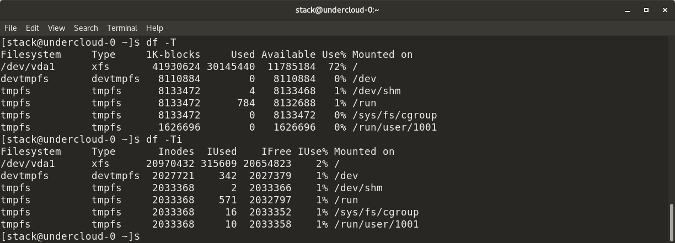
Command To Find Used Space In Linux How To Check Swap Space In Linux 3 Steps with Pictures Disk Free Space Linux Linux Command To Check Free Disk Space In Gb Linux World HOW TO ADD SWAP SPACE IN LINUX LINUX SWAP TUTORIAL Triazs Hardware Information Terminal Ubuntu Web Jan 14 2022 nbsp 0183 32 The utility used to quickly check disk usage on almost all Linux systems is df which stands for quot disk filesystems quot It simply prints out a list of all the filesystems on your system df hT This command here is invoked with two flags h for quot human readable quot which prints out byte numbers in KB MB and GB and T which displays the type of
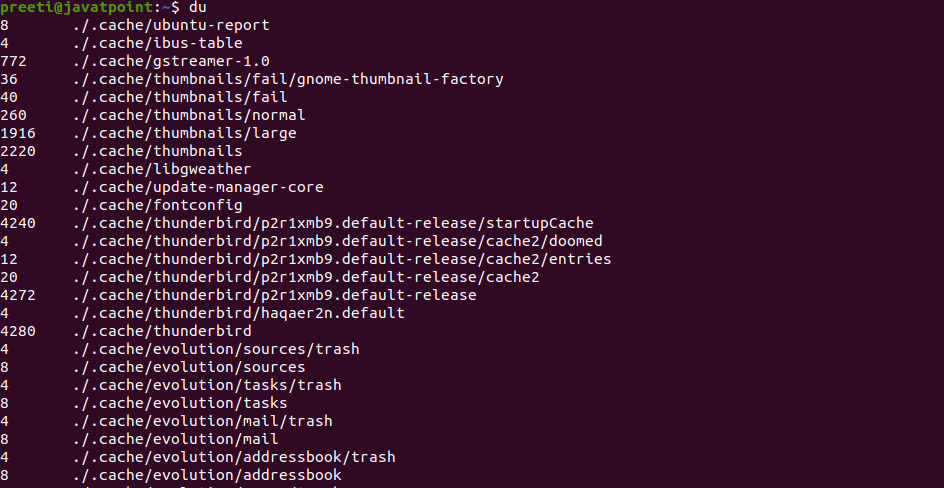
Web Jan 23 2016 nbsp 0183 32 Linux commands to check disk space using df command Shows the amount of disk space used and available on Linux file systems du command Display the amount of disk space used by the specified files and for each subdirectory btrfs fi df device command Show disk space usage information for a btrfs based mount Web Dec 4 2023 nbsp 0183 32 How to Check Disk Space in Linux Using the df Command The df command or Disk Filesystem is used to check disk space It displays the amount of used and available storage space in your machine When executing this command you will see the default columns Filesystem Size Used Available Use and Mounted On
Triazs Hardware Information Terminal Ubuntu C mo Revisar El Espacio De Intercambio SWAP En Linux Linux Commands To Check Disk Space Javatpoint Linux Command To Check The Disk Space How To Find A File In Linux Using The Command Line How To Check Free Space In Command Prompt Linux World Linux Command To Check The Disk Space Linux Check Disk Space Command To View System Disk Usage df And Du Ls Check The Disk Space In Ubuntu Unix Linux Stack Exchange
Command To Find Used Space In Linux
 Command To Find Used Space In Linux
http://www.wikihow.com/images/e/e5/Check-Swap-Space-in-Linux-Step-3-Version-2.jpg
Web Nov 4 2020 nbsp 0183 32 The simplest way to find the free disk space on Linux is to use df command The df command stands for disk free and quite obviously it shows you the free and available disk space on Linux systems df h With h option it shows the disk space in human readable format MB and GB Here s the output of the df command for my Dell
Pre-crafted templates offer a time-saving solution for developing a diverse variety of documents and files. These pre-designed formats and layouts can be utilized for various personal and expert projects, consisting of resumes, invites, flyers, newsletters, reports, discussions, and more, streamlining the content production process.
Command To Find Used Space In Linux

Finding Unallocated Disk Space In Linux Systran Box

C mo Revisar El Espacio De Intercambio SWAP En Linux
Linux Commands To Check Disk Space Javatpoint

Linux Command To Check The Disk Space

How To Check Free Space In Command Prompt Linux World
Linux Command To Check The Disk Space

Web Oct 17 2023 nbsp 0183 32 These commands let you easily identify what s using up your system s storage View the Total Available and Used Disk Space on Linux Bash contains two useful commands related to disk space To find out the available and used disk space use df disk filesystems sometimes called disk free

Web Dec 15 2023 nbsp 0183 32 So you could better understand the usage of the df command in Linux 1 Check Linux Disk Space Usage The df command displays the information of device name total blocks total disk space used disk space available disk space and mount points on a file system sudo df Show Linux Disk Space Usage 2 Check Information on

Web Jan 3 2020 nbsp 0183 32 The df command stands for quot disk free quot and shows available and used disk space on the Linux system df a shows the file system s complete disk usage even if the Available field is 0 df T shows the disk usage along with each block s filesystem type e g xfs ext2 ext3 btrfs etc

Web Apr 30 2022 nbsp 0183 32 1 Use the h argument to display the sizes and usage in megabytes and gigabytes The h argument refers to human readable df h 2 Use df h to see a broad overview of disk usage This
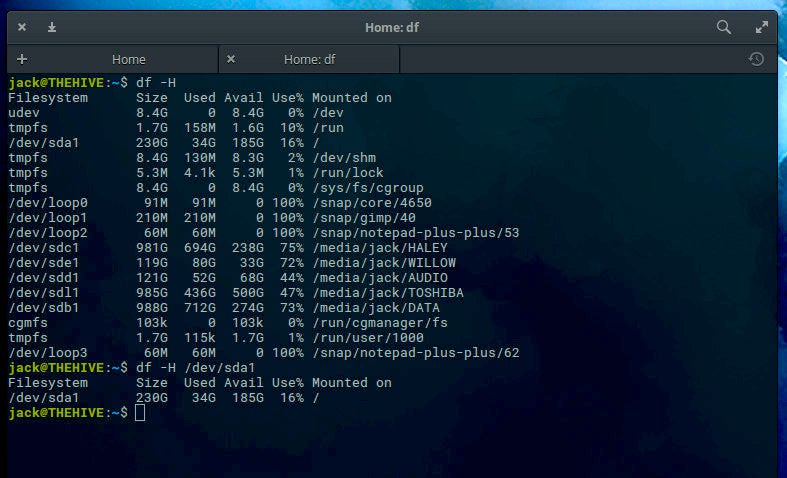
Web Aug 13 2021 nbsp 0183 32 The df command short for disk free shows each drive s disk size space used and free space Each block in the above output represents one kilobyte To make the output from df easier to read you can add the h option This option displays disk space in kilobytes K megabytes M and gigabytes G sudo df h
Web Jun 27 2012 nbsp 0183 32 You can use two commands df and du df report file system disk space usage Usage works like such df h Which should output something like this Filesystem Size Used Avail Use Mounted on dev vzfs 20G 3 5G 16G 18 The h flag provides human readable output which makes reading of the output easier Web Jan 30 2024 nbsp 0183 32 To check disk space in Linux you can use the df command Here are some examples To see an overview of disk space usage for all mounted file systems in human readable format df h To check the disk space usage for a specific directory e g the root directory df h
Web Jul 20 2023 nbsp 0183 32 Let us break down the command and see what says each parameter du command Estimate file space usage a Displays all files and folders sort command Sort lines of text files n Compare according to string numerical value r Reverse the result of comparisons head Output the first part of the files n Print the first n lines In our