Command Prompt List Partitions Windows Command Prompt List For Windows 10 KAMAZON Diskpart List Disk Kali Linux How To Use Command Prompt On Bootup Hrommid Command Prompt List Tips Trick Hacks APK Pour Android T l charger Using Diskpart To Delete Partition For Your Windows 7 8 10 Web Oct 10 2019 nbsp 0183 32 At the DISKPART gt prompt type list disk and hit enter This will list all of the available storage drives including hard drives USB storage SD cards etc that your PC can currently detect Starting with the number zero Diskpart will list any detected disks
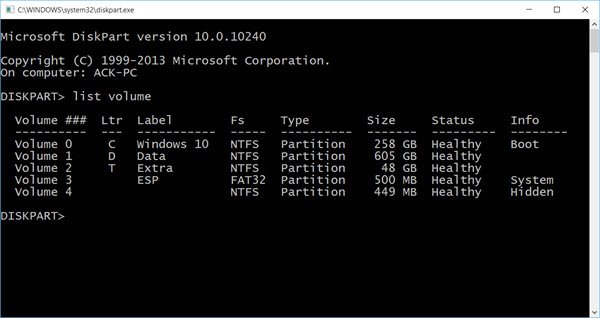
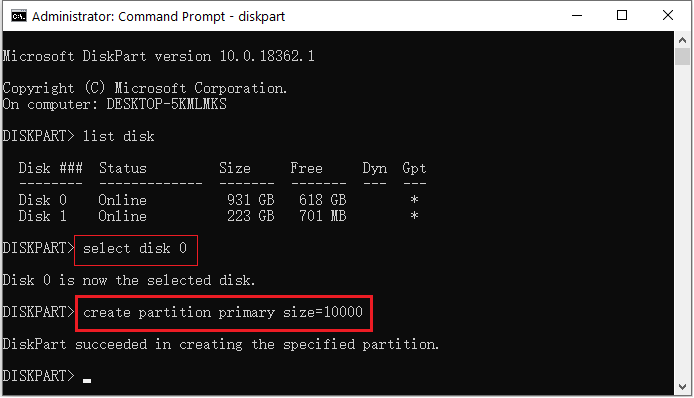
Web May 20 2023 nbsp 0183 32 List Partition Displays list of partitions for the selected disk List Volume Displays all the partitions of all the disks How to open DiskPart in Windows Open Command Prompt Web Jul 20 2021 nbsp 0183 32 To create a partition At a command prompt type diskpart At the DISKPART prompt type list disk Note the drive number you wish to manipulate At the DISKPART prompt type select disk 0 This selects disk to edit make sure to type in the disk number from step two
Using Diskpart To Delete Partition For Your Windows 7 8 10 Windows 7 Backup Command Line Dusupernal How To Create Disk Partitions In Windows Using Diskpart Command Converting MBR Partitions TO GPT Using Command Prompt YouTube How To Create Disk Partitions In Windows Using Diskpart Command LaptrinhX Diskpart Change Disk Number Speedbetta How To Use Fdisk To Manage Partitions On Linux Delete Protected Partitions In Windows Using Command Prompt How To Delete Partition In Windows 10 Multiple Options
Command Prompt List Partitions
 Command Prompt List Partitions
https://kamazonplay.com/wp-content/uploads/2020/12/Windows-10-Command.jpg
Web Sep 6 2023 nbsp 0183 32 Open a command prompt and type the following command Press Enter and you will see the list of Drives You can also use the following parameter Using the following will display Device ID
Templates are pre-designed documents or files that can be used for numerous purposes. They can save effort and time by supplying a ready-made format and layout for creating various kinds of content. Templates can be used for individual or expert projects, such as resumes, invitations, leaflets, newsletters, reports, presentations, and more.
Command Prompt List Partitions
How To Run A Disk Check In Command Prompt Bathgarry
Windows 7 Backup Command Line Dusupernal

How To Create Disk Partitions In Windows Using Diskpart Command

Converting MBR Partitions TO GPT Using Command Prompt YouTube
Diskpart Change Disk Number Speedbetta

How To Use Fdisk To Manage Partitions On Linux

Web Feb 3 2023 nbsp 0183 32 The diskpart command interpreter helps you manage your computer s drives disks partitions volumes or virtual hard disks Before you can use diskpart commands you must first list and then select an object to give it focus After an object has focus any diskpart commands that you type will act on that object

Web Aug 29 2023 nbsp 0183 32 Use List Commands Utilize commands like list disk list partition and list volume to get a clear view of your disk configuration before making any changes This helps you verify

Web Connect to endpoint Launch elevated command prompt Run diskpart to list all volumes C gt diskpart DISKPART gt LIST VOLUME Create script text file with the following LIST VOLUME For each volume listed add the following to the script text file SELECT VOLUME lt gt LIST PARTITION Save script text file with logical name Diskpart Script txt

Web Mar 13 2023 nbsp 0183 32 Displays a list of the available commands or detailed help information on a specified command import Imports a foreign disk group into the disk group of the local computer inactive Marks the system partition or boot partition with focus as inactive on basic master boot record MBR disks list

Web Dec 4 2018 nbsp 0183 32 To create a new partition you need to use the create partition command followed by the partition type and size Note that the list command used previously also displays the available free space on each hard disk Your partition must be of a size equal or less to the amount of available free space
Web Sep 3 2012 nbsp 0183 32 Is there any CMD command line that shows all partition letters For example C D E Can that command also show all the partition s information Free space used space total space command line Web Feb 3 2023 nbsp 0183 32 partition Displays the partitions listed in the partition table of the current disk volume Displays a list of basic and dynamic volumes on all disks vdisk Displays a list of the VHDs that are attached and or selected This command lists detached VHDs if they are currently selected however the disk type is set to Unknown until the VHD is
Web Nov 15 2023 nbsp 0183 32 Step 1 You can use the two methods mentioned above to open the command prompt or Run window Step 2 Enter Diskpart Steps about essential partition functions are as follows Create a partition using Diskpart 1 At the Diskpart prompt type List Disk 2 Input Select Disk represents the disk number 3 Type Create partition