Command Prompt Check Mapped Drives The NET USE Command To See Mapped Network How To Map Network Drives From The Command Prompt In Windows How To Delete Mapped Drives In Windows How To Map Network Drives From The Command Prompt In Windows How To Map Network Drives From The Command Prompt In Windows WEB Dec 18 2014 nbsp 0183 32 In Windows if you have mapped network drives and you don t know the UNC path for them you can start a command prompt Start Run cmd exe and
WEB SET bCheckPath bOriginalPath p0 The variable CD stores the current path and you need only the drive letter so you only search for that with the FIND command in WEB Jul 21 2011 nbsp 0183 32 Open a command prompt and type net use and press enter That will list all active drive mappings
How To Map Network Drives From The Command Prompt In Windows How To Map Network Drives From The Command Prompt In Windows Network How To Map Network Drives From The Command Prompt In Windows How To Map Network Drives From The Command Prompt In Windows How To Map Network Drives From The Command Prompt In Windows YouTube Mapped Network Drive Not Showing In The Elevated Apps Windows OS Hub How To Delete Mapped Drives In Windows Command Prompt Deriving UNC Network Path Blog Cung C p C c a c nh X M ng Trong D u Nh c L nh N ng Cao
Command Prompt Check Mapped Drives
 Command Prompt Check Mapped Drives
https://apnewsday.com/wp-content/uploads/2022/08/net-user-test01domain.png
WEB In Windows 8 the same command run from an elevated prompt returns quot There are no entries in the list quot The behavior is identical for powershell Get WmiObject Win32 LogonSessionMappedDisk A workaround for
Templates are pre-designed documents or files that can be used for different functions. They can conserve time and effort by supplying a ready-made format and design for developing various kinds of material. Templates can be utilized for personal or professional jobs, such as resumes, invitations, flyers, newsletters, reports, presentations, and more.
Command Prompt Check Mapped Drives

How To Map Network Drives From The Command Prompt In Windows

How To Map Network Drives From The Command Prompt In Windows Network
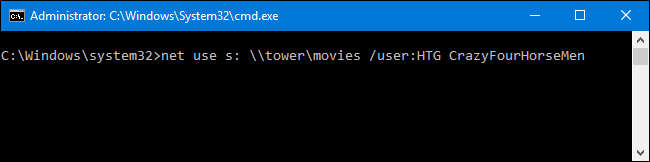
How To Map Network Drives From The Command Prompt In Windows
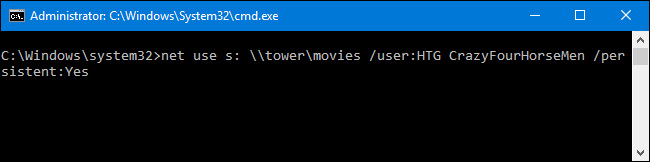
How To Map Network Drives From The Command Prompt In Windows
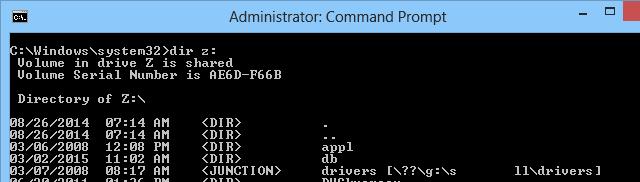
Mapped Network Drive Not Showing In The Elevated Apps Windows OS Hub
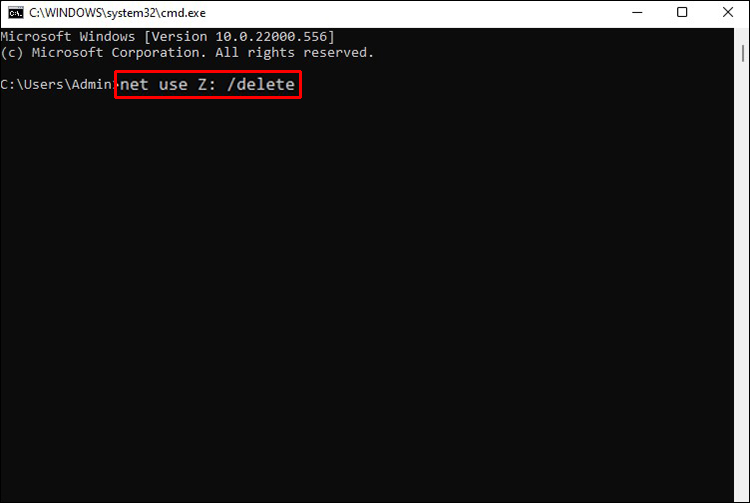
How To Delete Mapped Drives In Windows

WEB Jan 8 2014 nbsp 0183 32 Is there a command that can be used from the command line to output a list of the mapped network drives on the local system and their location on the network to a text file This will only be used on

WEB Aug 11 2017 nbsp 0183 32 command in Command Prompt to map a network drive for this tutorial You can also use the same command in PowerShell if you prefer To map a network drive type the following command and then hit

WEB On Windows 10 when you want to list network shares with net view in Administrator command prompt by default you get C WINDOWS system32 gt net view System error

WEB May 9 2024 nbsp 0183 32 You can display or list hard drives in CMD Command Prompt or PowerShell using wmic diskpart fsutil psdrive command line in Windows 11 10

WEB Jan 28 2021 nbsp 0183 32 In Command Prompt enter the following command to view the remote path of a network drive net use All the information of the mapped drive on your device is now displayed on the screen Status
WEB Oct 31 2014 nbsp 0183 32 Is there a way to pull a list of mapped drives for a user on another network computer ideally through the command prompt Windows 7 I have tried wmic node WEB Mar 15 2024 nbsp 0183 32 As a workaround you can mount network drives from the elevated command prompt using the commands net use or rundll32
WEB Aug 9 2015 nbsp 0183 32 The fastest solution I currently have is to Type quot start quot to open explorer Alt D to focus the address bar type the drive letter I want and press enter and wait for it to