Command Line See All Drives CMD List Drives How To List Drives In Command Prompt Answered How Can I See All Drives In CMD StackHowTo How Can I See All Drives In CMD StackHowTo Pin On Powershell And Cmd C mo Formatear Un USB Con CMD s mbolo Del Sistema En Windows 10 Apr 29 2023 nbsp 0183 32 CAD command command s LISP LISP CAD command
Mar 5 2025 nbsp 0183 32 keil Internal command error Keil Internal command error Keil Settings Windows10
C mo Formatear Un USB Con CMD s mbolo Del Sistema En Windows 10 How Can I See All Drives In CMD StackHowTo How Can I See All Drives In CMD StackHowTo Access C Drive Windows 10 Yydelta How Can I See All Drives In CMD StackHowTo How To Map Network Drives From The Command Prompt In Windows Network USB Safely Remove Help Change Device Properties Dialog 73 CMD Commands To Use On Windows Operating System Windows Operating How To Map Network Drives From The Command Prompt In Windows YouTube
Command Line See All Drives
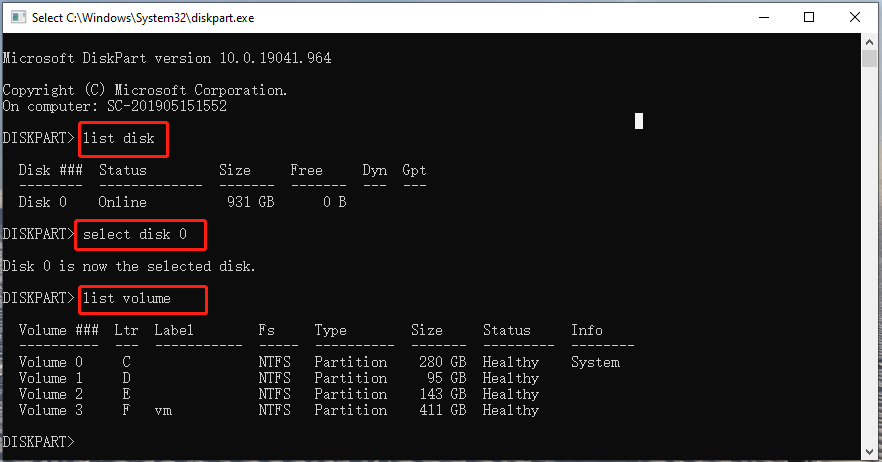 Command Line See All Drives
https://www.partitionwizard.com/images/uploads/articles/2022/05/cmd-list-drives/cmd-list-drives-4.png
Command R Mac OS X Command Option R
Pre-crafted templates use a time-saving solution for developing a diverse variety of documents and files. These pre-designed formats and designs can be made use of for various personal and expert jobs, consisting of resumes, invitations, flyers, newsletters, reports, presentations, and more, improving the material production procedure.
Command Line See All Drives
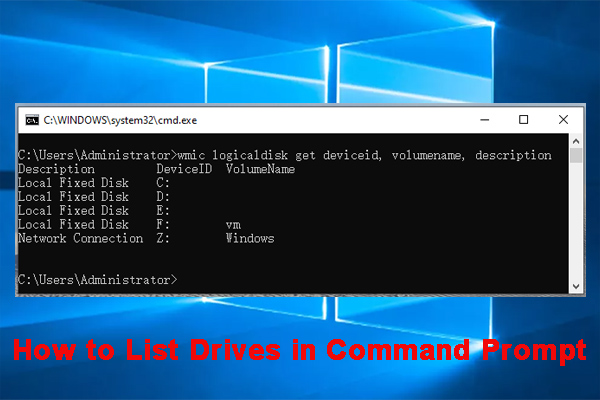
CMD List Drives How To List Drives In Command Prompt Answered
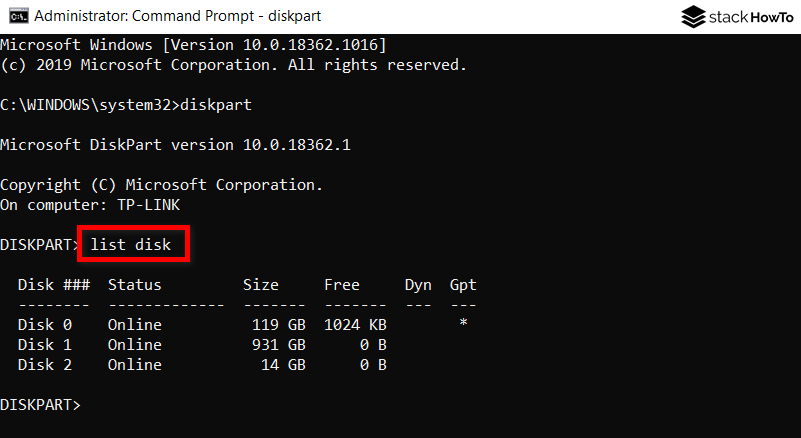
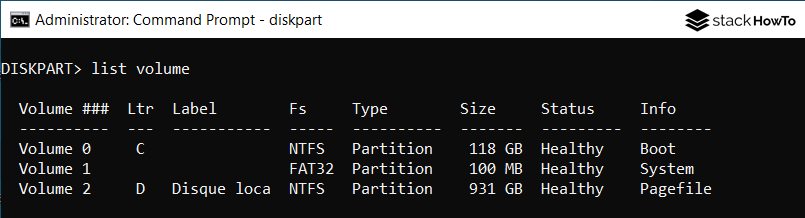
How Can I See All Drives In CMD StackHowTo

How Can I See All Drives In CMD StackHowTo

Access C Drive Windows 10 Yydelta

How To Map Network Drives From The Command Prompt In Windows Network

USB Safely Remove Help Change Device Properties Dialog
command Command Apple key 4 Option PC Ctrl

Apr 9 2025 nbsp 0183 32 command command command Windows command Windows
Aug 4 2024 nbsp 0183 32 UNKNOWN COMMAND quot UNKNOWN COMMAND quot

WinX Windows X WinX quot quot quot quot

vim Press ENTER or type command to continue vimrc
[desc-11] [desc-12]
[desc-13]