Command For Running C Program In Terminal How To Run A C Program In Terminal How To Run C Program In Visual Studio Code Mac Zilladast How Do I Make Vs Code Put The Output Of My C Program In TERMINAL Panel How To Write Compile And Run A C Program In Ubuntu And Other Linux How To Compile A C File Using Tiny C Compiler 7 Steps Riset Web Step 1 Open command prompt Go to Windows search and type cmd Right click on the command prompt and Run as administrator Note It s not mandatory to open command prompt in Administrative mode You can open command prompt with local user rights Step 2 Validate availability of gcc compiler
Web Sep 12 2023 nbsp 0183 32 STEP 4 Compile the program The next step is to compile the program To do this we need to use the command gcc followed by the name of the program we are going to execute In our case we will use Armstrong c After this an executable file will be created in the directory that your c file exists in Eg Armstrong exe Web Dec 9 2012 nbsp 0183 32 1 open up a terminal and compile the program 2 run it for example in Ubuntu program name comman name anything anything example a out locale a this example prints all locales supported by my compiler which is gcc more info
How To Compile A C File Using Tiny C Compiler 7 Steps Riset Run C Program Using Command Prompt With Source Code YouTube How To Run C Program In Command Prompt Using Mingw BEST GAMES WALKTHROUGH Creating And Running C Program TUTORIALTPOINT Java Tutorial C How To Run C Program In Terminal For Mac How To Run C Program In Terminal For Mac How To Compile And Run C Program Using GCC On Ubuntu 18 04 LTS Linux How To Run C Program In Visual Studio Code Stack Overflow LinuXamination Compile Run C Program On Linux Terminal
Command For Running C Program In Terminal
 Command For Running C Program In Terminal
https://i0.wp.com/learncplusplus.org/wp-content/uploads/2022/07/smartmockups_l62cej5y.jpg?resize=1140%2C694&ssl=1
Web Mar 25 2019 nbsp 0183 32 You cannot execute an file quot c quot from shell You must compile it first For example We have an file called quot file c quot Open a terminal Use gcc for compile the file and make an executable gcc file c o executable Now you can open the executable file since shell just go to the folder and execute executable Share
Pre-crafted templates use a time-saving solution for developing a varied variety of files and files. These pre-designed formats and layouts can be used for various individual and expert jobs, consisting of resumes, invites, leaflets, newsletters, reports, discussions, and more, streamlining the content creation process.
Command For Running C Program In Terminal

Simple Ways To Run C Program In Command Prompt 6 Steps

Run C Program Using Command Prompt With Source Code YouTube
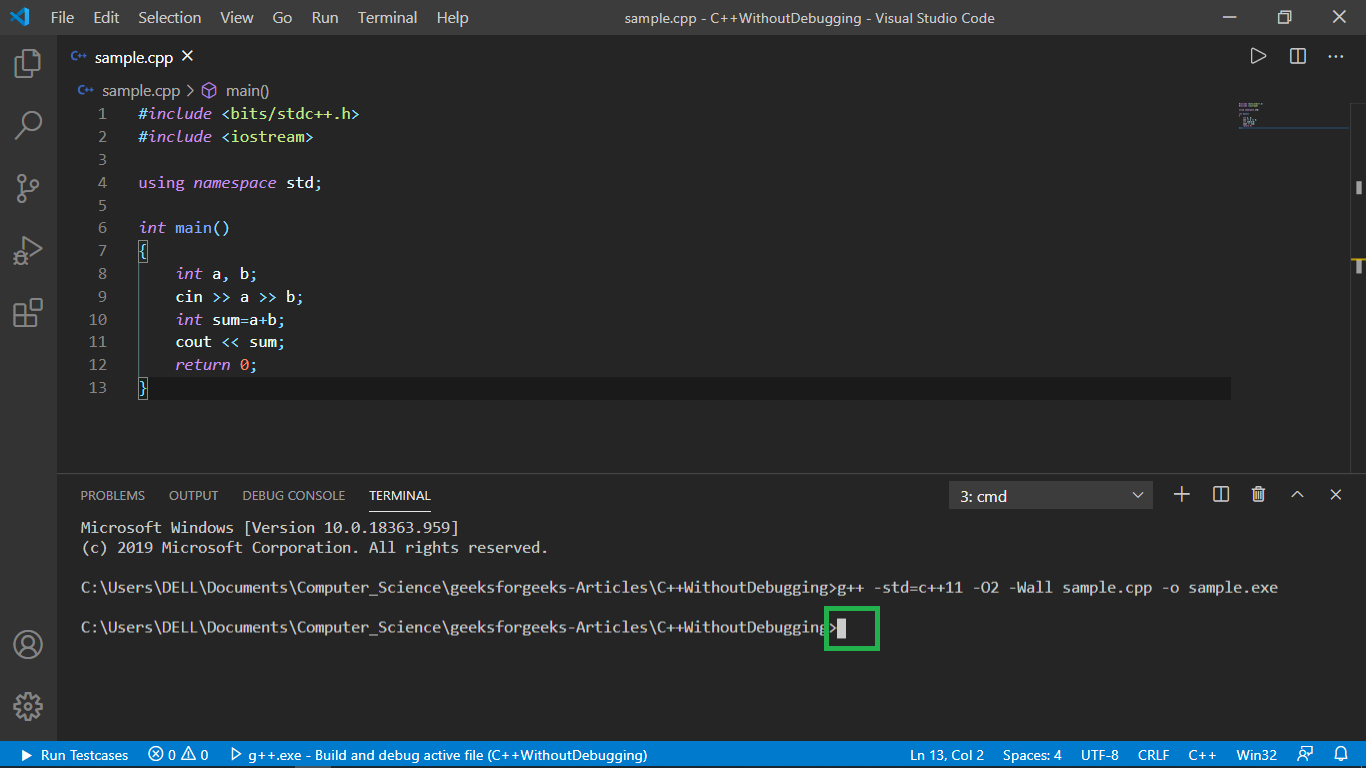
How To Run C Program In Command Prompt Using Mingw BEST GAMES WALKTHROUGH

Creating And Running C Program TUTORIALTPOINT Java Tutorial C
How To Run C Program In Terminal For Mac

How To Compile And Run C Program Using GCC On Ubuntu 18 04 LTS Linux

Web Jan 14 2016 nbsp 0183 32 1 make probably just compiles your program rather than both compiling and running it and you re not using it properly either Look inside the Makefile for a list of targets they re at the start of their respective lines in the form target name make test might be correct
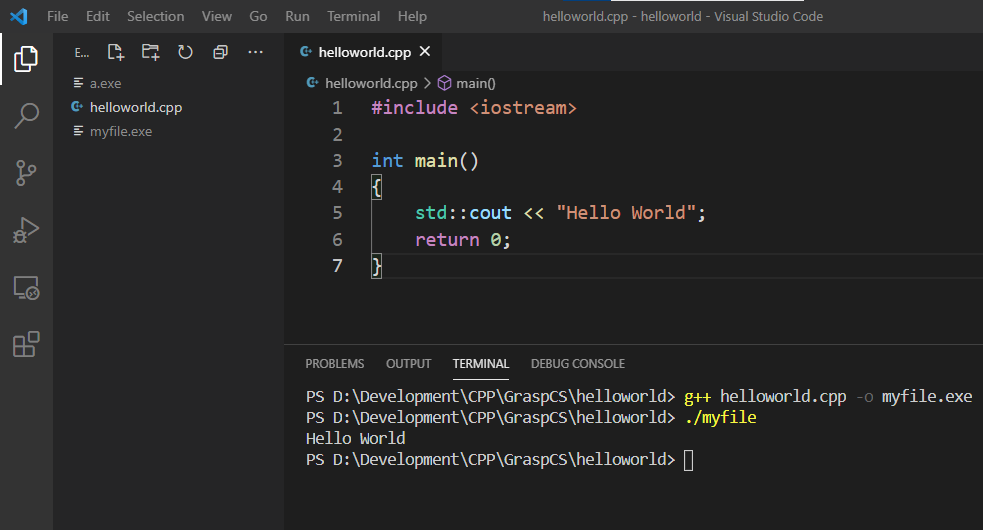
Web Nov 1 2023 nbsp 0183 32 Run the gcc command to compile your C program The syntax you ll use is gcc filename c o filename exe This compiles the program and makes it executable Replace filename c with the name of the file containing your C code and filename exe with the name you want to give the compiled program

Web Jul 31 2023 nbsp 0183 32 Method 1 Using CC Compiler In this method we will be compiling and executing the C program code using CC Compiler Step 1 First we need to open the text editor and terminal for writing code and executing it through the terminal Step 2 In the text editor we need to write any code using a C programming language
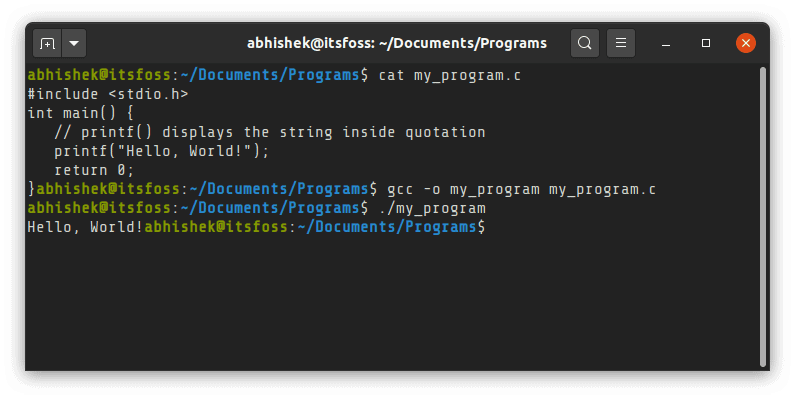
Web Oct 21 2008 nbsp 0183 32 In order to compile and run C source code from a Mac terminal one needs to do the following If the path of cpp file is somePath fileName cpp first go the directory with path somePath To compile fileName cpp type c fileName cpp o fileName To run the program type fileName

Web Jul 26 2022 nbsp 0183 32 How to run C program In Terminal or the command prompt with a Professional C compiler Download RAD Studio 11 Now See What s New in RAD Studio 11 How to run C program in Terminal with C Builder You can run C code using most C compilers and build tools like C Builder 1
[desc-11] [desc-12]
[desc-13]