Chrome Pdf Printer Settings Foxit Pdf Printer Settings Resume Examples Printer Settings In Microsoft Pdf Viewer Advanced Settings Christianluli Bolt Spacing Wood Members MODE Architecture GitHub DevExpress Examples how to use the pdf printer settings Cannot Print A File It Opens As Save As Instead On Windows Computer WEB Instead of using the regular Print or Ctrl P option try using the Print using system dialog option Ctrl Shift P You can then select the printer you wish to use and click on
WEB May 14 2024 nbsp 0183 32 In the Chrome browser select the three vertical dots More icon in the upper right corner Choose Settings gt Privacy and security gt Site Settings gt Additional WEB Jan 23 2014 nbsp 0183 32 Before you create the PDF you can also change the page margins adjust headers and footers and set options like whether you want background colors and
Cannot Print A File It Opens As Save As Instead On Windows Computer Foxit Pdf Printer Missing Resume Examples How To Add A Watermark In Drawings Tekla User Assistance ReaSoft PDF Printer Settings General Settings ADOBE PDF 9 0 PRINTER DRIVER Printing From Chrome PDF Printer 7 PDF Plotting Layout Not Showing In AutoCAD When Exporting To PDF Using Foxit Pdf Printer Missing Resume Examples Foxit Pdf Printer Missing Resume Examples
Chrome Pdf Printer Settings
 Chrome Pdf Printer Settings
https://i2.wp.com/rudolfbarshai.com/wp-content/uploads/2020/09/foxit-pdf-printer-settings.png
WEB Oct 29 2013 nbsp 0183 32 Selecting the Headers and footers would do exactly what you need to achieve it will show the webpage URL in the footer as well as some other data in the
Pre-crafted templates provide a time-saving solution for creating a varied series of files and files. These pre-designed formats and designs can be made use of for various individual and expert projects, including resumes, invites, flyers, newsletters, reports, discussions, and more, improving the content creation procedure.
Chrome Pdf Printer Settings
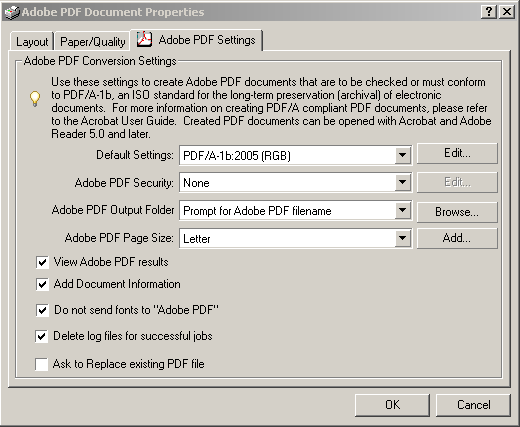
Adobe PDF Printer Settings For PDF A Southern District Of New York

Foxit Pdf Printer Missing Resume Examples

How To Add A Watermark In Drawings Tekla User Assistance

ReaSoft PDF Printer Settings General Settings

Printing From Chrome PDF Printer 7 PDF
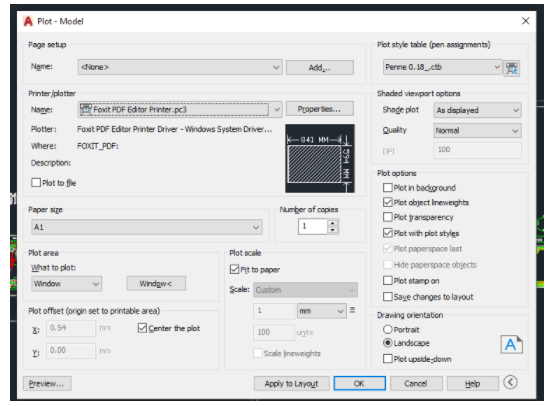
Plotting Layout Not Showing In AutoCAD When Exporting To PDF Using

WEB On your computer open Chrome Open the page image or file you want to print Click FilePrint Or use a keyboard shortcut Windows amp Linux Ctrl p Mac p In the

WEB Aug 20 2012 nbsp 0183 32 To change the print margins settings in Google Chrome this is what you ll need to do Enter the Chrome print preview page Shortcut Ctrl P There is a sidebar in

WEB Jan 30 2021 nbsp 0183 32 Tap the quot Print quot icon to open the printer settings menu where you can customize everything The menu is similar to the one on a desktop computer and the
WEB Learn how to fix the issue of print always defaulting to quot Save to Pdf quot in Google Chrome with this helpful thread from the Chrome Community

WEB To change the printer you want to print to click the Change button You can select to print from a different printer to a PDF document or even to the cloud using Google Drive
WEB Mar 31 2021 nbsp 0183 32 Chrome s Print dialogue as it appears on a Mac in early 2021 showing a preview of appropriately enough David Bull s Encyclopedia of Woodblock Printmaking WEB Sep 7 2017 nbsp 0183 32 If you need to print a page to PDF using Chrome or Edge without header and footer there is an additional command line option no pdf header footer Another
WEB How to enable the native Chrome PDF viewer The native Chrome PDF viewer is the default way to open PDF files and view them in Chrome It s relatively simple to adjust