Check Office Activation Status Powershell Microsoft PowerShell Check Windows License Activation Status Word For Mac Combo Box Not Found Zoomathis Check Office Activation Cmd Mountainlasopa How To Activate Microsoft Office 2019 2016 Microsoft Access Product Activation Failed Beatslasopa The general syntax is as follows Console cscript ospp vbs Option Value ComputerName User Password Option Specifies the option and value to use to activate a product install or uninstall a product key install and display license information set KMS host name and port and remove KMS host name and port
Microsoft 365 If you re using a Microsoft 365 product see View Microsoft 365 licenses and services with PowerShell Follow the steps to find your license type and other details about your version of Office Office LTSC 2021 Office 2019 and Office 2016 Press Windows logo key X on your keyboard to open the quick action menu View activation of Microsoft 365 Apps by using vnextdiag ps1 n To view the activation status of Microsoft 365 Apps you can use the PowerShell script named vnextdiag ps1 n To use vnextdiag ps1 you need to open a Windows PowerShell command prompt and navigate to the C Program Files Microsoft Office Office16 folder
Microsoft Access Product Activation Failed Beatslasopa How To Check Office Activation Status How To Check The Office 2016 Office 365 License Activation Status Como Verificar A Vers o Do PowerShell No Windows 10 TheFastCode How To Activate Microsoft Office 2019 2016 How To Activate Microsoft Office 2019 2016 Microsoft PowerShell Check Windows License Activation Status VGeek Powershell Get Domain Join Status DONIMAIN Checking Windows Activation Status On Active Directory Computers
Check Office Activation Status Powershell
https://lh3.googleusercontent.com/proxy/DPSfH0yIqdTdH0eXlSY5Kn6EuQvDeIU017I0ExItMb9f8YEro3nNOEENxns85TA3ro9_inKbtPVw8zIWpEujlHMLJiUX5xBdAVaPEv7fb64eDnv-krDDpiQYLSJuRGdRggG6EHaF0HvqYaiPXrZsOQ6UEQ=w1200-h630-p-k-no-nu
01 23 2023 4 contributors Applies to Microsoft 365 Feedback In this article Download the Enterprise version of the Assistant Script the Reset Office Activation scenario Available switches for the Reset Office Activation scenario Sample commands Detected conditions and results
Pre-crafted templates use a time-saving option for producing a diverse variety of files and files. These pre-designed formats and designs can be used for numerous individual and expert jobs, including resumes, invitations, flyers, newsletters, reports, presentations, and more, streamlining the content production process.
Check Office Activation Status Powershell

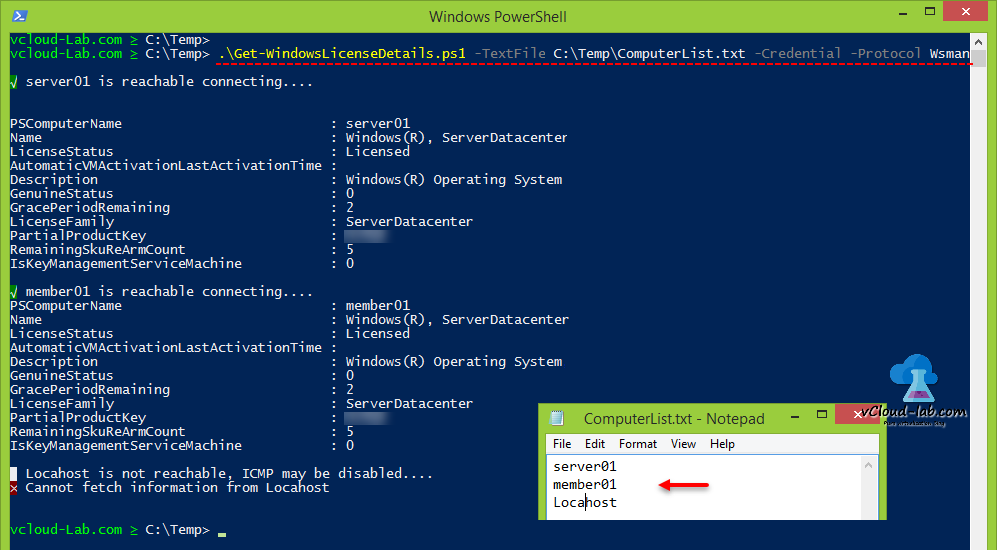
PowerShell Script To Check Windows Activation Status On Multiple
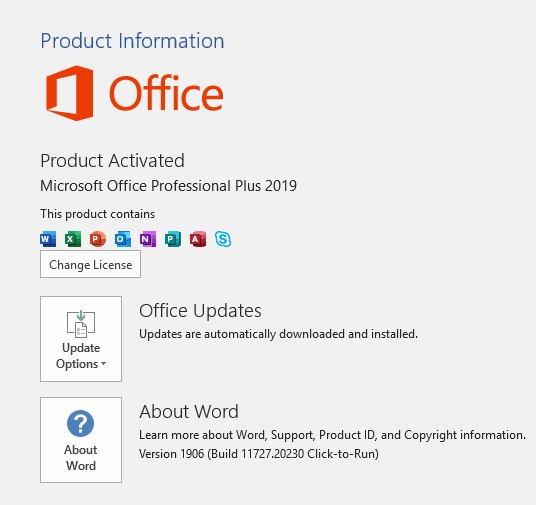
How To Check Office Activation Status
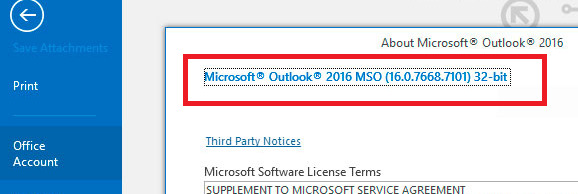
How To Check The Office 2016 Office 365 License Activation Status

Como Verificar A Vers o Do PowerShell No Windows 10 TheFastCode

How To Activate Microsoft Office 2019 2016

Microsoft PowerShell Check Windows License Activation Status VGeek

Checking activation status of Office 2021 Microsoft Community TI Tiberius Claudius Created on July 6 2022 Checking activation status of Office 2021 I m a home user running Windows 10 Pro I purchased Office 2021 Home and Business from microsoft and have installed and activated it

Check Office Activation Status via PowerShell Removing Office 365 2016 Activation Popup Let s Get Started Checking the License Type and Activation Status of Office 2019 2016 or Office 365

4 Answers Sorted by 16 A purely PowerShell solution would be Get CimInstance SoftwareLicensingProduct Filter Name like Windows where PartialProductKey select Description LicenseStatus This will give you an output like this Description LicenseStatus Windows R Operating System OEM DM channel 1

Step 1 The first step is to check the type of your Office 2016 2019 or Office 365 installation To do so open Word Excel or any other Office application click File menu click Account and then click About Word to check if your Office 2016 Office 2019 or Office 365 install is 32 bit or 64 bit

Open a command prompt with administrative privileges type the following and hit Enter to navigate to the Office installation folder If you have 32 bit Office type the following command and
The best way is to use the CIM cmdlets The CIM cmdlets shipped in Windows PowerShell 3 0 with Windows 8 and Windows Server 2012 so they have been around for a while The WMI team wrote a great article about CIM cmdlets on the Windows PowerShell Blog that you may want to read Introduction to CIM Cmdlets To restart the Software Protection Service run the following commands Console Copy net stop sppsvc net start sppsvc Run the following command to display the license information for the installed and active Windows edition cscript slmgr vbs dli
In the admin center go to the Reports Usage page From the dashboard homepage click on the View more button on the Office activations card Interpret the Office activations report You can view the activations in the Office 365 report by choosing the Activations tab Select Choose columns to add or remove columns from the report