Check Numpy Version In Jupyter Notebook How To Check If NumPy Is Installed And Find Your NumPy Version How To Check Scipy Version Jupyter Colab Terminal Anaconda How To Check Python Version In Jupyter Notebook Finxter How To Check Numpy Version Jupyter Colab Terminal Anaconda Pycharm SOLVED How To Check Spark Version PySpark Jupyter Notebook These Web Sep 30 2021 nbsp 0183 32 1 So in my Anaconda environment I have two installed versions of numpy Just for illustration purposes if I type conda list in the Anaconda Prompt I have the following By default my Jupyter Notebook uses version 1 20 2 I have checked this by using print np version 1 20 2
Web May 16 2023 nbsp 0183 32 Python NumPy Check NumPy version np version Modified 2023 05 16 Tags Python NumPy This article explains how to check the NumPy version used in Python py or Jupyter Notebook ipynb Contents Check NumPy version the version attribute Get detailed NumPy version information np version Web Mar 23 2023 nbsp 0183 32 Viewed 135 times 0 As stated the version shown in my terminal is of 1 24 2 but in my jupyter notebook reflects 1 19 5 instead Here is what is reflected on my terminal packages in environment at opt anaconda3 Name Version Build Channel numpy 1 24 2 pypi 0 pypi numpydoc 1 4 0 py39hecd8cb5 0
SOLVED How To Check Spark Version PySpark Jupyter Notebook These How To Check Numpy Version Jupyter Colab Terminal Anaconda Pycharm How To Check Spark Version PySpark Jupyter Notebook By BigData ETL How To Check The Numpy Version In Linux Mac And Windows CodeVsColor How To Check NumPy Version Installed On Your System How To Check Python Version In Jupyter Notebook Finxter How To Check Numpy Version Jupyter Colab Terminal Anaconda Pycharm How To Check Python Version In Jupyter Notebook Finxter Install Ipython Windows 10 Montananet
Check Numpy Version In Jupyter Notebook
 Check Numpy Version In Jupyter Notebook
https://opensourceoptions.com/wp-content/uploads/2021/07/pexels-george-milton-6954188.jpg
Web Dec 7 2022 at 13 14 Add a comment 8 Answers Sorted by 379 from platform import python version print python version This will give you the exact version of python running your script eg output 3 6 5 Share Improve this answer Follow
Pre-crafted templates provide a time-saving solution for producing a varied series of files and files. These pre-designed formats and layouts can be utilized for numerous personal and professional tasks, including resumes, invites, flyers, newsletters, reports, discussions, and more, enhancing the material production procedure.
Check Numpy Version In Jupyter Notebook
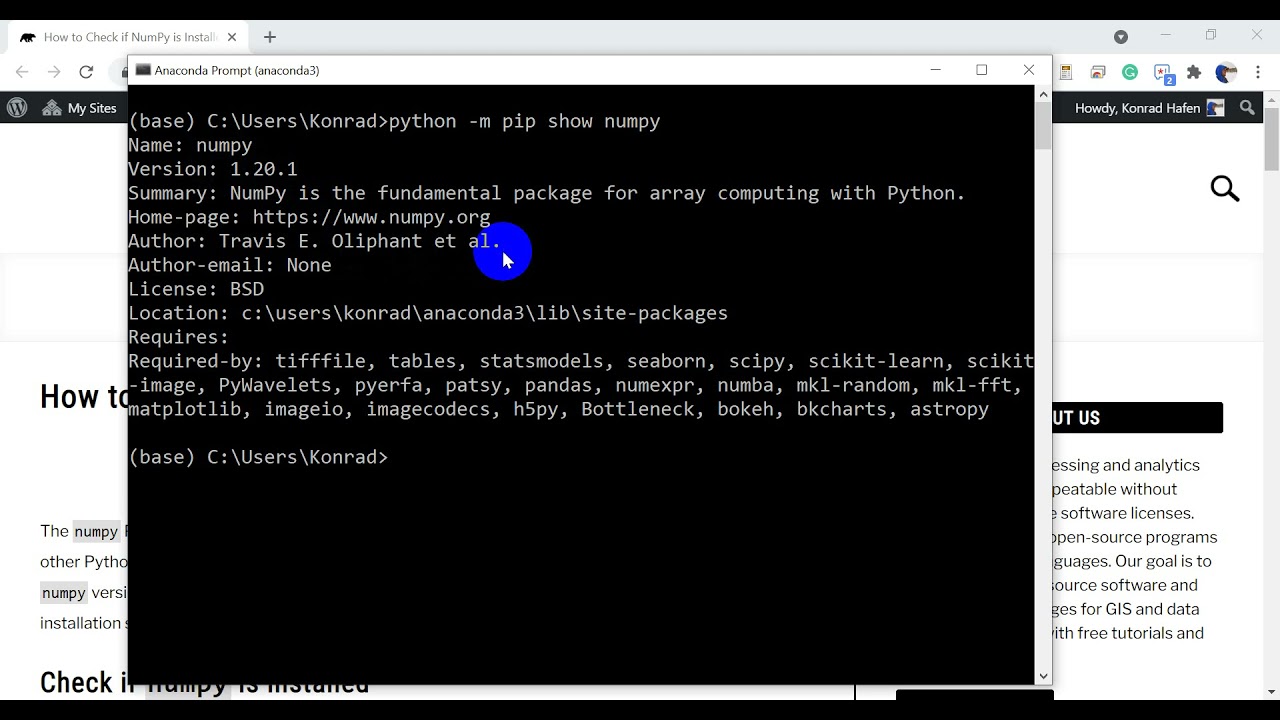
How To Check The Numpy Version In Your Script Finxter Riset

How To Check Numpy Version Jupyter Colab Terminal Anaconda Pycharm

How To Check Spark Version PySpark Jupyter Notebook By BigData ETL
How To Check The Numpy Version In Linux Mac And Windows CodeVsColor

How To Check Python Version In Jupyter Notebook Finxter

How To Check Numpy Version Jupyter Colab Terminal Anaconda Pycharm

Web You can check the NumPy version in Jupyter Notebook with the following code I highly recommend you This book to learn Python import numpy as np print np version

Web May 19 2021 nbsp 0183 32 I m currently testing some installs on Jupyter notebooks and I want to check the installed version of particular libraries modules e g numpy and then run a test to confirm that version preferably using doctest python3 m pip install numpy lt check installed version gt lt test version using doctest gt

Web Sep 25 2023 nbsp 0183 32 Check the version of NumPy You can find out the version of NumPy using the following methods Using lt Module version gt in python Using pip show command Using pip list command Using importlib metadata package Using lt Module version gt

Web If you are using Jupyter Notebook you can quickly find out the version of Numpy installed in your system by typing the following command in a cell and pressing shift enter to execute the cell import numpy print numpy version

Web Apr 23 2020 nbsp 0183 32 Open Jupyter notebook Type pip show numpy in a cell and press Shift Enter This will display the details of the numpy package including the version number It is important to know the version of NumPy that is installed on your system because different versions may have different features and compatibility with other libraries Updating to a
[desc-11] [desc-12]
[desc-13]