Check Installed Pytorch Version How To Check PyTorch Version Jupyter Colab Terminal Anaconda Checking The Version Of PyTorch Installed In Linux Systran Box Python Installed Pytorch 1 12 In The Environment But Detects Version Python Pytorch Version On G5 xlarge Stack Overflow Pin On Renewable Energy How do I specify which version to import I know I can check the version property but import crashes in the first place Thank you The environment A remote Linux with kernel 5 8 0 I am not a super user Python 3 8 6 pip 21 2 4 python python 3 x pip pytorch python import Share Improve this question Follow asked Oct 21 2021 at 6 24 zzzhhh
4 Answers Sorted by 5 Coming to your 1st question In your python script just add import torch if this gives ModuleNotFoundError No module named torch then your pytorch installation is not complete And your 2nd question to check if your pytorch is using cuda use this torch cuda is available To check your Pytorch version simply run the following command in your terminal python c import torch print torch version The latest Pytorch version at the time of writing this article is 1 7 0 Here are some of the new features added in this release Support for theCUDA 11 toolkit
Pin On Renewable Energy PyTorch 1 13 Release Including Beta Versions Of Functorch And Improved Checking The Version Of PyTorch Installed In Linux Systran Box Install And Configure PyTorch On Your Machine Microsoft Learn How To Check PyTorch CUDA Version Easily VarHowto How To Check Your Pytorch CUDA Version Surfactants Python Installed Pytorch 1 12 In The Environment But Detects Version Unable To Save The Model In TorchScript Format Jit PyTorch Forums Python 2 Pytorch How To Check The Pytorch Version Installed
Check Installed Pytorch Version
 Check Installed Pytorch Version
https://www.codethebest.com/wp-content/uploads/2022/09/Check-PyTorch-version-.png
The first way to verify your Pytorch installation is to check the version number To do this you can use the command pytorch version If you see a message that says something like you have version 0 4 1 installed then you know that Pytorch is installed and working correctly
Pre-crafted templates provide a time-saving option for producing a varied series of documents and files. These pre-designed formats and layouts can be made use of for various personal and professional tasks, including resumes, invites, leaflets, newsletters, reports, discussions, and more, streamlining the material development process.
Check Installed Pytorch Version

Check TorchVision Version PyTorch Tutorial YouTube
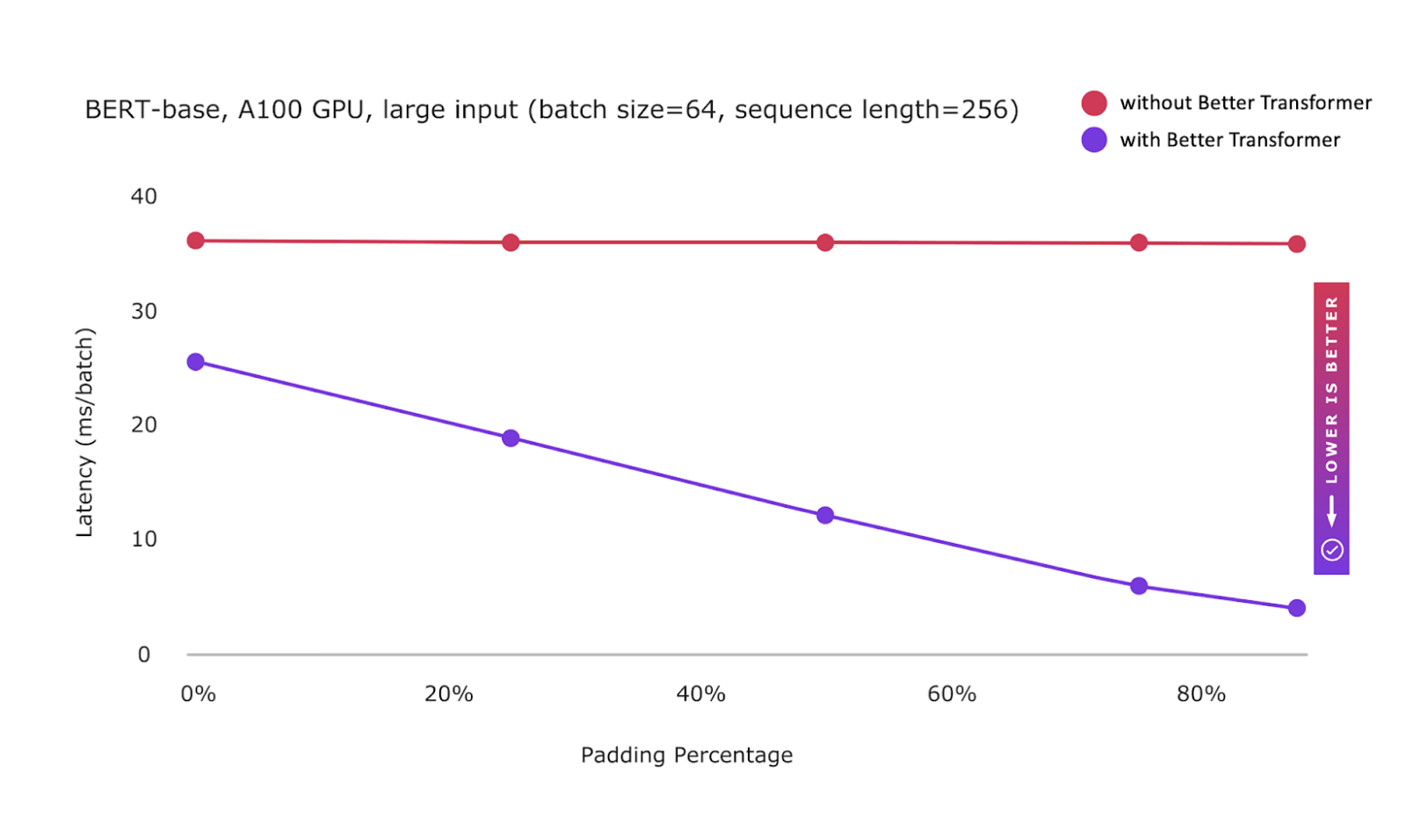
PyTorch 1 13 Release Including Beta Versions Of Functorch And Improved

Checking The Version Of PyTorch Installed In Linux Systran Box
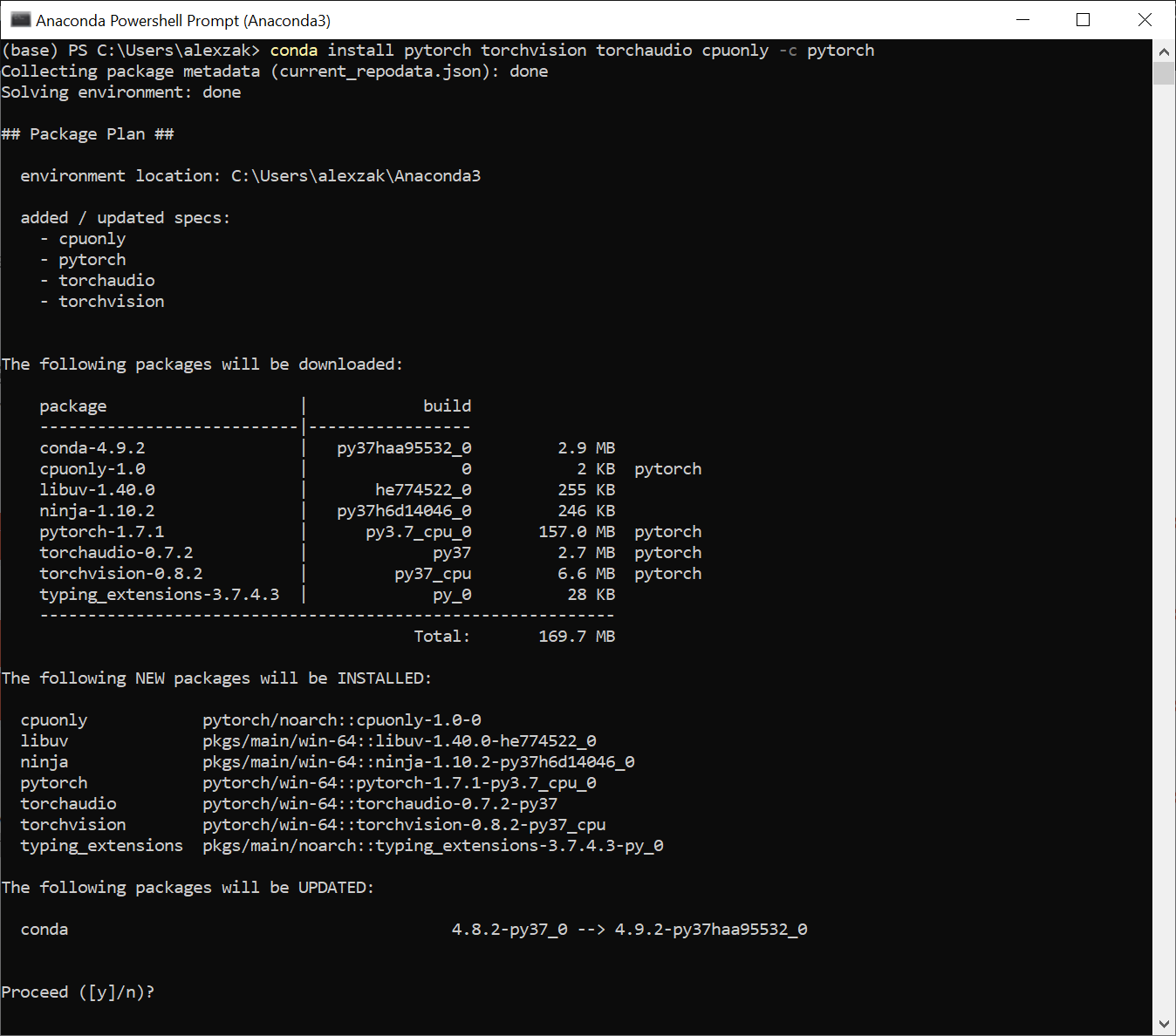
Install And Configure PyTorch On Your Machine Microsoft Learn

How To Check Your Pytorch CUDA Version Surfactants

Python Installed Pytorch 1 12 In The Environment But Detects Version

4 Answers Sorted by 3 I have tried to install new Pytorch version But it didn t work and then I deleted the Pytorch files manually suggested on my command line Finally I installed new Pytorch version using conda install pytorch torchvision torchaudio cudatoolkit 11 0 c pytorch and everything works fine This code works well after that

Shortcuts Start Locally Select your preferences and run the install command Stable represents the most currently tested and supported version of PyTorch This should be suitable for many users Preview is available if you want the latest not fully tested and supported builds that are generated nightly

15 PyTorch is delivered with its own cuda and cudnn Therefore you only need a compatible nvidia driver installed in the host So the question is with which cuda was your PyTorch built Check that using torch version cuda

Here you will learn how to check PyTorch version in Python or from command line through your Python package manager pip or conda Anaconda Miniconda Contents Prerequisite Use Python code to check PyTorch version Use pip to check PyTorch package version Use conda to check PyTorch package version What is PyTorch

If you are using a terminal or the command prompt then you can check the version of PyTorch by running the following command pip show torch Here you don t have to put the before the pip command like the above platforms You will get the version of the PyTorch in the output
Installing previous versions of PyTorch We d prefer you install the latest version but old binaries and installation instructions are provided below for your convenience Commands for Versions 1 0 0 v2 1 1 Conda OSX conda conda install pytorch 2 1 1 torchvision 0 16 1 torchaudio 2 1 1 c pytorch Linux and Windows There are two ways to check your Pytorch version Method 1 Check the version number at the bottom left corner of the Pytorch splash screen The version number is displayed in the format x x x Method 2 Run the command python c import torch print torch version in your terminal This will print out the full Pytorch version
To check it from terminal in linux python c import torch print torch version 27 Likes gireesh4manu Vishnu Kumar Kailash Kumar November 27 2018 2 09pm 4 So quick question here When I check from Jupyter I m able to see the version printed but when I do the same from terminal I get import error no module named torch