Check If Docker Daemon Is Running Solved How To Check If Docker Daemon Is Running 9to5Answer Check If Docker Daemon Is Running Linux About Dock Photos Mtgimage Org Ci Check If Docker Daemon Is Running And Start It If It Isn t Issue Check If Docker Daemon Is Running Linux About Dock Photos Mtgimage Org How To Check If Docker Daemon Is Running About Dock Photos Mtgimage Org Web Mar 27 2019 nbsp 0183 32 Now check from the Python code and OS X if the daemon is running check if the docker daemon is running in os x and if not run it if os name quot posix quot subprocess call quot bin docker sh quot shell True
Web Start with systemd link On some operating systems like Ubuntu and Debian the Docker daemon service starts automatically Use the following command to start it manually sudo systemctl start docker If you want Docker to start at boot see Configure Docker to start on boot Start the daemon manually link Web How to Verify if Docker Daemon is Running It is important to know the current status of your Docker Daemon while working on the Docker containers There exist a couple of different ways in which the status of your Docker can be checked Let s dig into them Method 1 Use the systemctl command
How To Check If Docker Daemon Is Running About Dock Photos Mtgimage Org Check If Docker Daemon Is Running Linux About Dock Photos Mtgimage Org Check If Docker Daemon Is Running Windows 10 About Dock Photos Bash How To Check If Docker Daemon Is Running Stack Overflow Checking If The Docker Daemon Is Running On A Linux Host A Guide To Error Docker Error Response From Daemon Container Id Is Not Running Checking If The Docker Daemon Is Running On A Linux Host A Guide To How To Check If The Docker Daemon Or A Container Is Running Check If Docker Desktop Is Running About Dock Photos Mtgimage Org
Check If Docker Daemon Is Running
 Check If Docker Daemon Is Running
https://sgp1.digitaloceanspaces.com/ffh-space-01/9to5answer/uploads/post/avatar/397592/template_how-to-check-if-docker-daemon-is-running20220622-1917798-1j3qvnv.jpg
Web Apr 11 2023 nbsp 0183 32 You can check whether the Docker daemon is running using the following command sudo systemctl status docker The command will return the status of the docker daemon which will look like this Now check what is being displayed in the quot Active quot If there is active running in green then the Docker daemon and containers should be running
Templates are pre-designed files or files that can be used for various functions. They can conserve time and effort by offering a ready-made format and layout for producing different sort of content. Templates can be used for personal or expert projects, such as resumes, invites, flyers, newsletters, reports, discussions, and more.
Check If Docker Daemon Is Running

How To Check If Docker Daemon Is Running

Check If Docker Daemon Is Running Linux About Dock Photos Mtgimage Org

Check If Docker Daemon Is Running Windows 10 About Dock Photos

Bash How To Check If Docker Daemon Is Running Stack Overflow
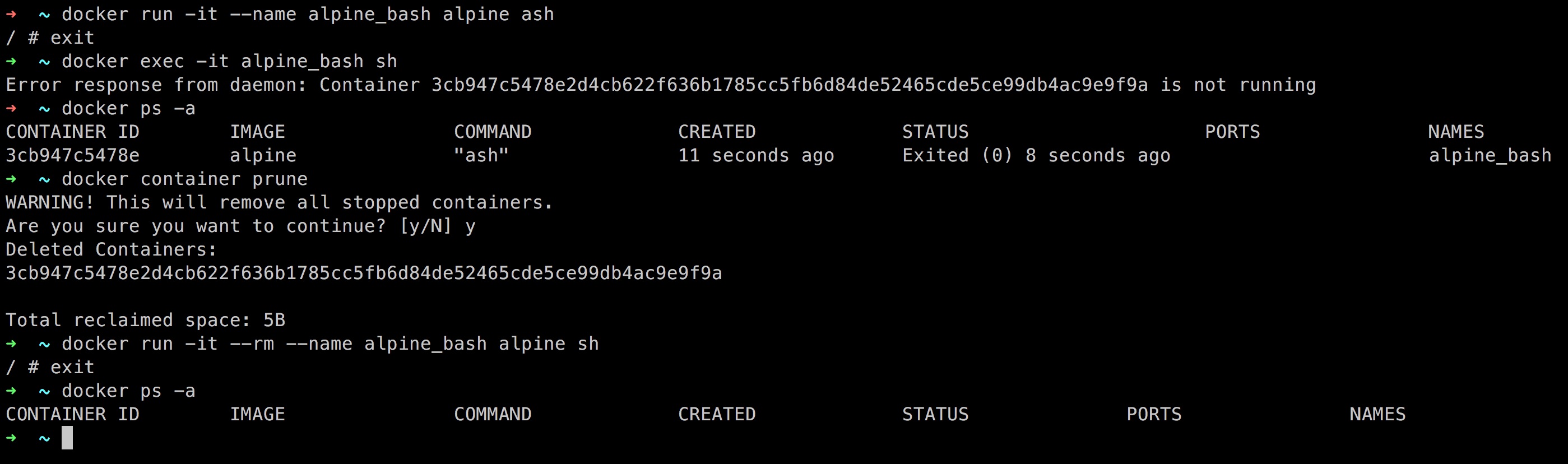
Error Docker Error Response From Daemon Container Id Is Not Running

Checking If The Docker Daemon Is Running On A Linux Host A Guide To

Web Aug 25 2021 nbsp 0183 32 How to Check If the Docker Daemon or a Container Is Running Checking With Systemctl You can check Docker s status with systemctl on distributions that use Systemd for service Inspecting Process Details Another way to check for a running Docker daemon is by inspecting its process ID file The

Web The operating system independent way to check whether Docker is running is to ask Docker using the docker info command You can also use operating system utilities such as sudo systemctl is active docker or sudo status docker or sudo service docker status or checking the service status using Windows utilities

Web Jul 19 2019 nbsp 0183 32 Afford two methods docker version This method works both for cmd amp powershell but if for cmd you need to use echo errorlevel to check Get Process This method just works for powershell If docker daemon is running it

Web May 25 2017 nbsp 0183 32 If you re using Docker for Windows Then simply start the desktop app installed in C Program Files Docker Docker Docker Desktop exe You can also stop Docker for Windows and run just the Docker daemon dockerd exe That ll only let you run Docker Windows Containers dockerd exe is in the program files directory Share

Web Oct 25 2014 nbsp 0183 32 By default the docker daemon will use the unix socket unix var run docker sock you can check this is the case for you by doing a sudo netstat tunlp and note that there is no docker daemon process listening on any ports
[desc-11] [desc-12]
[desc-13]