Check Docker Service Status How To Install Kali Docker Image To The Linux POFTUT Install Docker CE On Debian 11 Bullseye Linux Linux Shout Install Docker CE On AWS EC2 Amazon Linux To Run Containers How To Check Docker Ip Range Pilotcomm Ubuntu Dockerfile For Trusted Automated Docker Builds Dec 12 Dec 14 Dec 99 99 5 100 100 5 The official status page for services offered by Docker
To configure the Docker daemon using a JSON file create a file at etc docker daemon json on Linux systems or C ProgramData docker config daemon json on Windows Using this configuration file run the Docker daemon in debug mode using TLS and listen for traffic routed to 192 168 59 3 on port 2376 Description The docker stats command returns a live data stream for running containers To limit data to one or more specific containers specify a list of container names or ids separated by a space You can specify a stopped container but stopped containers do not return any data
Ubuntu Dockerfile For Trusted Automated Docker Builds Install Kubernetes Cluster Using Kubeadm In RHEL CentOS AlmaLinux Docker S TLS Ond ej ika How To Check Docker Desktop And Docker Engine Versions KindaCode How To Install Docker On A Linux Server Systran Box Docker status Manjaro Dot Site How To Install Docker On Debian 11 How To Check Docker Desktop And Docker Engine Versions KindaCode Daily News Media How To Install Apache In A Docker Container In Linux
Check Docker Service Status
 Check Docker Service Status
https://www.poftut.com/wp-content/uploads/2017/03/img_58d689a3396bd.png
Using the docker command and service 5 1 Overview The Docker project was responsible for popularizing container development in Linux systems The original project defined a command and service both named docker and a format in which containers are structured
Templates are pre-designed files or files that can be utilized for various functions. They can conserve time and effort by offering a ready-made format and design for developing various sort of content. Templates can be used for individual or expert jobs, such as resumes, invites, flyers, newsletters, reports, discussions, and more.
Check Docker Service Status

What Is A Docker Compose Service

Install Kubernetes Cluster Using Kubeadm In RHEL CentOS AlmaLinux
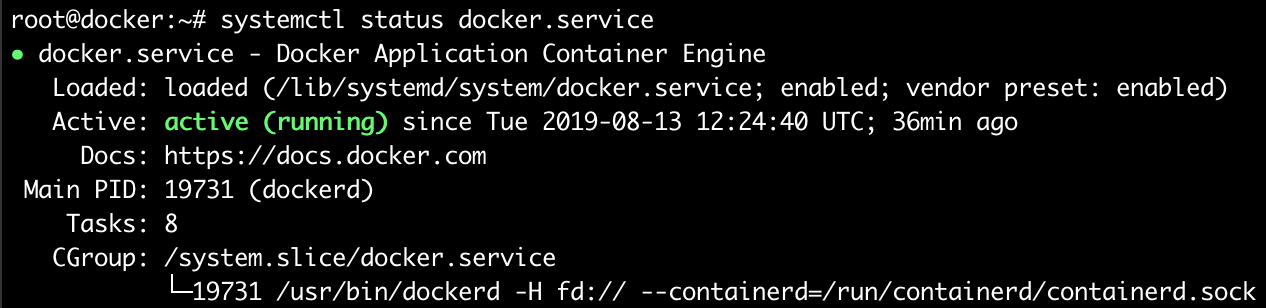
Docker S TLS Ond ej ika

How To Check Docker Desktop And Docker Engine Versions KindaCode
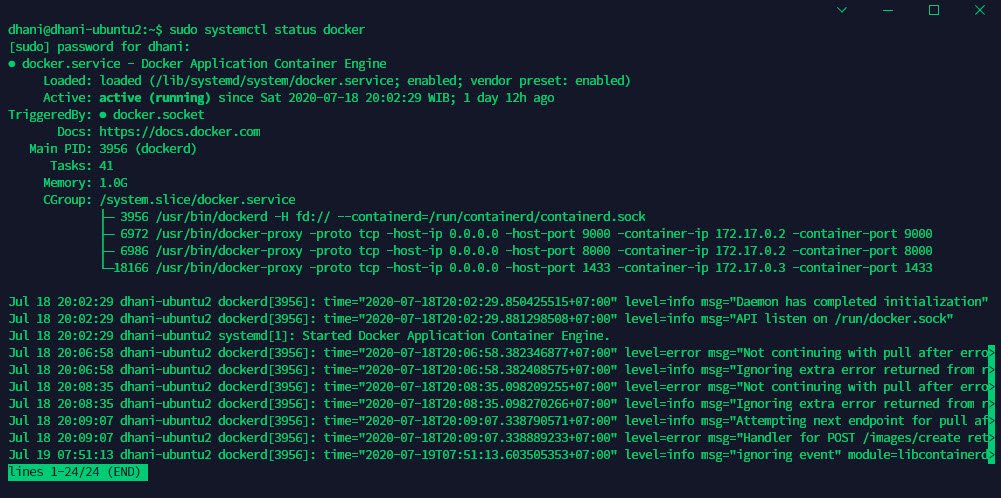
Docker status Manjaro Dot Site
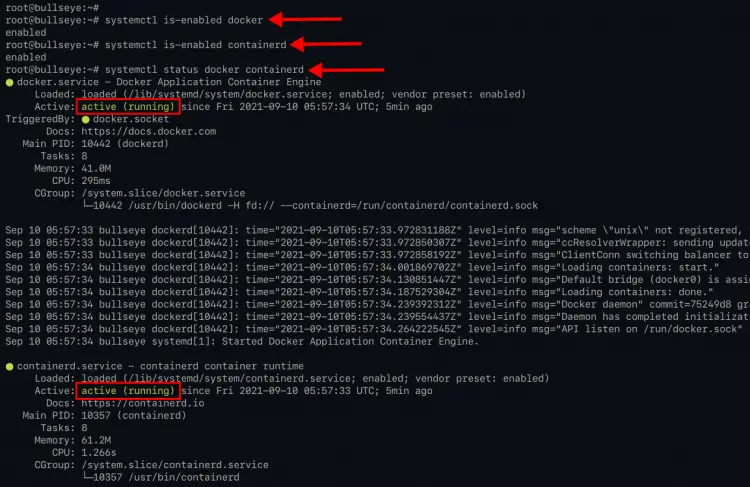
How To Install Docker On Debian 11

8 Answers Sorted by 29 Try running either of these commands on Powershell or cmd if docker is installed you should get a error free response docker version OR docker compose version OR docker ps Share Improve this answer Follow edited Feb 9 at 17 11 KyleMit 32 3k 68 469 671

How to check if the docker engine and a docker container are running Ask Question Asked 6 years 7 months ago Modified 7 months ago Viewed 497k times 218 In a script I need to check a Is the docker engine running b Given a container name is that docker container running bash docker Share Follow edited Apr 21 at 13 32 OneCricketeer

The operating system independent way to check whether Docker is running is to ask Docker using the docker info command You can also use operating system utilities such as sudo systemctl is active docker or sudo status docker or sudo service docker status or checking the service status using Windows utilities

Usage docker service ps OPTIONS SERVICE SERVICE Description Lists the tasks that are running as part of the specified services Note This is a cluster management command and must be executed on a swarm manager node To learn about managers and workers refer to the Swarm mode section in the documentation Options Examples

Swarm This command works with the Swarm orchestrator Usage docker service Description Manage Swarm services Note This is a cluster management command and must be executed on a swarm manager node To learn about managers and workers refer to the Swarm mode section in the documentation
We can also use the docker inspect command to get the status of a single container docker inspect f State Status mycontainer running Here mycontainer is the container name for which we wish to find the current state We can also replace it with the Docker container id 3 Possible States of a Docker Container docker compose ps all NAME COMMAND SERVICE STATUS PORTS demo app1 container bin sh c app1 sh app1 running demo app2 container bin sh c app2 sh app2 running Copy We must note that the output contains the STATUS column denoting the current status of the container
Now let s make the script executable and check its output chmod x dpkg status sh dpkg status sh docker Status installed To begin with we can see a preview of the output piped to the grep command Package adduser Status install ok installed Priority important Section admin Installed Size 608 Maintainer Ubuntu Developers