Change Windows Language For All Users How To Change The Default Language For Windows 7 Logon Screen Change WINDOWS 11 Language From Chinese To English Change Windows How To Change Your System TTS Windows Language For Homeseer TTS YouTube Download Windows 11 Home Single Language Nflpase Windows10 How To Change Windows To change the Windows 11 default language follow the below steps Open Settings Click Time language Click Language region In the Language section click the Add a language button for the Preferred languages setting Search for the new language and select the desired language Click Next Note You can search for the country s
1 answer You can deploy a Windows language pack as an application in Configuration Manager How to deploy a Windows language pack as an application in Configuration Manager The easiest way is to Add languages to Windows images Add language packs LIPs and Features on Demand Here s how Step 1 Press the Windows key X and select Settings from the menu that appears Step 2 Use the left pane to navigate to Time language tab Then click on Language region on
Windows10 How To Change Windows How To Change Language In WINDOWS 10 TOO EASY YouTube Windows Application Development Features Of The Windows Application How To Change Language On Windows 10 To English 2022 YouTube Free Download Windows 10 ISO File All Editions Technig Managing Multiple Users In Google Chrome On Windows Madhya Pradesh How To Change Display Language In Windows 10 With Images Change How To Change The Language In Windows 10 EASY QUICK YouTube How To Change The Display Language In Windows 10
Change Windows Language For All Users
 Change Windows Language For All Users
https://www.nextofwindows.com/wp-content/uploads/2010/04/image19.png
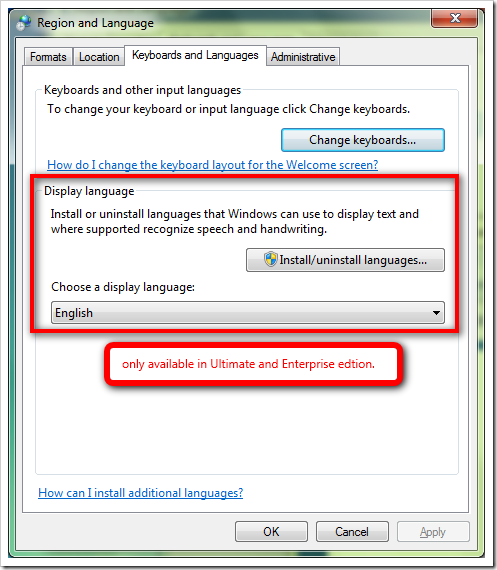
Click Region Go to the Administrative tab and click Change system locale under Language for non Unicode programs Select a language from the drop down menu and click OK Click Cancel Click Copy settings Check Welcome screen and system accounts and New user accounts Click OK
Pre-crafted templates offer a time-saving service for developing a varied series of documents and files. These pre-designed formats and layouts can be made use of for various personal and expert projects, consisting of resumes, invitations, leaflets, newsletters, reports, presentations, and more, streamlining the material creation procedure.
Change Windows Language For All Users
How To Change The Windows 11 Display Language GHacks Tech News

How To Change Language In WINDOWS 10 TOO EASY YouTube

Windows Application Development Features Of The Windows Application

How To Change Language On Windows 10 To English 2022 YouTube

Managing Multiple Users In Google Chrome On Windows Madhya Pradesh

How To Change Display Language In Windows 10 With Images Change

Click Start type settings into the search bar and hit Enter or click Open Alternatively you can hit Windows i to open Settings Click Time Language on the left hand side and then click Language Region Click Add Language to open the list of available languages You can scroll through the list or use the search function to

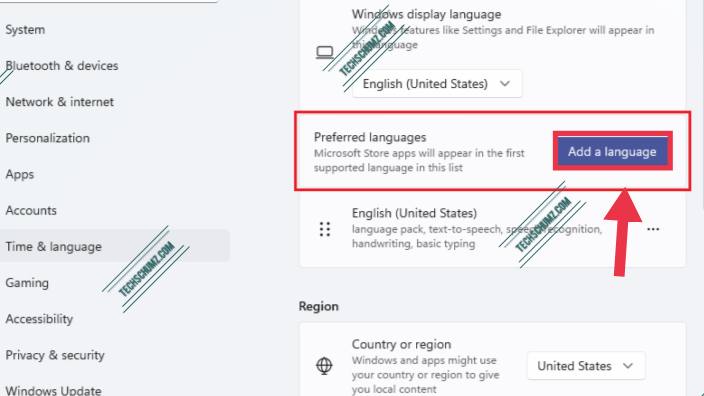
To change the system default language close your apps and use these steps Open Settings Click on Time Language Click on Language Under the Preferred languages section click the Add a

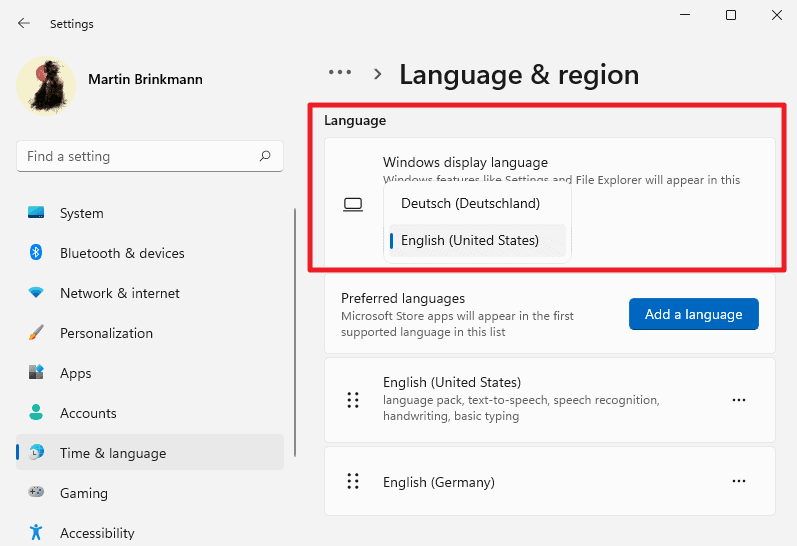
The display language you select changes the default language used by Windows features such as Settings and File Explorer Select Start Settings Time language Language region Choose a language from the Windows display language menu or next to Preferred languages select Add a language to install the one you want if it isn t listed
1 Answer Consider using the Set WinSystemLocale and or Set WinUserLanguageList PowerShell cmdlets right from the PowerShell command line or IDE with no script and with a couple simple commands

Open Settings Click on Time language Click the Language region page in the right side Source Windows Central Image credit Source Windows Central Under the Language section click the
How to Force System UI Language as Display Language in Windows The display language a user selects changes the default language the entire operating system uses for that specific user account The system UI language is a user interface language that can be set by an administrator in the Welcome screen and new user accounts settings Windows uses this language if the current user ex new user In this case German de DE is the current interface language in Windows Run the following command to set English as your preferred Windows interface language Set SystemPreferredUILanguage Language en US You will need to restart Windows to apply the new language pack Restart Computer
Type and search Language settings in the Windows search bar and then click Open In preferred languages click Add a language Choose a language you want to install from the list and then select Next The following takes Chinese Traditional Taiwan as a reference